
Chazie Baniquid
Technical Content Marketer
7 minutes to read
4 Ways to Protect Your ACF Frontend Forms From Spam
Advanced Custom Fields (ACF) Frontend Forms are highly flexible, but they do not include built-in spam protection. To keep bots out, you need to use a honeypot field, add CAPTCHA manually or through third-party ACF field add-ons, validate submissions using hooks, or install an anti-spam plugin like oopspam. A layered approach gives you the strongest protection with minimal friction.
This guide explains each method in simple, actionable steps for developers, agencies, and WordPress site owners working with ACF.
Use Anti-Spam Plugins
Anti-spam plugins provide the strongest first layer of protection. They use machine learning, IP reputation checks, rate limiting, and contextual detection to filter out bad submissions. This works better than stand-alone CAPTCHAs or honeypots because bots evolve quickly.
oopspam Anti-Spam (that’s us 👋) supports ACF Frontend Forms and filters spam before WordPress saves the submission. It uses ML-based scoring, country rules, VPN/proxy blocking, rate limiting, and detailed logs.
How to Set Up oopspam for ACF Frontend Forms
This setup protects all forms on your WordPress site, including ACF Frontend Forms.
Step 1: Install oopspam Anti-Spam
Go to Plugins → Add New and search for oopspam Anti-Spam. Install and activate.

Step 2: Create an account and copy your API key
Go to oopspam.com, create an account, and copy the API key from the dashboard.

Step 3: Paste your API key in WordPress
Navigate to oopspam - General Settings → My API Key. Paste the key from your oopspam Dashboard account.

Turn on ACF Frontend Forms Spam Protection to ensure your ACF forms are fully protected. Click Save Changes.
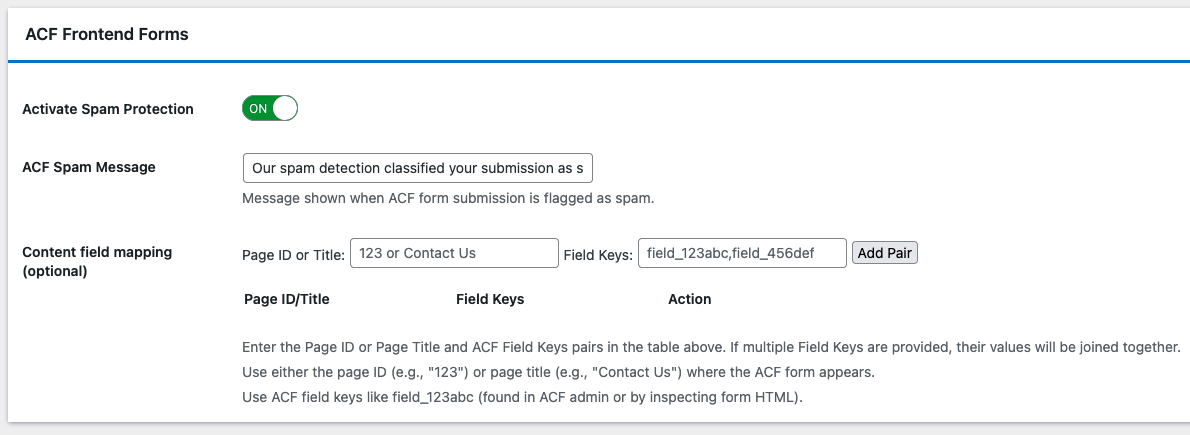
Enable Advanced Spam Protection in oopspam
oopspam includes several side filters that work together to protect ACF Frontend Forms from automated spam, high-volume attacks, and human-assisted spam. These features run invisibly without affecting legitimate users.
Turn on the following options inside oopspam:
- VPN/Proxy/TOR Blocking – Blocks anonymous networks often used by bots.
- Country Rules – Allow only the regions you serve.
- Language Filter – Reject submissions written in irrelevant languages.
- Rate Limiting – Prevent repeated submissions from the same IP or email.
- Contextual Detection – Analyze message content to identify spam patterns.
- Logs – Store submission data so you can review blocked attempts and fine-tune your rules.
These filters stop automated spam, distributed botnets, and suspicious traffic before it reaches your ACF Frontend Forms.
Use Honeypots
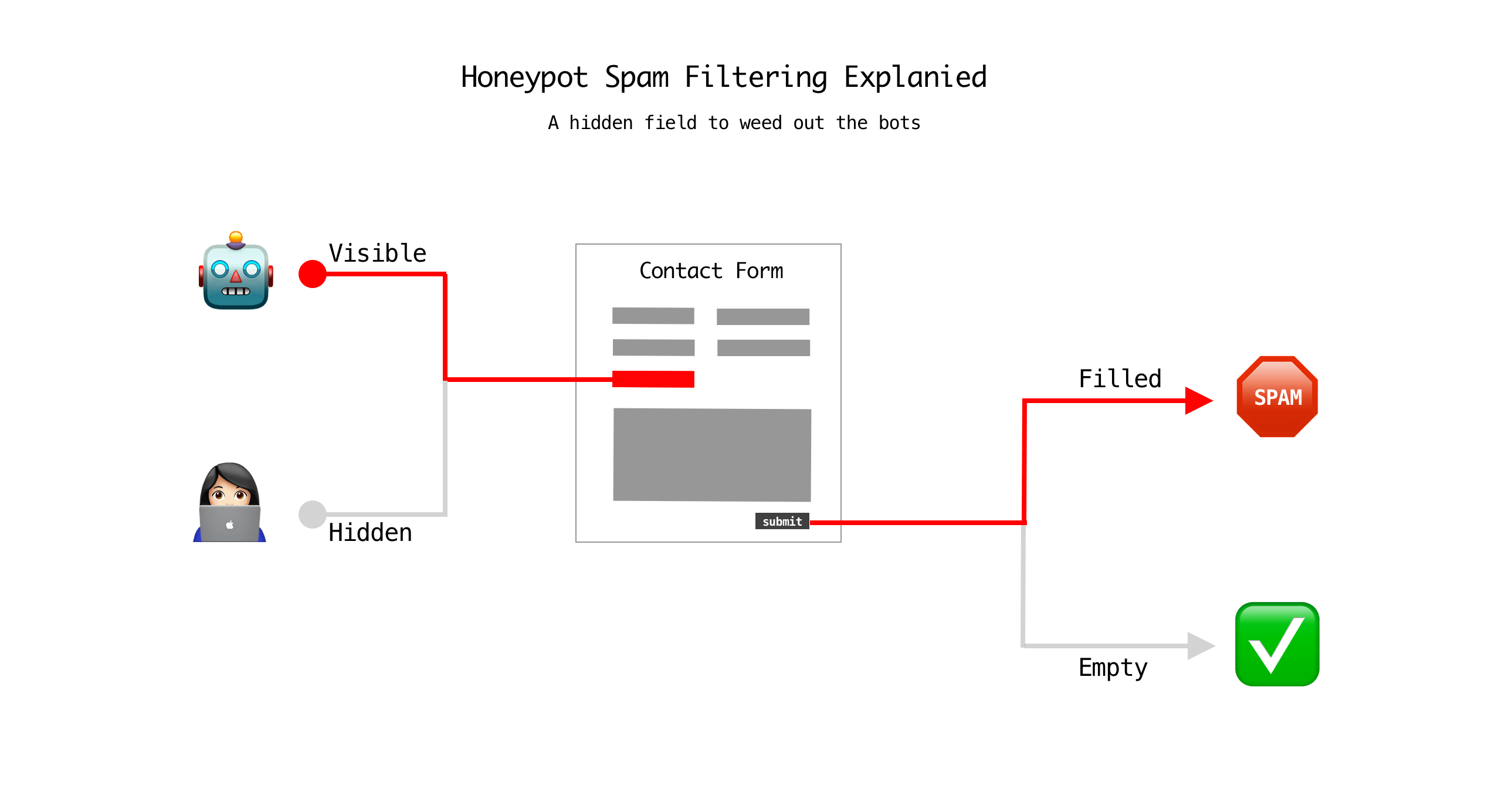
A honeypot is a simple but effective tool. Bots fill in every field they see. Humans do not. If the hidden field contains data, you treat it as spam. Honeypots work well with ACF because you can add them directly to the form output.
How to Add a Honeypot in ACF
Add a hidden field:
acf_form(array(
    'post_id'       => 'new_post',
    'html_after_fields' => '<input type="text" name="honeypot" style="display:none;">'
));
Then block submissions using a hook:
add_action('acf/save_post', 'my_acf_form_validate_honeypot', 10, 1);
function my_acf_form_validate_honeypot( $post_id ) {
    if ( ! empty( $_POST['honeypot'] ) ) {
        wp_die( 'Spam detected!' );
    }
}
This prevents the post from being saved.
Implement CAPTCHA for ACF Frontend Forms
CAPTCHAs increase friction slightly but stop basic bot traffic. They work best as an extra layer, combined with honeypots or oopspam.

ACF does NOT include built-in CAPTCHA. You must use a custom ACF field type, a third-party plugin, or manual integration. Since ACF does not support CAPTCHA natively, here are the methods to use:
1. Manual reCAPTCHA or hCaptcha
This is the only native method without third-party plugins. How it works:
- Add the CAPTCHA script and widget manually
- Render it before or after your ACF form
- Validate the CAPTCHA token server-side using an ACF hook
This is recommended for developers who want full control.
2. Use a third-party ACF reCAPTCHA field plugin
These plugins create a reCAPTCHA ACF field type that you can add to your field group:
- ACF Extended (ACFEX) – Includes a reCAPTCHA field
- acf-recaptcha (Free) – Adds a reCAPTCHA field
These are not official ACF features, but they simplify CAPTCHA implementation.
Use Code-Based Validation
Bots often bypass the front-end and send POST requests directly to the form endpoint. Server-side validation catches them.
Recommended ACF Hooks
1. acf/validate_value
Validate specific fields before submission.
2. acf/save_post
Block specific IPs, emails, or suspicious patterns before the entry is saved.
Example:
add_action('acf/pre_save_post', 'block_suspicious_ips');
function block_suspicious_ips( $post_id ) {
    $blocked = array('192.168.1.10');

    if ( in_array($_SERVER['REMOTE_ADDR'], $blocked) ) {
        wp_die('Blocked for security reasons.');
    }
}
3. Combine with user agent or country checks
Use server variables or an IP detection API to filter regions you do not serve.
Putting It All Together
If you use oopspam, you don’t need honeypots, CAPTCHA, or manual validation, oopspam handles everything for you. For most users, the simplest and strongest setup is:
Use oopspam Anti-Spam
oopspam replaces the need for:
- Honeypots
- CAPTCHA
- Manual code-based validation
- Custom security rules
All of the protections are built in, and you can turn them on with a toggle, no development work required.
Optional alternatives (if not using oopspam):
- Add a honeypot manually
- Add CAPTCHA manually or via a third-party ACF field
- Use server-side validation hooks for custom filters
These methods work, but they require coding, testing, and ongoing maintenance.
Final Takeaway
ACF Frontend Forms don’t include native spam protection, so you must add it yourself. If you want a hands-off, accurate, and easy solution, oopspam alone is enough. It covers all the major spam threats with one plugin and a few settings.
If you prefer to implement protection yourself, you can combine honeypots, CAPTCHA, and server-side validation to build your own layered setup, but it requires more work.
