
Chazie Baniquid
Technical Content Marketer
7 minutes to read
How to Block VPN and Data Center IP Submissions in Jetpack Forms?

Jetpack Forms cannot automatically block VPN or data center IP submissions on its own. To stop this type of spam reliably, you must add a third-party IP intelligence layer or use a network firewall. This guide explains what Jetpack Forms can and cannot do, then walks through three practical methods, starting with the safest and most effective approach for form-level protection.
Why VPN and Data Center Spam Gets Through Jetpack Forms
Jetpack Forms is designed to be lightweight and easy to use. It focuses on content-based spam detection, not IP reputation analysis.
That means Jetpack Forms does not natively identify:
- VPN endpoints
- Cloud provider IP ranges
- Proxy or TOR networks
As a result, submissions coming from AWS, Google Cloud, Azure, or commercial VPNs often look “clean” to basic filters. They pass through unless you add an external layer that understands where traffic is coming from.
This is not a flaw. It is a scope decision. Jetpack relies on complementary tools to handle advanced abuse patterns.
What Jetpack Forms Can Do Natively
Before adding anything new, it helps to understand Jetpack’s built-in limits.
Jetpack Forms can:
- Integrate with Akismet for content-based spam filtering
- Record the submitter’s IP address for moderation and abuse review
- Manually block specific IP addresses or ranges using its firewall
Jetpack Forms cannot:
- Automatically detect VPNs or proxies
- Maintain live lists of cloud provider IPs
- Block traffic based on IP reputation or ASN ownership
This distinction matters. VPN and data center IPs change constantly. Manual lists do not scale.
Method 1: Use OOPSpam for Jetpack Forms
This is the most practical solution if your goal is to stop spam submissions while keeping your website accessible to real users.
OOPSpam Anti-Spam (that’s us 👋) works at the form submission level. It evaluates each Jetpack Forms submission before it is saved and checks it against continuously updated threat intelligence. Legitimate visitors can still browse your site normally.
Why OOPSpam Works Well with Jetpack Forms
OOPSpam fills the exact gap Jetpack leaves open.
It detects and filters:
- Known VPN and proxy networks
- Major cloud infrastructure providers
- Emerging abusive IP ranges using reputation signals
Because filtering happens when the form is submitted, spam never reaches your Jetpack Forms inbox.
How to Set Up OOPSpam with Jetpack Forms
The setup is straightforward and does not require custom code.

First, install and activate OOPSpam Anti-Spam from the WordPress Plugin Repository.

Next, create an account on the OOPSpam and generate an API key from your dashboard.

Then, go to OOPSpam → General Settings in your WordPress admin. Paste your API key and save.
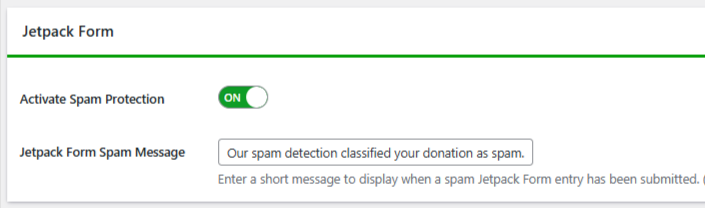
Under the same settings screen, make sure Activate Spam Protection is turned on and that Jetpack Forms is enabled for protection.
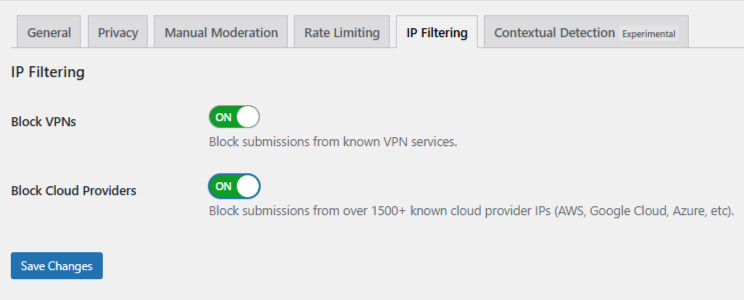
Finally, open the IP Filtering tab. Enable:
- Block Cloud Providers: It stops most automated spam from cloud infrastructure.
- Block VPNs: Enable only if your users are unlikely to rely on VPNs for privacy or work.
Save your changes. From this point on, Jetpack Forms submissions from VPNs and data centers are filtered automatically.
This approach requires no IP list maintenance and no ongoing rule updates.
Optional: Use Manual Moderation for Repeat Abuse
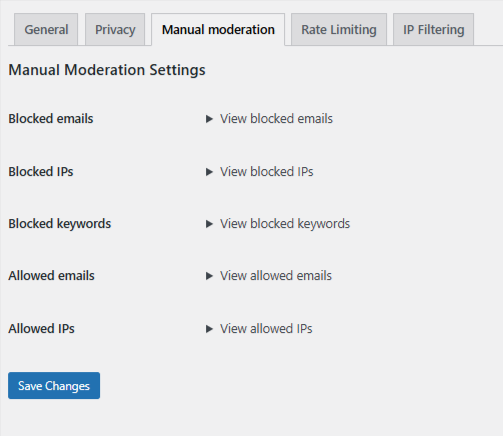
Inside OOPSpam → Manual Moderation, you can take targeted action without tightening global rules or risking false positives.
You can manually:
- Block specific IP addresses or entire IP ranges
- Block repeat email addresses used across submissions
- Block keywords or short phrases that appear in abusive messages
- Allow trusted IPs or email addresses to bypass filtering
This is best used for persistent or borderline spam, not as a replacement for automated detection. Manual moderation works well when abuse is consistent but does not clearly match VPN or cloud provider rules.
Method 2: Use Cloudflare Security Rules
If your site already runs on Cloudflare, you can block VPN and cloud traffic at the network edge. This stops unwanted traffic earlier, but it also has broader consequences.
This method is powerful, but it is not form-specific.
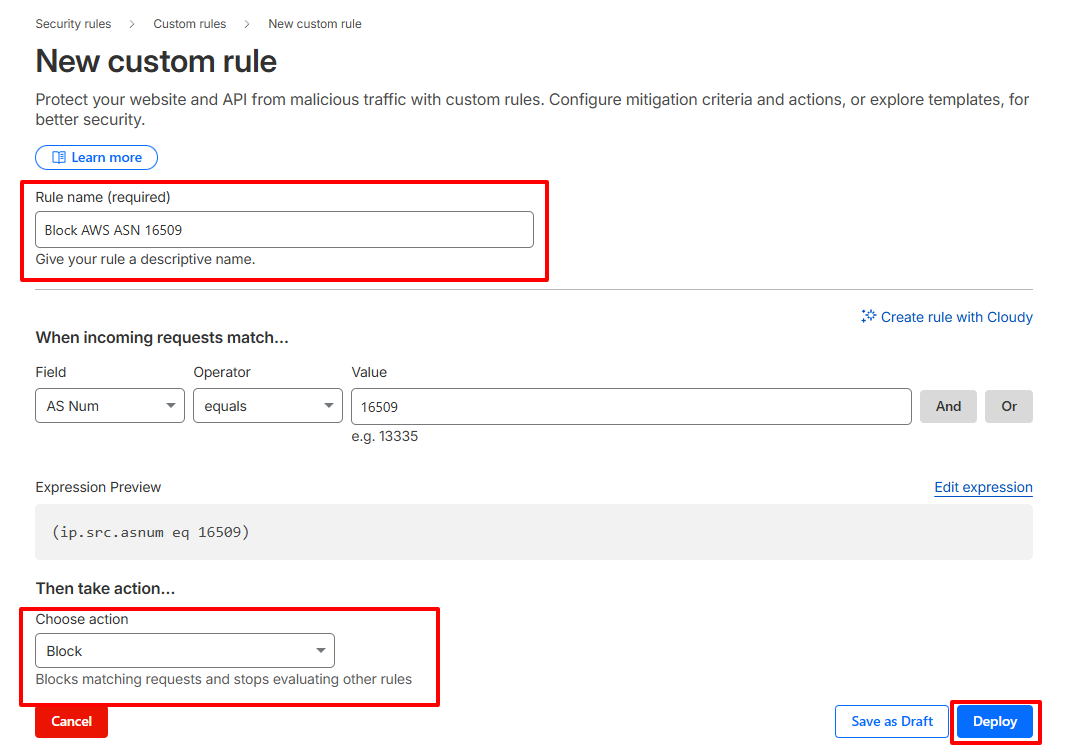
How to Create a Cloudflare ASN Rule
- Log in to Cloudflare and select your website.
- Go to Security → Security Rules → Custom rules and create a new rule.
- Match incoming traffic by AS Num. For example, Amazon AWS uses ASN 16509.
- Choose an action. Start with Managed Challenge. Use Block only when you are confident the rule will not affect legitimate users.
- Name the rule clearly and deploy it.
This blocks traffic from entire cloud networks. It is effective, but it may also block real users on corporate networks or privacy-focused VPNs.
Jetpack’s Built-In Firewall (Manual Option Only)
Jetpack includes a manual IP blocking feature inside its firewall. This is useful for repeat offenders but not for dynamic infrastructure-based spam.
How to Block IPs in Jetpack Firewall
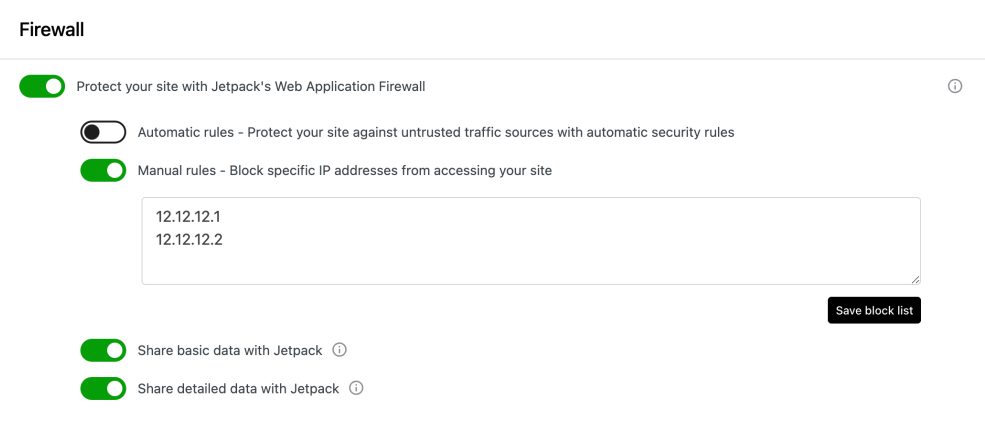
- Go to Jetpack → Settings → Security → Firewall.
- Enable Manual rules – Block specific IP addresses from accessing your site.
- Enter IP addresses using commas, spaces, or new lines. Jetpack supports IPv4, IPv6, CIDR notation, and IP ranges.
- Click Save block list.
This works when you already know which IPs are abusive. It does not automatically update and is not practical for VPN or data center blocking at scale.
Choosing the Right Approach for Jetpack Forms
- If your priority is form spam prevention without site disruption, use OOPSpam.
- If your priority is maximum perimeter control, use Cloudflare with care.
- If your priority is quick reaction to known abusers, Jetpack’s WAF is sufficient.
Final Takeaway
Jetpack Forms alone cannot stop VPN and data center spam. That protection lives outside its core feature set.
The safest and most targeted solution is to add a form-level IP intelligence plugin like OOPSpam. It blocks abusive infrastructure without locking out real visitors. Network-level tools like Cloudflare are powerful, but they should be applied deliberately.
When spam evolves, static defenses fall behind. Automated reputation-based filtering is what keeps Jetpack Forms usable long term.
