
Chazie Baniquid
Technical Content Marketer
5 minutes to read
How to Block VPN and Data Center IP Submissions in Forminator?
Forminator does not natively block VPN or data center IP addresses. To stop this type of spam, you must use third-party tools.
Forminator-friendly solution is OOPSpam Anti-Spam (that’s us 👋), which filters submissions using real-time IP intelligence before spam reaches your inbox. For advanced cases, Cloudflare Security Rules can add an extra layer at the network edge.
This guide explains both methods clearly and shows how to use them correctly with Forminator.
Why VPN And Data Center Spam Gets Through Forminator
Forminator is a form builder, not an IP intelligence system. It can validate fields, show CAPTCHA challenges, and block obvious bot behavior. What it cannot do is determine where an IP address originates at the infrastructure level.
VPN services rotate exit IPs constantly. Cloud providers operate massive address ranges. To Forminator, these often look like normal visitors. Without external intelligence, the form has no way to tell whether a submission came from a real user or an automated process running on a server.
That gap is why VPN and data center spam is so common on Forminator sites.
Method 1: Blocking VPN And Cloud IPs In Forminator With OOPSpam
The setup is straightforward.
First, install and activate the OOPSpam Anti-Spam plugin from the WordPress plugin repository.

After activation, create an account on the OOPSpam website and generate an API key. This key connects your site to OOPSpam’s real-time detection service.

Paste the API key into Settings → OOPSpam Anti-Spam inside WordPress.

Once saved, scroll down and turn on spam protection for Forminator.
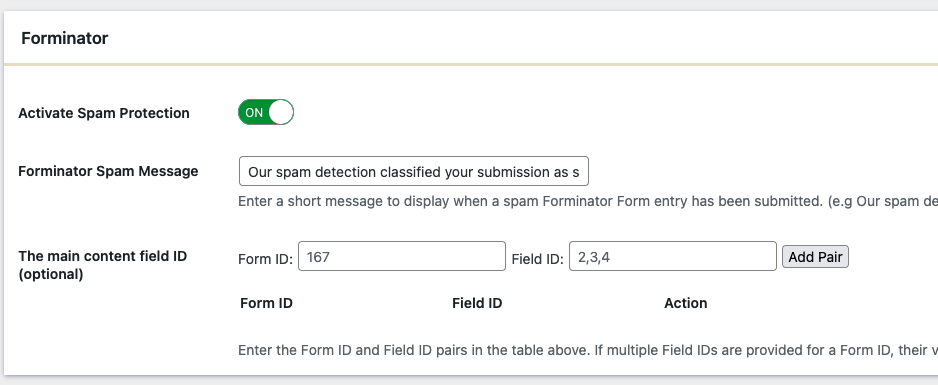
At this point, Forminator is already protected at a basic level. The next step is what stops VPN and data center abuse specifically.
Enabling IP Filtering For Forminator Submissions
Inside the OOPSpam settings, open the IP Filtering tab. This is where infrastructure-based spam is handled.
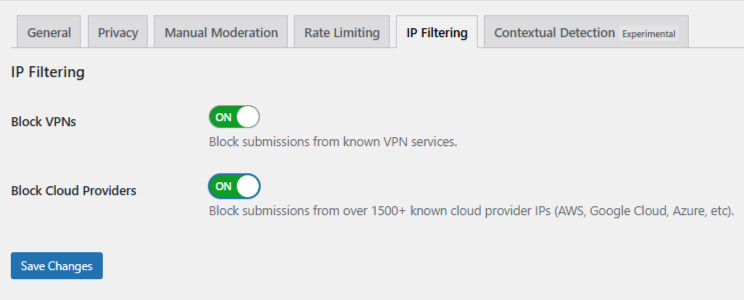
- Enable Block Cloud Providers first. This blocks submissions from major hosting networks like AWS, Google Cloud, and DigitalOcean, where most automated form spam originates.
- Enable Block VPNs if needed. This filters traffic from known VPN services, but it may affect legitimate users who rely on VPNs for work or privacy.
Once these options are enabled and saved, Forminator forms begin filtering VPN and cloud traffic automatically. No additional configuration is needed.
Using Manual Moderation When Spam Is Targeted
Not all spam is fully automated. Some abuse is slow, repetitive, or intentionally human-like.
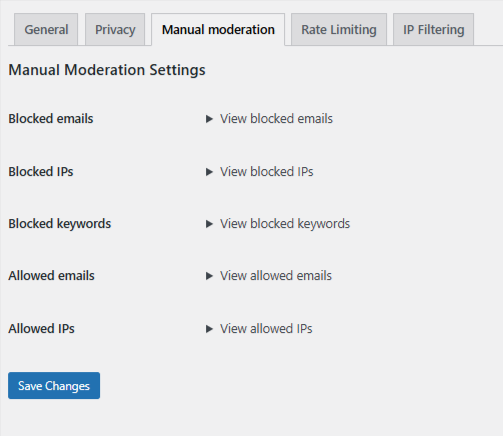
OOPSpam includes a Manual Moderation section for these cases. It allows you to fine-tune protection when patterns appear. You can:
- Block specific IP addresses that repeatedly submit spam
- Block email addresses used by known offenders
- Block keywords or phrases commonly found in abusive messages
- Allow trusted IPs or email addresses so they are never filtered
This approach is useful when spam is persistent but does not justify blocking entire networks.
Method 2: Blocking VPN And Cloud Traffic Using Cloudflare Security Rules
If your website runs on Cloudflare, you can block VPN and cloud traffic even earlier, before it reaches WordPress.
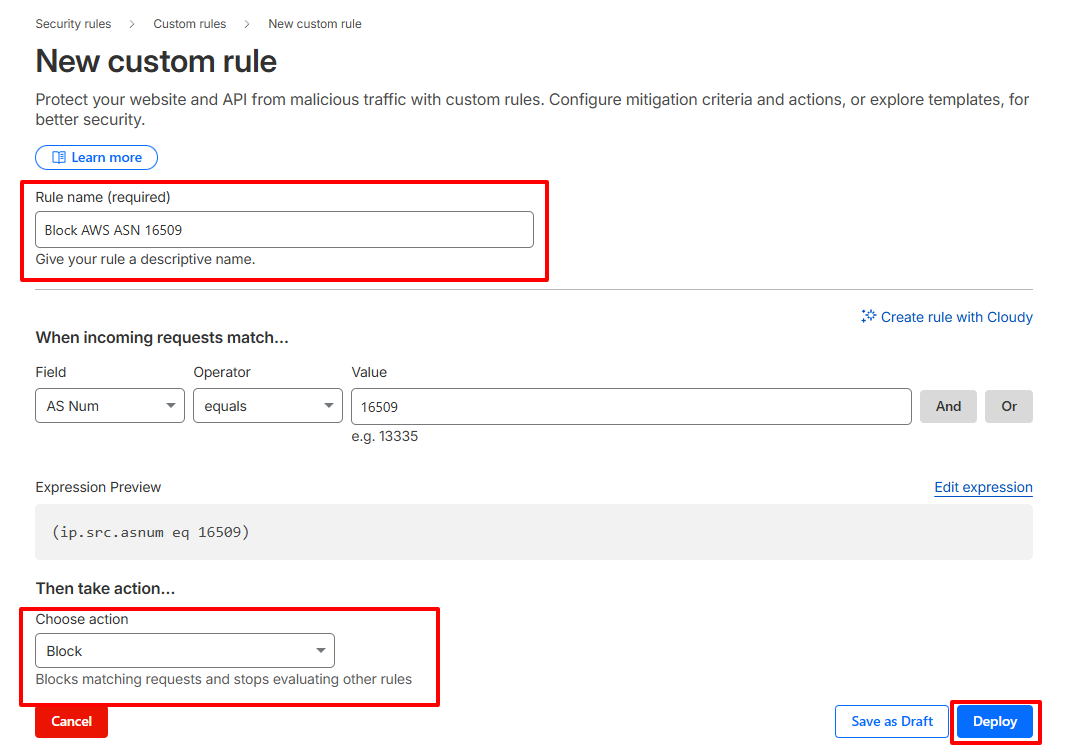
This method uses ASN-based rules, which target entire network operators such as cloud providers.
Important Warning: Cloudflare rules apply at the network edge. Unless scoped carefully, they affect your entire website, not just Forminator forms.
Step-By-Step: Create A Cloudflare ASN Rule
- Log in to your Cloudflare dashboard.
- Select your website.
- Go to Security → Security Rules → Custom rules.
- Click Create Rule.
- Set the rule condition to match traffic by ASN.
Example for Amazon AWS: (ip.src.asnum eq 16509)
-
Choose an action:
-
-
Managed Challenge (recommended starting point)
-
Block (use only if you are confident)
-
-
- Name the rule clearly and deploy it.
When This Method Makes Sense
- You are seeing high-volume infrastructure-based attacks.
- Spam persists even after form-level filtering.
- You understand the risk of blocking legitimate users on hosted networks.
Final Thoughts
Forminator does not block VPN or data center IPs by default. That is normal. It is not designed to maintain IP intelligence. With the right third-party tools, this limitation is easy to address.
OOPSpam provides the cleanest and most Forminator-friendly solution. Cloudflare offers a powerful backup option when needed. Used together or separately, they allow you to stop infrastructure-based spam without turning your forms into an obstacle course for real users.
That balance is the goal.
