
Chazie Baniquid
Technical Content Marketer
6 minutes to read
How to Block VPN and Data Center IP Submissions in WPDiscuz?

WPDiscuz does not natively block VPNs or data center IPs. If you want to stop comment spam from AWS, Google Cloud, VPNs, and proxies, you must use external IP intelligence or network-level rules.
The solution is OOPSpam Anti-Spam, which filters risky IPs before comments are saved. Cloudflare rules can help at scale, but they are not WPDiscuz-specific and must be used carefully.
This guide shows both methods, explains when to use each, and focuses only on what works for WPDiscuz comment submissions.
Method 1: Use OOPSpam Anti-Spam
This is the most accurate and WPDiscuz-friendly approach, because spam is filtered before the comment is saved and without relying on static IP blocklists.
OOPSpam Anti-Spam (that’s us 👋) evaluates each submission in real time using continuously updated threat intelligence, including:
- Known VPN and proxy networks
- Cloud infrastructure IP ranges (AWS, Google Cloud, Azure, DigitalOcean, etc.)
- Emerging spam sources not yet listed on public blocklists
Because detection happens at the application layer, this method avoids blocking legitimate visitors who may simply be browsing your site through a VPN.
Setup Steps
Start by installing the plugin. In your WordPress dashboard, go to Plugins → Add New, search for OOPSpam Anti-Spam, then install and activate it.

Next, connect your API key. Create an account in the OOPSpam dashboard and copy your API key.

Return to WordPress and go to Settings → OOPSpam Anti-Spam. Paste the key into the My API Key field and save your changes.

Once the API key is connected, confirm WPDiscuz integration. Make sure spam protection is enabled for WPDiscuz. No additional WPDiscuz configuration is required.

Finally, enable IP filtering. Open the IP Filtering tab in the OOPSpam settings.
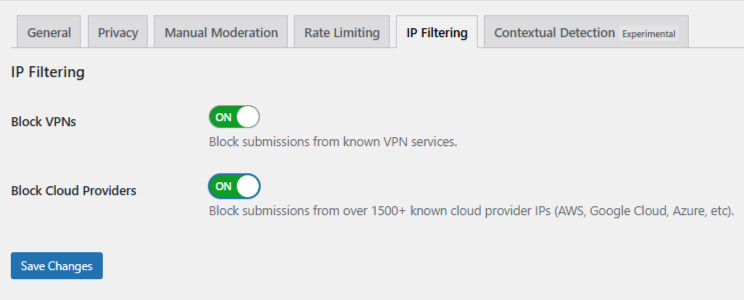
- Turn on Block Cloud Providers first. This blocks submissions from major hosting networks like AWS, Google Cloud, Azure, and DigitalOcean, which are the most common sources of automated comment spam.
- Turn on Block VPNs only if needed. This filters traffic from known VPN services but may affect legitimate users who rely on VPNs for work or privacy.
After setup, spam submissions are filtered automatically in the background. Comments from VPNs, proxies, and cloud infrastructure are blocked before WPDiscuz stores or displays them, keeping your comment sections clean without disrupting real users.
Using Manual Moderation When Spam Is Targeted
Not all WPDiscuz spam is automated. Some messages are written to look real, rotate IPs, and bypass basic filters. In these cases, manual moderation is needed.
OOPSpam includes a Manual Moderation section for handling targeted abuse without blocking entire networks or disrupting real users.
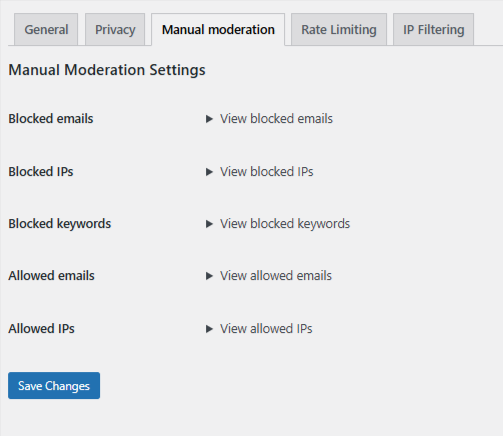
Inside the Manual Moderation tab, you can:
- Block specific IP addresses that repeatedly submit spam
- Block email addresses linked to known offenders
- Block keywords or phrases commonly used in abusive comments
- Allow trusted IPs or email addresses so they are never filtered
These rules take effect immediately and work without any changes to WPDiscuz itself.
Method 2: Block VPN and Cloud Traffic Using Cloudflare Security Rules
If your site is already using Cloudflare, you can block or challenge unwanted traffic at the network edge, before it ever reaches WordPress.
This method relies on ASN-based rules, which target entire network operators such as cloud providers commonly abused for bot traffic.
Important limitation: Cloudflare rules are not WPDiscuz-specific. Unless scoped carefully, they apply to your entire website, not just comment submissions.*
How ASN-Based Blocking Works
Each major cloud provider operates under one or more Autonomous System Numbers (ASNs). For example:
- Amazon AWS → ASN 16509
- Google Cloud → ASN 15169
- Microsoft Azure → ASN 8075
Blocking or challenging an ASN affects all traffic coming from that provider.
Step-by-Step: Create a Cloudflare ASN Rule
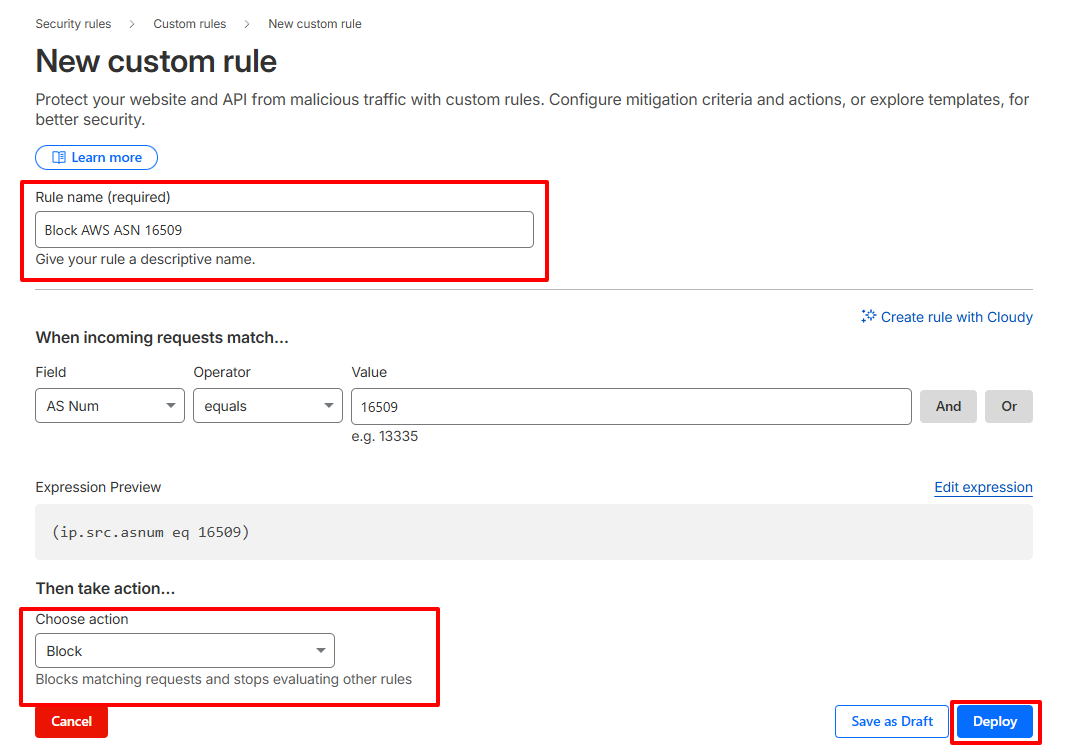
- Log in to your Cloudflare dashboard
- Select your website
- Navigate to Security → Security Rules → Custom rules
- Click Create rule
- Set the condition:
-
- Field: AS Num
- Operator: equals
- Value: 16509 (Amazon AWS example)
Expression preview: (ip.src.asnum eq 16509)
- Choose an action:
-
- Managed Challenge (recommended starting point)
- Block (only if you are confident)
- Name the rule clearly (e.g. Block AWS ASN 16509)
- Deploy the rule
OOPSpam vs Cloudflare: Which Should You Use?
| Feature | OOPSpam | Cloudflare ASN Rules |
|---|---|---|
| VPN detection | Yes | Partial |
| Cloud IP detection | Yes | Yes |
| WPDiscuz-specific | Yes | No |
| False-positive risk | Low | Medium to High |
| Scope | Comments only | Entire site |
| Setup complexity | Low | Medium |
Final Recommendation
For WPDiscuz comment spam involving VPNs and data center IPs:
- Start with OOPSpam Anti-Spam for comment-level protection
- Add Cloudflare ASN or managed-list rules only if you are dealing with sustained infrastructure-based attacks
This layered approach balances security, accuracy, and user experience without breaking legitimate access or overblocking privacy-conscious users.
