How to Block Countries From Your Website: The Complete Guide

Technical Content Marketer

Reviewed by Onar Alili
Co-founder & Engineer
Published 6 min read
You block countries from your website using a firewall service like Cloudflare (site-wide) or a spam-filtering tool like oopspam (form-level). Cloudflare stops traffic at the network edge before it reaches your server. oopspam blocks spam and unwanted submissions by country while keeping your site publicly accessible. Neither method is 100% accurate: VPNs and proxies can bypass IP-based geo-blocking.
Why Block Countries in the First Place
Site owners block countries for three main reasons:
- Spam and fraud reduction: cutting down fake form submissions, bot signups, and fraudulent orders from high-risk regions.
- Legal and licensing compliance: some content, products, or services can only be sold or shown in specific countries.
- Server load and security: reducing exposure to regions responsible for repeated attacks or scraping.
Before you block anything, know what “blocking a country” actually does.
How Country Blocking Actually Works
Every visitor’s request carries an IP address. Firewalls and spam filters use IP geolocation, a database that maps IP ranges to countries, to guess where a visitor is located. Based on that guess, the tool applies a rule: allow, challenge, or block.
This means country blocking is really IP-range blocking, not identity verification. That distinction matters for two reasons:
- VPNs, proxies, and Tor let a visitor appear to be in a different country in seconds.
- IP geolocation databases aren’t perfect. They occasionally misclassify an IP, which can block legitimate customers or search engine crawlers by mistake.
With that in mind, here are the two most practical ways to block countries today.
Method 1: Block Countries Site-Wide With Cloudflare
Cloudflare sits in front of your website as a reverse proxy, so it can block traffic before it ever reaches your server. This is the fastest option for stopping a country from loading your site entirely.
Note: Cloudflare retired the old “Firewall Rules” terminology. Country blocking now lives under Security Rules.
Steps:
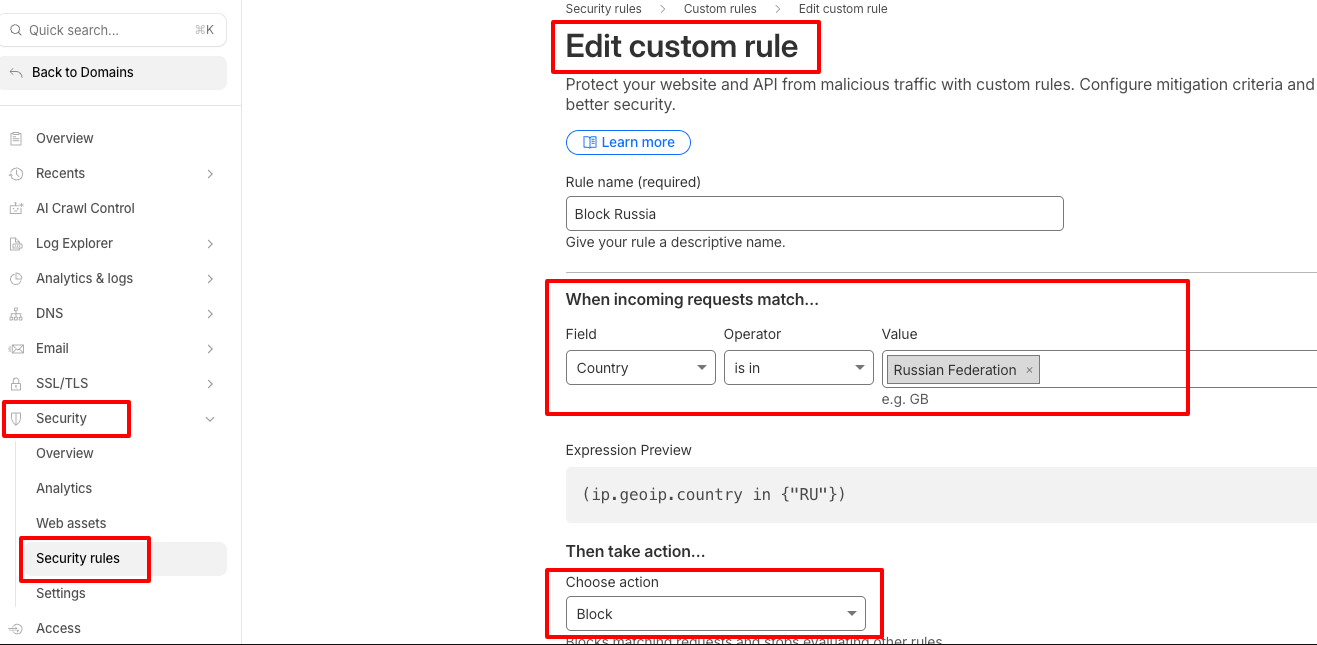
- Log in to your Cloudflare dashboard and select your domain.
- Go to Security → Security Rules → Custom Rules.
- Click Create rule and give it a name (e.g., “Block Russia”).
- Under “When incoming requests match,” set:
-
- Field: Country
- Operator: is in
- Value: select the country or countries to block
- Under “Then take action,” choose:
-
- Block: deny the request outright
- Managed Challenge: show a CAPTCHA-style check instead of a hard block (recommended for most sites, since it filters bots without locking out real visitors)
- Click Deploy.
The rule activates globally within seconds. This approach is a good fit for compliance requirements or shutting down a targeted, region-specific attack, but it blocks your entire site for that country, including real customers who happen to be traveling or using a corporate VPN.
Method 2: Block Countries at the Form Level With oopspam
If your real problem is spam (fake signups, bot form submissions, fraudulent leads), blocking a whole country from your website is overkill. It also doesn’t stop spam originating from allowed countries.
oopspam (that is us) filters spam using country rules combined with behavior-based detection, so you get geo-control without cutting off legitimate visitors from your entire site. It’s built for exactly this use case, unlike a general firewall that only knows “allow” or “block.”
Steps:
Install the oopspam Anti-Spam plugin (WordPress), or connect via API for other platforms.

Create a free account at oopspam.com and copy your API key.
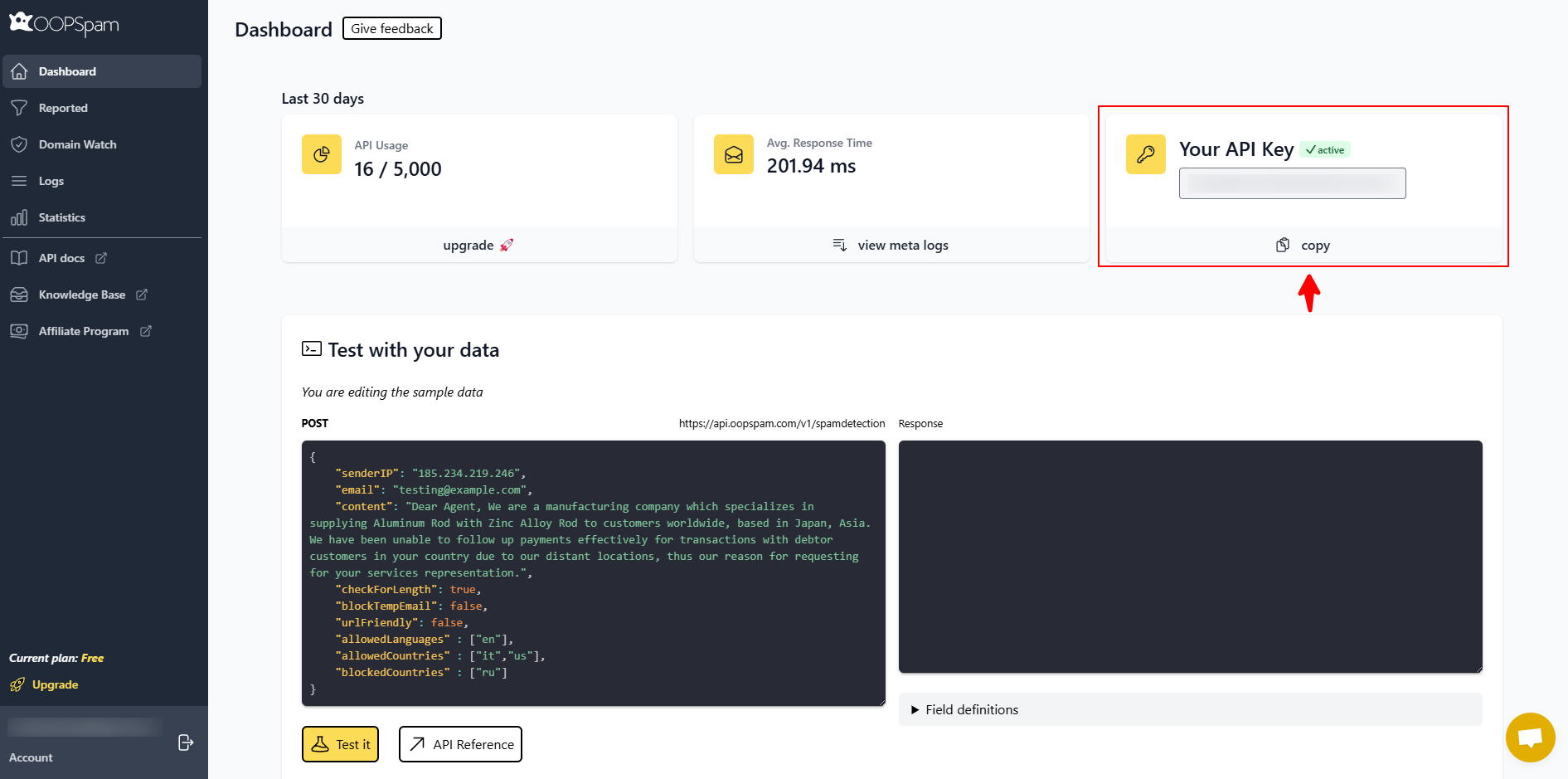
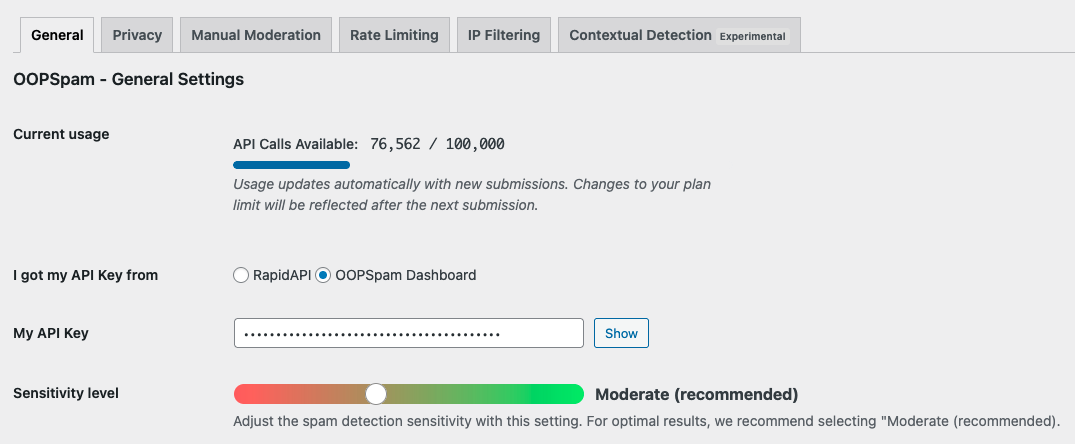
Navigate to oopspam → General Settings in WordPress, paste your API key, and save.
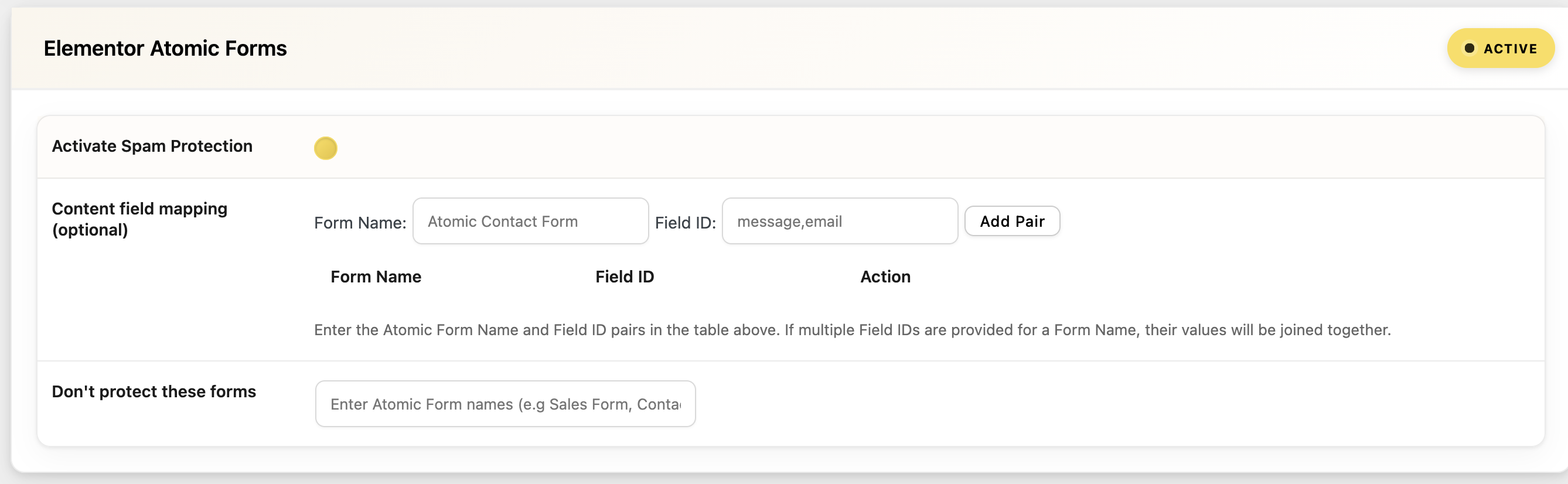
Turn on spam protection for your forms (Elementor, WPForms, Gravity Forms, WS Form, etc.).
Go to oopspam → Settings → Country Filtering and choose:
- Trusted Countries: always allow submissions from selected countries and skip spam checks
- Country Allowlist: accept submissions only from selected countries
- Country Blocklist: block submissions from selected countries
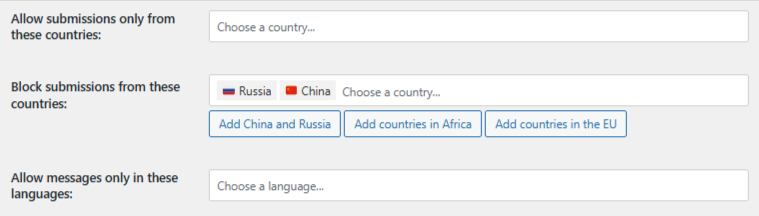
Save your settings.
Why this beats a blanket site block:
- Your website stays visible and accessible worldwide.
- Country rules apply only where spam actually happens: your forms.
- oopspam also blocks VPN, proxy, and Tor traffic, adds rate limiting, and uses contextual spam detection to catch abuse that country rules alone would miss.
- You avoid accidentally blocking real customers, partners, or search crawlers from your entire site.
Cloudflare vs. oopspam: Which Should You Use?
| Goal | Best Tool |
|---|---|
| Block a country from your entire website | Cloudflare |
| Meet a legal/licensing restriction | Cloudflare |
| Stop spam or fraudulent form submissions | oopspam |
| Keep your site public while filtering junk leads | oopspam |
| Respond to a temporary, region-specific attack | Cloudflare |
Many sites use both: Cloudflare for broad network-level security, and oopspam for precise, form-level spam control.
Limitations to Keep in Mind
- VPNs and proxies bypass geo-blocking. A determined visitor or bot can appear to be anywhere.
- IP geolocation isn’t perfect. Misclassified IPs can block real users or search engine crawlers.
- Country blocking alone doesn’t stop targeted abuse. Attackers rotate IPs and regions; layered defenses (rate limiting, behavioral detection, allowlists) hold up better over time.
- A blocked country isn’t the same as a blocked attacker. Treat country rules as one layer, not a complete security strategy.
Final thoughts
Block countries with Cloudflare when you need to restrict access to your whole site for legal or security reasons. Use oopspam when your actual goal is stopping spam: it lets you filter by country at the form level without shutting real visitors out of your site. For most businesses fighting spam rather than compliance issues, oopspam is the more precise, less disruptive choice.