How to Block Foreign-Language Spam in WordPress Forms

Technical Content Marketer

Reviewed by Onar Alili
Co-founder & Engineer
Updated Published 9 min read
If your WordPress contact forms are flooded with submissions in Russian, Chinese, or other foreign languages, you can stop them using a combination of native form plugin filters, a keyword blocklist, and a dedicated anti-spam plugin like oopspam. This guide walks you through each method clearly and efficiently.
Why Foreign-Language Spam Is a Growing Problem
Foreign-language spam clogs your inbox, corrupts your CRM data, and wastes time that your team could spend on real leads. Spammers increasingly use bots that rotate IPs and submit forms in bulk, often targeting sites with little or no language-based filtering in place.
If your business serves English-speaking customers only, there is no legitimate reason to receive form submissions written in Cyrillic, Mandarin, Arabic, or other scripts. Blocking them is both practical and safe.
Method 1: Use a Plugin with a Built-In Language Filter
The fastest and most reliable approach is to install oopspam, an anti-spam plugin built specifically for WordPress forms. It works silently in the background, requires no CAPTCHA, and does not slow down your site.
How oopspam’s Language Allowlist Works
oopspam uses machine learning and a database of over 500 million malicious IPs and emails to evaluate every form submission. For foreign-language blocking specifically, it includes a Language Allowlist feature:
Install and activate the oopspam Anti-Spam plugin from the WordPress plugin directory.

Go to oopspam > Settings in your WordPress dashboard.

Enter your API key (available after creating a free account at oopspam.com).

Navigate to the Country and Language settings. You will see three fields:
- Country Allowlist: Select the specific countries you want to accept submissions from. Only those submissions will be processed. Leave it empty to accept from all countries not on your blocklist.
- Country Blocklist: Select countries you want to block outright. oopspam includes quick-add buttons for common choices such as China and Russia, countries in Africa, or EU countries. Blocked submissions will be rejected unless the sender also appears in your Trusted Countries list.
- Language Allowlist: Choose the language(s) you want to accept (e.g., English, Spanish). Only messages written in those languages will be processed. Leave it empty to accept all languages.
Save your settings.
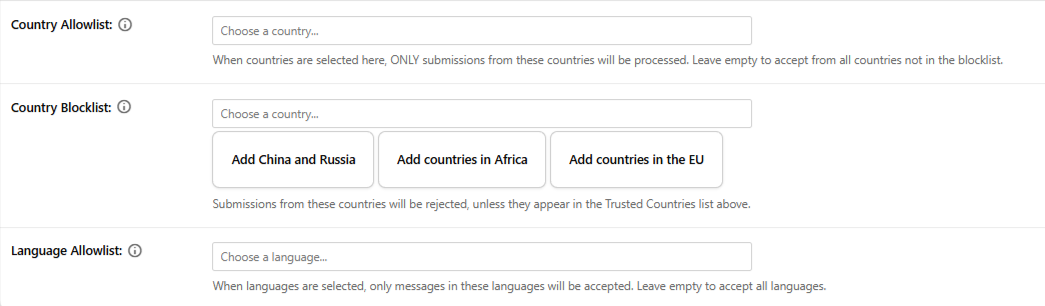
Any submission that does not match your selected language(s) is automatically flagged and blocked before it reaches your inbox.
Note: The Language Allowlist works best when your form includes a textarea or a message field with at least a few sentences. Short fields like “Name” or “Email” may not provide enough text for accurate language detection.
This two-layer approach (language + country) gives you much stronger protection than either method alone.
Supported form plugins include: WPForms, Fluent Forms, Elementor Forms, WS Form, Forminator, HappyForms, Gravity Forms, and more.
Method 2: Use Your Form Builder’s Native Keyword and Country Filter
Many WordPress form builders include their own spam settings, such as keyword blocking or country filtering. If yours does, it is worth turning on as an extra layer. The exact menu names differ between plugins, so look for a section called something like Spam Protection, Anti-Spam, or Security in your form’s settings.
Example: Country and Keyword Filtering in WPForms
WPForms is a good example of how these native filters work. You can use its built-in filtering to allow or block submissions by country or keyword.
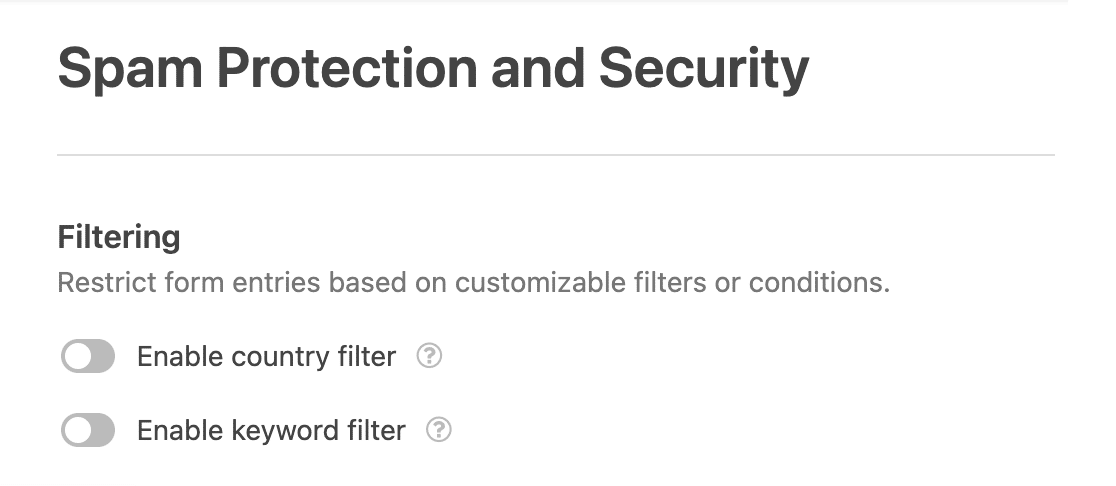
- Open the WPForms form builder and select the form you want to protect.
- Go to Settings > Spam Protection and Security.
- Click on the Filtering tab.
- Enable the Country or Keyword Filter option.
- Add the countries or keywords you want to allow or block.
- Save the changes.
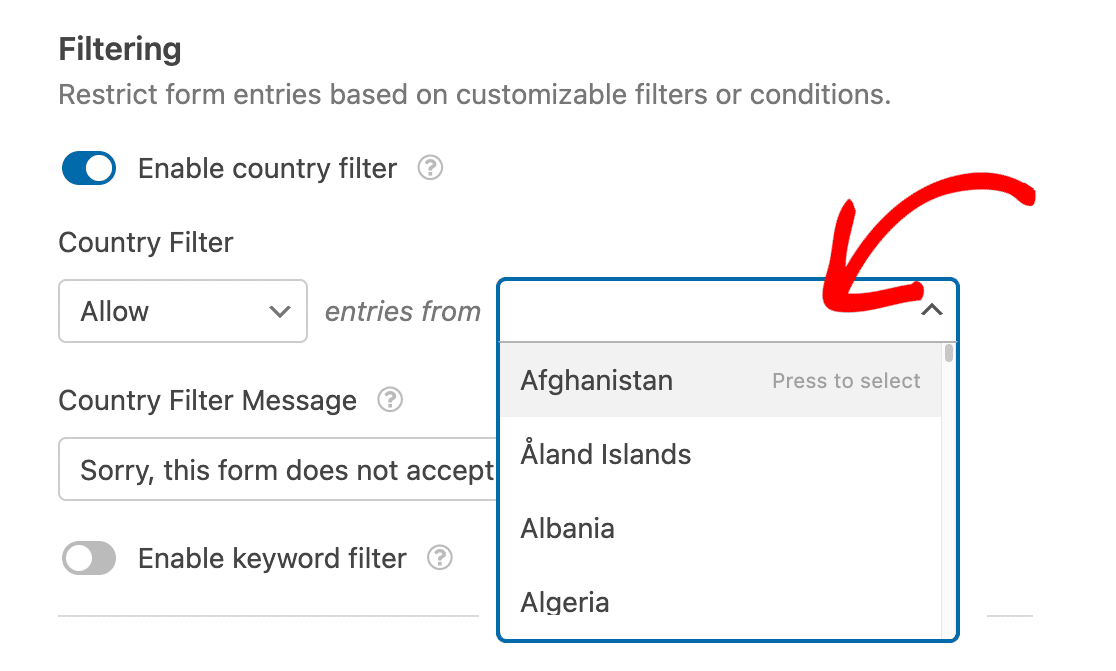
If you use a different form builder, check its settings or documentation for a similar keyword or country option. The steps will vary, but the idea is the same.
Native filters like these are straightforward and work well for basic needs. However, they filter by country or exact keyword, not by the language a message is written in. They are less granular than oopspam’s language detection and may not catch bots that spoof their location.
Method 3: Build a Keyword Blocklist
A keyword blocklist lets you reject submissions that contain specific words or phrases that show up often in foreign-language spam. You can set one up in WordPress core (for comments only) or in oopspam (for comments and forms).
Steps via WordPress Core (Discussion Settings):
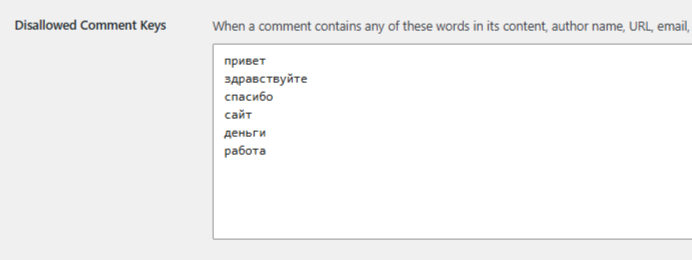
- Go to Settings > Discussion in your WordPress dashboard.
- Scroll down to the Disallowed Comment Keys box.
- Paste in the characters or words you want to block, one per line.
- Click Save Changes.
Note: WordPress’s built-in Disallowed Comment Keys setting applies only to WordPress’s native comment system. It does not protect contact forms or any other form builders on your site. If your goal is to filter form submissions, this method alone will not work.
Steps via oopspam’s Manual Moderation Tab:
If you are already using oopspam, you do not need a separate blocklist tool. The plugin includes a dedicated Manual Moderation tab that lets you manage blocked keywords alongside blocked emails, IPs, and allowed senders, all in one place.
Unlike the WordPress core option, the Blocked Keywords feature in oopspam works across both the WordPress comment system and all supported form builders.
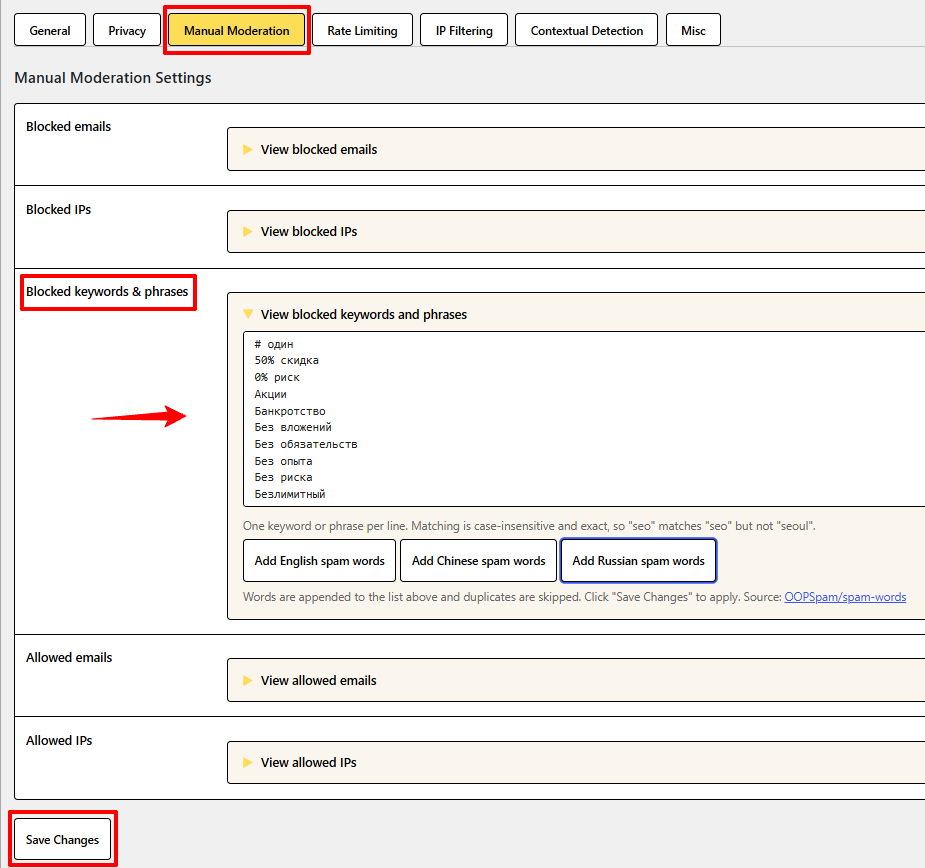
- In your WordPress dashboard, go to oopspam Anti-Spam > Settings.
- Click the Manual Moderation tab.
- Expand the Blocked keywords & phrases section.
- Add your own foreign-language words or phrases, one per line, or use the quick-add buttons below to load a ready-made list.
- Click Save Changes.
Add Ready-Made Spam Word Lists in One Click
You do not have to build your blocklist from scratch. Below the keyword field, oopspam includes three quick-add buttons:
- Add English spam words
- Add Chinese spam words
- Add Russian spam words
Click a button and oopspam appends a curated list of common spam words in that language to your blocklist. Words already on your list are skipped, so you will not end up with duplicates. The lists come from oopspam’s open-source spam-words repository. Click Save Changes to apply them.
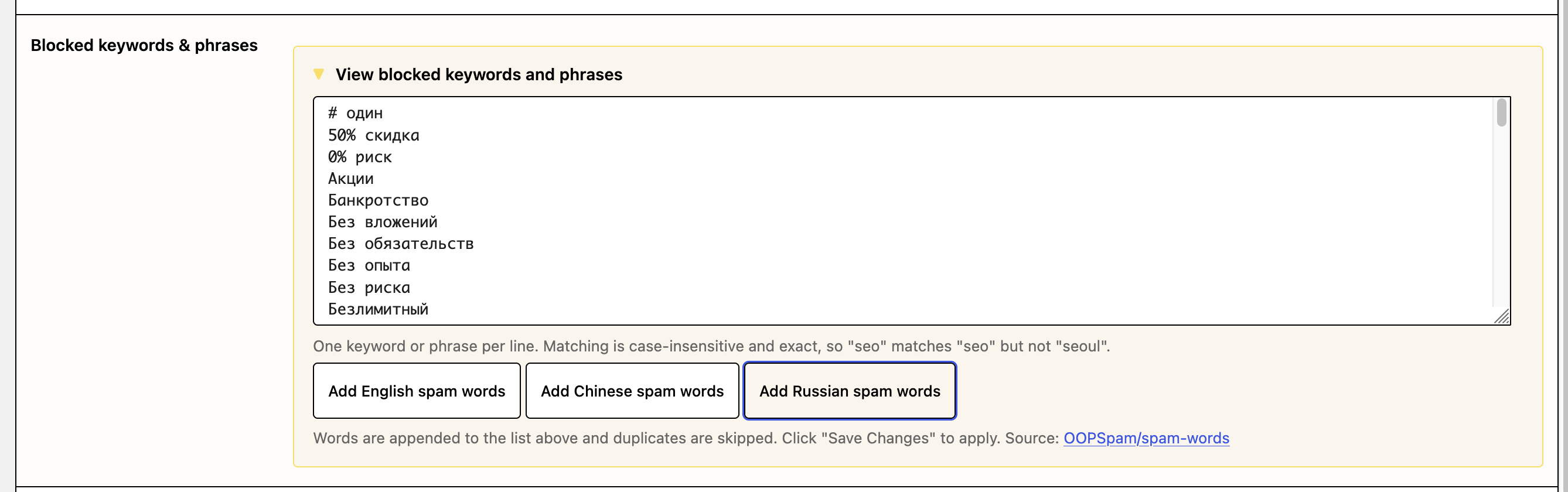
You can edit the list after adding it. Remove any word that might appear in a genuine enquiry for your business, or add your own terms on new lines.
Tip: Matching is case-insensitive and exact. For example, “seo” matches “seo” but not “seoul”. This keeps false positives low, but it also means single letters or partial words will not catch spam. Add whole words and phrases instead.
Any form submission containing a blocked keyword is rejected automatically. This is particularly useful when you have already spotted recurring spam phrases in your inbox and want to shut them down immediately without waiting for the machine learning filter to catch up.
Steps via the oopspam Dashboard (All Your Websites at Once):
Managing several websites? Keywords added on the Moderation page of your oopspam dashboard apply to every website on your account, not just the one where the plugin is installed. Go to Moderation > Blocked keywords, enter one word or phrase per line, and click Add.
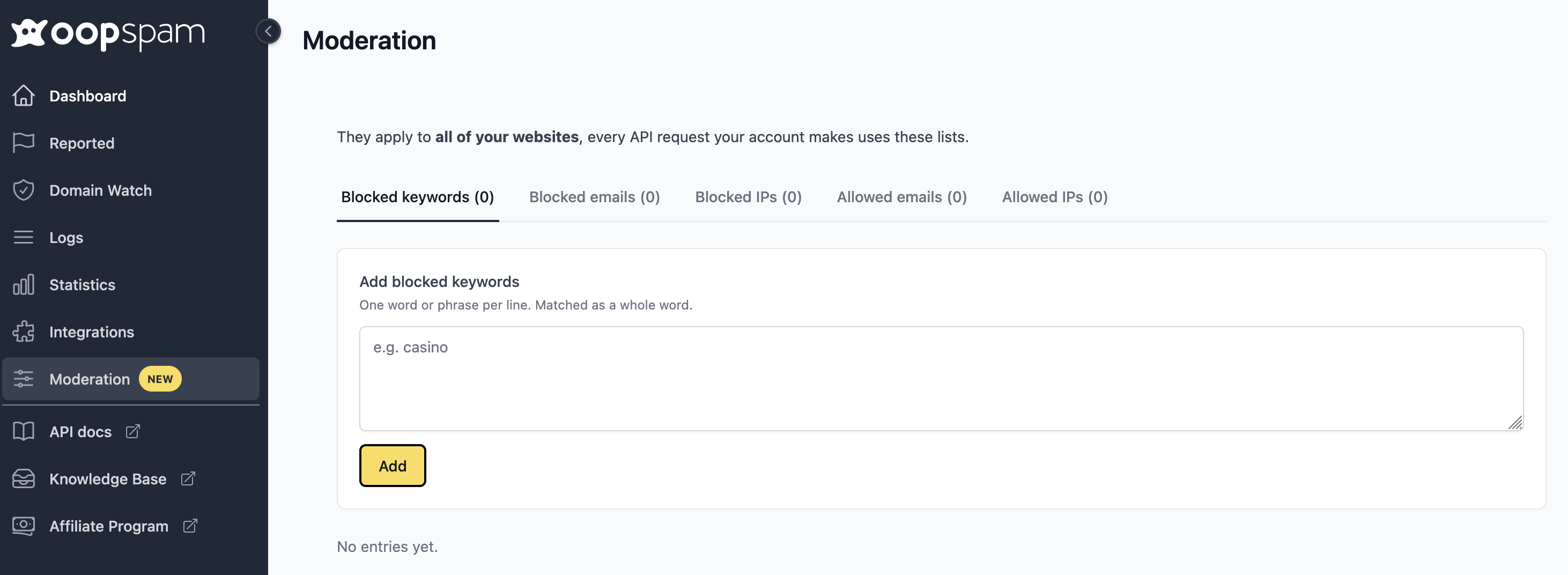
What to add to your blocklist:
- A ready-made list for the language you receive spam in, such as the Russian or Chinese list
- Specific spam words or phrases you have already spotted in your inbox
- Domain extensions frequently linked to spam, such as .ru
Important limitation: Keyword blocklists, whether managed through WordPress core or oopspam, require occasional updates as spammers shift their tactics. Treat them as a quick-response tool within a broader spam protection setup, not a standalone solution.
How to Block Russian Spam in WordPress Forms
If your WordPress forms are receiving spam written in Russian or other Cyrillic languages, you can use oopspam’s Language Allowlist to allow only the languages your business accepts. For example, an English-only website can allow English and automatically block submissions written in Russian.
For extra coverage, open the Manual Moderation tab and click Add Russian spam words to load a ready-made list of common Russian spam terms into your blocklist. If you do not serve customers in Russia, you can also use the Country Blocklist’s quick-add button to block submissions from Russia outright.
Combining Methods for Maximum Protection
No single method is 100% foolproof, but layering your defenses significantly reduces the risk. Here is a practical stack that works for most WordPress sites:
- oopspam as your primary filter (language allowlist + country blocking + machine learning)
- Your form builder’s built-in keyword or country filter as a secondary gate, if it has one (for example, WPForms’ Country or Keyword Filter)
- A keyword blocklist, such as oopspam’s ready-made Russian, Chinese, or English spam word lists, for catching anything that slips through
This layered approach handles both automated bot submissions and manual human spam, which is increasingly common as spammers bypass basic CAPTCHA systems.
Final Thoughts
Foreign-language spam is a manageable problem with the right tools. For most site owners and developers, oopspam offers the most complete and low-maintenance solution, especially with its Language Allowlist, keyword blocklists, and country-based filtering working together.
Start with the method that fits your current form plugin and budget, and scale up your protection as your site grows.
