Why Legitimate Form Submissions Get Flagged as Spam and How to Reduce False Positives

Technical Content Marketer

Reviewed by Onar Alili
Co-founder & Engineer
Published 8 min read
Spam filters are not perfect. Even well-intentioned submissions from real users get blocked every day, not because those users did anything wrong, but because of inherited IP baggage, overly aggressive rate limits, or content that pattern-matches to known threats. The good news is that false positives are manageable, and in most cases, almost entirely preventable with the right adjustments.
What Is a False Positive in Spam Filtering?
A false positive occurs when a spam filter incorrectly blocks or flags a legitimate form submission as spam. The user is real, the message is genuine, but the system treats it as a threat.
For businesses, this is more than a technical nuisance. It means missed leads, frustrated customers, and broken trust. For developers and site owners, it means manually digging through spam queues to rescue real inquiries.
To understand the growing complexity of modern spam attacks, see our 2025 Annual Spam Report.
Why Does This Happen? The Root Causes
1. Bad IP Reputation (The Most Common Culprit)
Every device that connects to the internet does so through an IP address. Spam filters use IP reputation databases to score those addresses based on their history of abuse, spam campaigns, botnet activity, and malware distribution.
The problem? IP addresses get recycled.
When an IP address previously used for spam or malicious activity is later reassigned to a new user, that user can inherit a damaged reputation score, causing them to be blocked even though they have never done anything wrong. This is especially common with:
- Shared hosting environments where hundreds of users share one IP
- Mobile carrier networks and large corporate offices using Network Address Translation (NAT)
- VPN users whose exit nodes have a history of abuse
Real-time reputation systems occasionally flag legitimate users due to corporate NAT and proxies, where hundreds of users share a single egress IP that was previously abused by just one of them.
2. Overly Strict Rate Limiting
Rate limiting is designed to stop bots from flooding your forms with rapid-fire submissions. But when thresholds are set too low, they catch real users in the net, particularly:
- Users who submit multiple forms on the same site (for example, a contact form and a newsletter signup within the same session)
- Multiple users in an office sharing the same IP who all fill out your form around the same time
- Customers who accidentally submit twice
Strict rate limiting policies increase false positives and disrupt legitimate traffic, while overly permissive settings increase the risk of abuse. The right balance requires careful calibration.
3. Content That Triggers Keyword or Pattern Filters
Spam filters analyze submission content for patterns associated with known threats. Certain words, phrases, or formatting choices can inadvertently trip these filters, even in completely innocent messages. Industries like finance, pharmaceuticals, and adult education are especially vulnerable because their legitimate vocabulary often overlaps with known spam language.
4. Disposable or Newly Created Email Addresses
Some users sign up with free, newly created email accounts. To a filter, a brand-new Gmail or Outlook address with no reputation history can look suspicious, even if the person behind it is entirely genuine.
5. Geographic Location
Spam filtering systems sometimes apply geo-based scoring, treating submissions from certain countries or regions with higher suspicion. A legitimate customer submitting from a region flagged as a spam hotspot may get blocked even if their submission is perfectly clean.
How to Reduce False Positives
For WordPress Users (Using oopspam)
If you are using the oopspam Anti-Spam plugin (that’s us 👋) on WordPress, you have several built-in tools to address false positives directly.
Step 1: Diagnose the block reason
Go to oopspam Anti-Spam > Form Spam Entries in your WordPress dashboard. Check the Reason column next to the flagged entry. This tells you exactly why it was blocked, so you can take targeted action instead of guessing.
Common reasons and their fixes:
- IP Blocked - Disable IP analysis under Privacy > Do not analyze IP addresses
- Rate Limiting - Disable rate limiting entirely, or increase the submission limits to a less aggressive threshold
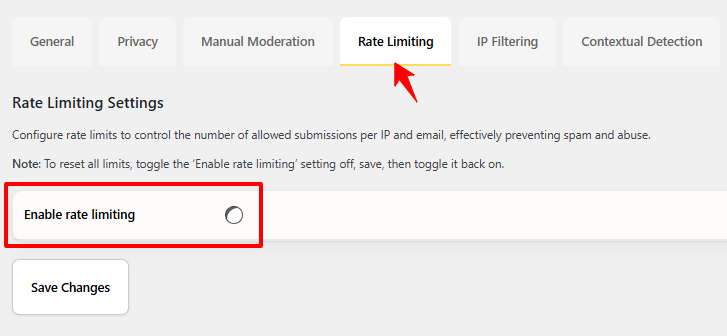
Step 2: Mark the entry as “Not Spam”
Bulk select or individually mark safe entries as Not Spam in the Form Spam Entries view. When you do this, three things happen:
- A report is sent to help improve oopspam’s detection accuracy
- The IP address and email are added to your local allowlist
- The system learns to prevent similar false positives from recurring, benefiting other oopspam users as well

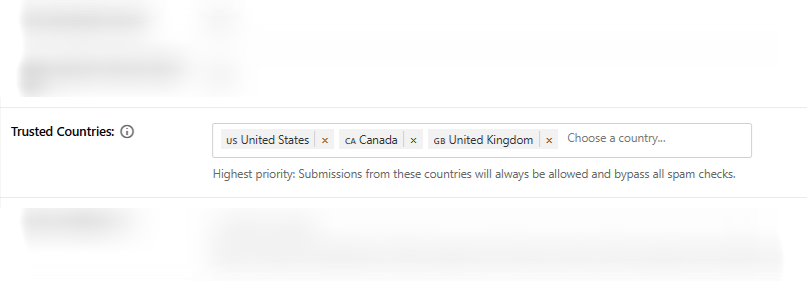
Step 3: Use the Trusted Countries filter
If your website primarily serves users from specific countries where spam is uncommon, enable the Trusted Countries filter. Submissions from those locations will bypass all spam checks entirely. Only enable this for countries you fully trust.
Step 4: Contact support
oopspam’s support team consists of technical experts who can help you resolve persistent issues quickly. Reach us via email at [email protected] or through the live chat on the oopspam dashboard.
For Non-WordPress Platforms and API Users
If you are integrating oopspam via API or using it with platforms outside WordPress (such as custom web apps, SaaS products, Webflow, Bubble, or others), the same principles apply, but the remediation steps look slightly different.
Log in to your oopspam dashboard and go to the Logs section. Every submission checked through the API is recorded there. Find the entry that was incorrectly flagged, review the block reason, and mark it as Not Spam.
Review your spam score thresholds
Spam scoring systems rate submissions on a scale from 1–2 (likely human) to 3–6 (likely a bot). A balanced threshold helps catch most spam while still allowing legitimate submissions through. If you are seeing high false positive rates, consider slightly loosening your threshold instead of disabling protection entirely.
Skip IP analysis selectively
Using the oopspam API, you can pass a flag to skip IP reputation checks for specific form submissions or user segments (for example, authenticated users who are already logged in to your platform). This is particularly useful when you know your users are behind corporate proxies or VPNs.
Build an allowlist
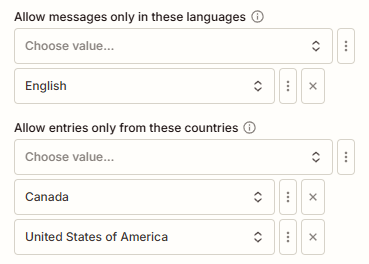
Trusted IP addresses and email domains that should always bypass spam checks can be added to your allowlist. The easiest way to do this is by marking false positives as Not Spam in the Logs page. This is especially effective for B2B platforms where you know your customers’ organizations and their IP ranges.
Use manual review workflows
Rather than hard-blocking suspicious submissions, route borderline ones to a review queue. This prevents legitimate submissions from being silently dropped while still keeping clear spam out of your inbox.
Leverage email validation at the point of submission
oopspam performs real-time email validation automatically when an email address is passed to the API. This includes checks for disposable addresses, MX record verification, and domain reputation, catching suspicious signups at the point of submission without any extra setup on your end.
General Best Practices to Minimize False Positives
Regardless of your platform or spam filtering tool, these principles apply universally:
- Never set-and-forget your spam filter. Review flagged submissions regularly. Even the best systems need periodic calibration.
- Layer your defenses. Use multiple signals (IP reputation, content analysis, email validation, behavioral checks) rather than relying on any single filter, which reduces over-reliance on aggressive thresholds.
- Provide a fallback for blocked users. Display a clear message when a submission is blocked, and offer an alternative contact method such as a direct email address or phone number.
- Monitor your false positive rate. Track the ratio of legitimate to spam submissions over time. A sudden spike in false positives often signals that a filter has become miscalibrated.
- Educate your support team. Ensure anyone handling customer inquiries knows how to check the spam queue and escalate suspected false positives.
Final Thoughts
False positives are an unavoidable side effect of any spam protection system, but they should be rare, not routine. The most common causes, bad IP reputation, aggressive rate limiting, and overly strict content filters, all have practical solutions that do not require you to sacrifice protection.
The goal is not to eliminate spam filtering. It is to tune it so that real users always get through while automated abuse does not. With the right tools and a habit of reviewing flagged entries, you can get false positives down to near zero.
If you are using oopspam and a legitimate submission was blocked, do not wait. Check the reason, mark it as Not Spam, and reach out to support if needed. Every report helps the system improve, for you and for every other site relying on it.