How to Block VPN and Data Center IP Submissions in MemberPress?

Technical Content Marketer

Reviewed by Onar Alili
Co-founder & Engineer
Published 6 min read
MemberPress does not automatically block VPN or data center IPs. To protect your membership site from automated spam registrations, you need additional layers of protection. This guide covers three approaches: oopspam (form-level), Cloudflare (network-level), and MemberPress built-in restrictions.
If you are seeing fake registrations, disposable emails, or payment card testing attacks, this guide shows exactly how to stop them.
Why MemberPress Needs VPN and Cloud IP Protection
MemberPress handles membership logic, payment processing, and content restriction effectively. However, it does not analyze IP reputation during registration. The plugin cannot distinguish between:
- A legitimate user registering from home or office
- A bot operating through a VPN or proxy
- An attacker using cloud servers (AWS, Google Cloud, Azure, DigitalOcean)
Modern spam and fraud operations use cloud infrastructure to launch automated attacks. These include fake registrations, payment card testing, and membership abuse. Standard email validation is not enough to stop these threats.
This is why IP-based filtering must happen at a different layer.
Method 1: Using oopspam Anti-Spam
oopspam (that’s us 👋) filters MemberPress registrations in real-time before accounts are created. It analyzes every submission against a continuously updated threat database that includes:
- VPN and proxy IP ranges
- Over 1,500+ cloud hosting providers and data centers
- Real-time reputation scoring
This approach blocks fraudulent registrations without affecting legitimate visitors browsing your site.
Step-by-Step: Set Up oopspam for MemberPress

Step 1: Install the Plugin
Log in to WordPress and navigate to Plugins → Add New. Search for “oopspam Anti-Spam” and click Install. Activate the plugin after installation completes.
Step 2: Connect Your API Key
Create a free account at the oopspam dashboard. Copy your API key from the account settings.

In WordPress, go to Settings → oopspam Anti-Spam. Paste your API key into the field provided and save.

Step 3: Enable Spam Protection
Open the General tab in oopspam settings. Turn on Activate Spam Protection for MemberPress.
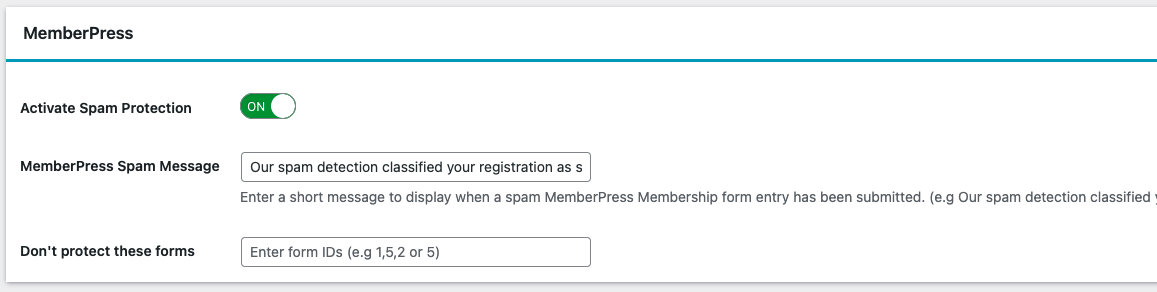
The plugin will automatically detect MemberPress and apply protection to registration forms.
Step 4: Configure IP Filtering
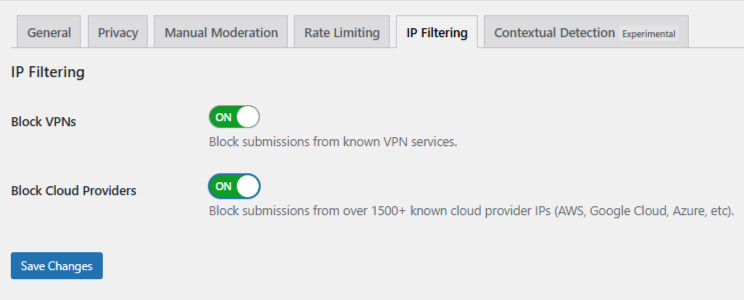
Navigate to the IP Filtering tab. You will see two filtering options:
- Block Cloud Providers – Blocks registrations from data centers and hosting infrastructure. Strongly recommended for membership sites.
- Block VPNs – Blocks registrations through VPN services. Consider carefully as legitimate users may use VPNs for privacy.
Enable the filters that match your security needs and save changes.
Manual Moderation for Targeted Abuse
Some fraudulent registrations are not fully automated. Attackers may manually create accounts using rotating IPs or craft profiles that appear legitimate. oopspam provides Manual Moderation tools for these situations.
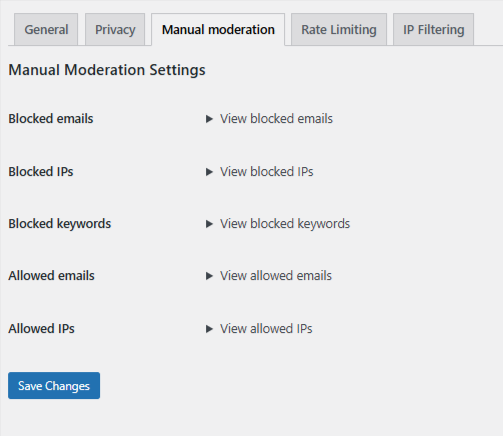
You can:
- Block specific IP addresses from repeat offenders
- Block email addresses or entire domains
- Block registrations containing specific keywords
- Whitelist trusted IPs or emails to prevent blocking legitimate members
This gives you granular control without blocking entire networks.
Method 2: Using Cloudflare Security Rules
If your site runs on Cloudflare, you can block unwanted traffic before it reaches WordPress. This reduces server load and stops attacks at the network perimeter.
Keep in mind: Cloudflare rules apply site-wide, not just to MemberPress registration forms.
Understanding ASN-Based Blocking
Cloudflare allows you to filter traffic by ASN (Autonomous System Number). Every major network operator has a unique ASN identifier.
For example: DigitalOcean uses ASN 14061
When you block an ASN, all traffic from that network is blocked.
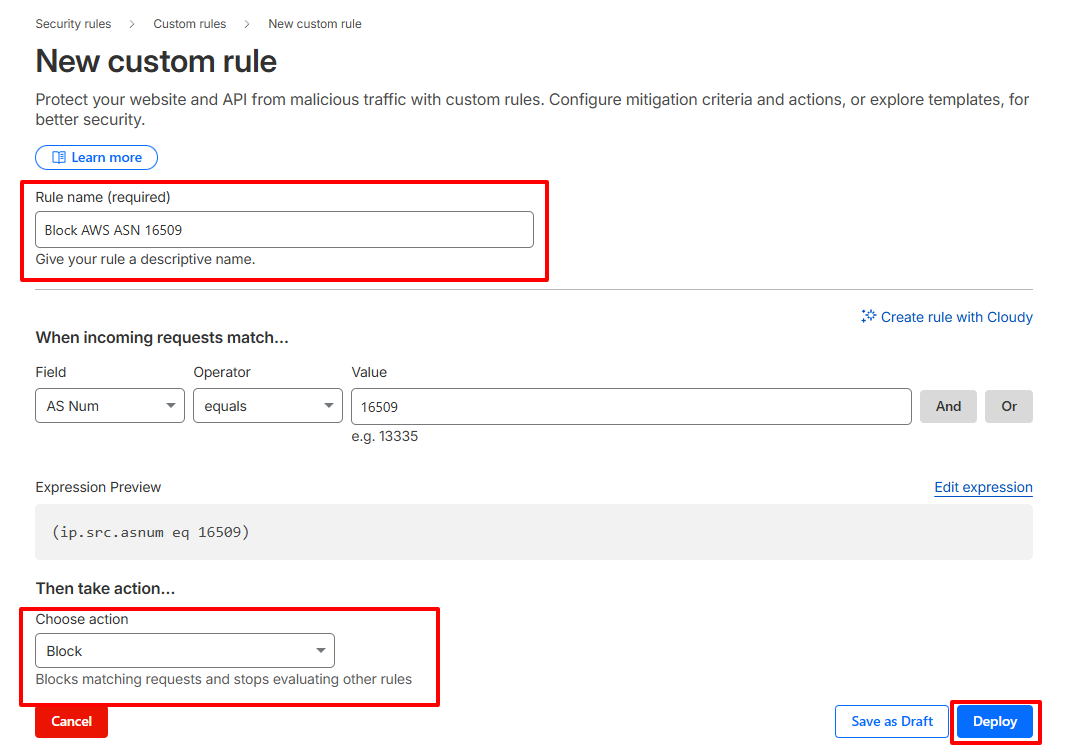
Step-by-Step: Create an ASN Blocking Rule
- Log in to your Cloudflare account
- Select your membership site
- Navigate to Security → Security Rules → Custom Rules
- Click Create Rule
- Set the field to AS Num and enter the ASN. Example:
(ip.geoip.asnum eq 14061) - Choose an action:
-
-
Managed Challenge – Recommended for testing (presents a verification challenge)
-
Block – Use when confident about the impact
-
- Name your rule clearly and deploy
Warning: Blocking entire ASNs can prevent legitimate members from accessing your site. This includes users on corporate VPNs, privacy-focused services, and businesses hosted in cloud environments.
Method 3: MemberPress Built-in Protections
MemberPress includes built-in features that help manage malicious registrations. While these do not directly block VPNs or data centers, they provide additional layers of protection.
Registration Restrictions (Growth/Scale Plans)
MemberPress allows you to block specific IP addresses or email domains. You can apply these restrictions globally or per membership level.
Setting Up Registration Restrictions

Navigate to MemberPress → Settings → Restrictions in your WordPress dashboard.
You can enable:
- IP Restriction – Block or allow specific IP addresses. Use wildcards or CIDR notation (e.g.,
192.168.0.*or192.168.0.0/24). Apply these settings globally or per membership. - Email Domain Restriction – Block registrations from disposable email services or suspicious domains.
- Email Address Restriction – Block specific email addresses tied to fraudulent accounts.
- Age Restriction – Require users to meet minimum age requirements.
Most of these restrictions can also be enforced using oopspam Manual Moderation. You can block individual IP addresses, email addresses, and entire domains, as well as whitelist trusted users.
The only control that cannot be replicated inside oopspam is the Age Restriction, which is handled directly by MemberPress during registration.
Global vs Membership-Level Restrictions

Global restrictions apply to your entire site. Set them in MemberPress → Settings → Restrictions.
If you apply restrictions on individual memberships, those will override global settings. For example, if you block an IP globally but allow it for one membership, the membership-specific setting takes priority.
You can also set restrictions for coupons and corporate accounts, giving you complete control over how members and sub-accounts register.
Final Takeaway
MemberPress provides powerful membership management, but it was not designed to fight infrastructure-based spam and fraud on its own.
For complete protection:
- Use oopspam for intelligent, form-level filtering that targets fraudulent registrations
- Enable MemberPress built-in restrictions to block specific IPs, domains, and prevent card testing
- Add Cloudflare rules only when facing serious, sustained attacks from specific networks
Together, these methods protect your membership site from automated abuse while maintaining a smooth experience for legitimate members.
