How to Block VPN and Data Center IP Submissions in MC4WP: Mailchimp for WordPress?

Technical Content Marketer

Reviewed by Onar Alili
Co-founder & Engineer
Published 5 min read
MC4WP: Mailchimp for WordPress does not include VPN or data center IP blocking. To protect your Mailchimp lists from automated spam, you need a third-party solution. The two most effective options are oopspam (form-level) and Cloudflare Security Rules (network-level).
If you are seeing bot signups, disposable emails, or fake subscribers that bypass double opt-in, this guide shows exactly how to stop them.
Why MC4WP Cannot Block Infrastructure-Based Spam
MC4WP excels at connecting WordPress to Mailchimp and supports double opt-in verification, but it does not analyze IP reputation. The plugin cannot identify whether a signup comes from:
- A legitimate home or office connection
- A VPN or proxy service
- A cloud hosting provider (AWS, Google Cloud, Azure, DigitalOcean)
Spammers use cloud servers and VPNs to generate fake signups at scale. Double opt-in helps but does not stop all abuse. Many bots can verify emails automatically.
This is why IP filtering needs to happen at a different layer.
Two Methods to Stop VPN and Data Center Signups
You have two practical approaches. Each works at a different level of your infrastructure.
- Method 1: Filter submissions inside WordPress using oopspam
- Method 2: Block traffic at the network edge using Cloudflare
You can implement one method or combine both for layered protection.
Method 1: Using oopspam Anti-Spam
oopspam (that’s us 👋) filters MC4WP submissions before they reach Mailchimp. It checks every submission against a continuously updated threat database that includes:
- VPN and proxy IP ranges
- Over 1,500+ cloud hosting providers and data centers
- Real-time reputation data
This approach blocks spam at the submission level without affecting visitors who are simply browsing your site.
Step-by-Step: Set Up oopspam for MC4WP

Step 1: Install the Plugin
Log in to WordPress and go to Plugins → Add New. Search for “oopspam Anti-Spam” and click Install. Activate the plugin after installation completes.
Step 2: Connect Your API Key
Visit the oopspam dashboard and create a free account. Copy your API key from the account page.

In WordPress, navigate to Settings → oopspam Anti-Spam. Paste your API key into the provided field and save.

Step 3: Enable Spam Protection
Open the General tab in oopspam settings. Toggle on Activate Spam Protection.
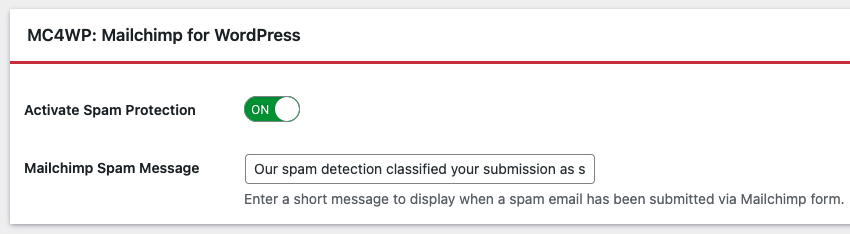
The plugin will automatically detect MC4WP when both plugins are active. No additional configuration is needed.
Step 4: Configure IP Filtering
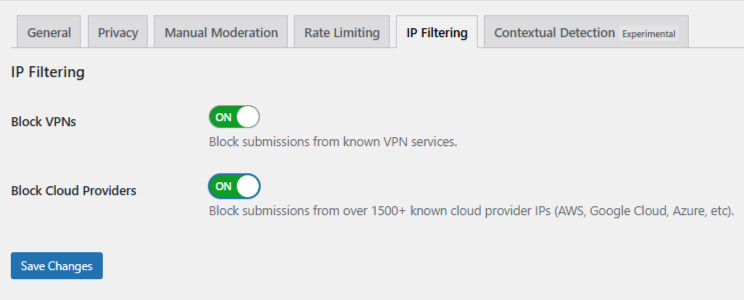
Click the IP Filtering tab. You will see two options:
- Block Cloud Providers – Blocks signups from data centers and hosting services. Recommended for most sites.
- Block VPNs – Blocks signups through VPN services. Consider your audience before enabling this.
Enable the filters that match your needs and save changes.
Handling Targeted Manual Spam
Some spam is not automated. Human spammers use rotating IPs and craft messages that look legitimate. For these cases, oopspam provides Manual Moderation tools.
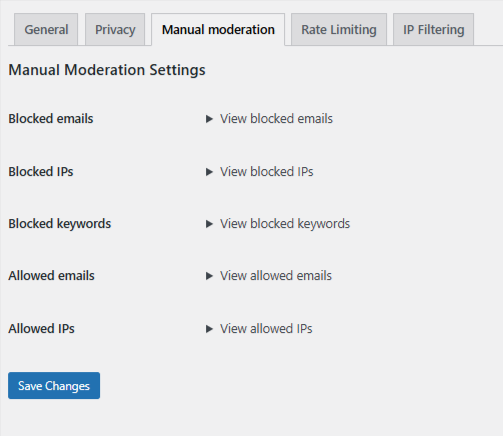
You can:
- Block individual IP addresses from repeat spammers
- Block specific email addresses or domains
- Block messages containing certain keywords
- Whitelist trusted IPs or emails to prevent false positives
This gives you control over edge cases without blocking entire networks.
Method 2: Using Cloudflare Security Rules
If you use Cloudflare, you can block unwanted traffic before it reaches WordPress. This happens at the network level and reduces server load.
Keep in mind: Cloudflare rules apply to your entire site, not just MC4WP forms.
Understanding ASN-Based Blocking
Cloudflare lets you filter traffic by ASN (Autonomous System Number). Every major network operator has an ASN identifier.
For example: Amazon AWS uses ASN 16509
When you block an ASN, you block all traffic from that network.
Step-by-Step: Create an ASN Blocking Rule
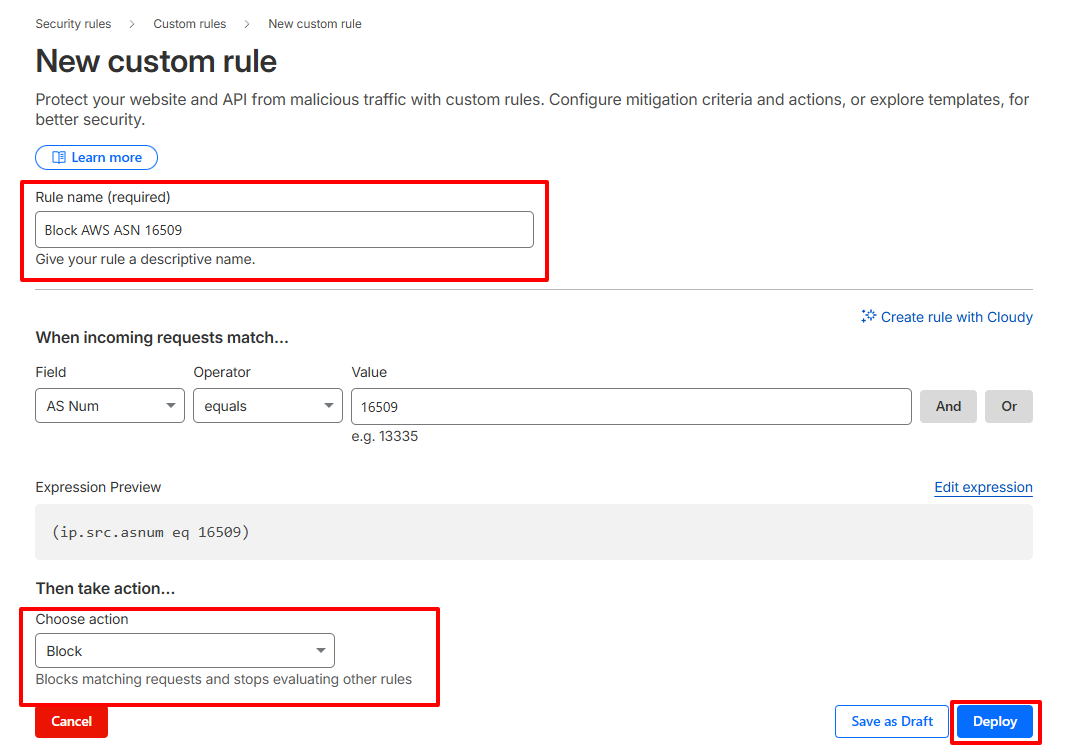
- Log in to your Cloudflare account
- Select the website you want to protect
- Navigate to Security → Security Rules → Custom Rules
- Click Create Rule
- Set the field to AS Num and enter the ASN. Example:
(ip.geoip.asnum eq 16509) - Select an action:
-
- Managed Challenge – Best for testing (shows a verification challenge)
- Block – Use when you are confident about the rule
- Give your rule a clear name and deploy
When to Use This Method
Cloudflare ASN blocking makes sense when:
- You face persistent, high-volume spam from specific networks
- Form-level filtering is not catching all abuse
- You have experience with network security and understand the trade-offs
Warning: Blocking entire ASNs can prevent legitimate users from accessing your site. This includes employees on corporate VPNs, users of privacy services, and businesses hosted in the cloud.
Final Takeaway
MC4WP: Mailchimp for WordPress handles the connection to Mailchimp efficiently, but it was not built to fight infrastructure-based spam. For complete protection:
- Use oopspam for targeted form-level filtering without affecting site access
- Add Cloudflare rules only when you need network-wide protection against serious attacks
Together, these methods keep your Mailchimp lists clean and your subscriber data trustworthy.
