
Chazie Baniquid
Technical Content Marketer
5 minutes to read
How to Block VPN and Data Center IP Submissions in Ultimate Member?
Ultimate Member does not natively block VPN or data center traffic. If spam registrations are coming from cloud infrastructure or anonymized networks, you must add a third-party filtering layer. The most reliable options are form-level IP filtering with oopspam and network-level blocking with Cloudflare.
This guide explains both methods, when to use each one, and how to configure them safely for Ultimate Member sites.
Why VPN And Data Center Spam Bypasses Ultimate Member
Ultimate Member includes basic anti-abuse protections such as honeypots, nonces, and optional CAPTCHA challenges. These help against simple bots, but they do not identify where traffic originates.
VPNs, proxies, and cloud servers introduce three problems:
- IPs rotate frequently
- Requests look human and pass CAPTCHA
- Traffic originates from large hosting networks, not residential ISPs
Because Ultimate Member has no IP reputation system, these submissions are treated as valid users unless an external control stops them.
Blocking these sources reduces automated abuse, but it must be done carefully to avoid false positives.
Method 1: Automatically Block VPN And Cloud IPs Using oopspam
oopspam (that’s us 👋) is a WordPress anti-spam plugin that integrates directly with Ultimate Member. It evaluates submissions in real time using a continuously updated threat database.
Unlike CAPTCHA or honeypots, oopspam analyzes network characteristics. This includes:
- IP ranges from over 1,500 cloud infrastructure providers
- Known VPN and proxy networks
- Reputation and abuse signals updated continuously
Filtering happens before Ultimate Member processes the registration, which keeps fake accounts out of your database.
Step 1: Install the oopspam Plugin

Log in to your WordPress dashboard, go to Plugins → Add New, search for oopspam Anti-Spam, and install and activate the plugin.

After activation, create a free account in the oopspam dashboard and copy your API key.
Step 2: Connect Your API Key

Go to Settings → oopspam Anti-Spam, open the General tab, select oopspam Dashboard as the source, and paste your API key into the My API Key field.
Once Ultimate Member is detected, its protection options will become available automatically.
Step 3: Enable Protection for Ultimate Member
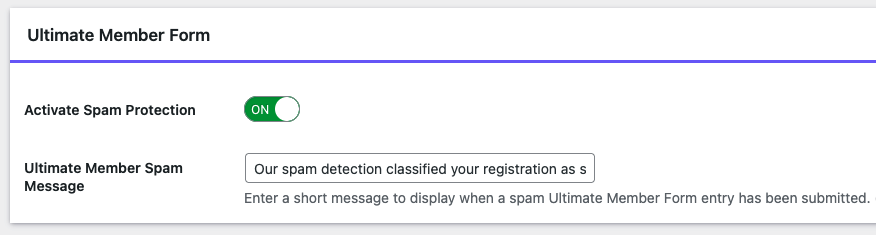
Turn ON the Activate Spam Protection option and confirm that Ultimate Member forms are listed and enabled. No changes are required inside Ultimate Member itself.
Step 4: Enable VPN And Cloud IP Blocking
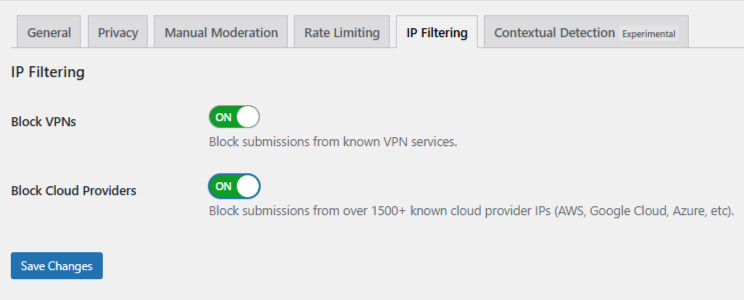
Open the IP Filtering tab and enable the following options:
- Block Cloud Providers (strongly recommended). Blocks bot traffic from hosting networks.
- Block VPNs (use with caution). Blocks VPN traffic but may affect real users.
Click Save Changes. From this point forward, spam traffic is filtered automatically in the background.
Using Manual Moderation When Spam Is Targeted
Manual moderation helps when abuse is persistent but limited and does not justify blocking entire networks. oopspam includes a Manual Moderation section for these cases.
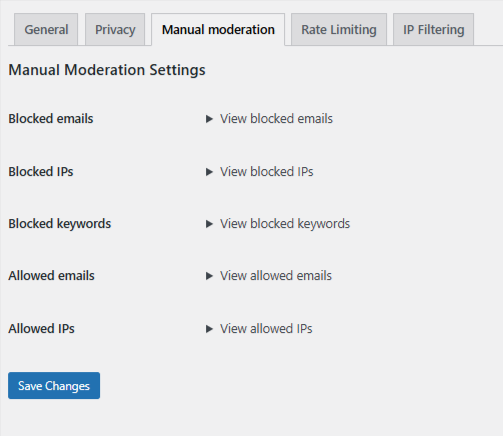
Manual moderation allows you to:
- Block specific IP addresses tied to repeat abuse
- Block email addresses used by known offenders
- Block keywords or phrases that consistently appear in spam
- Allow trusted IPs or email addresses so they are never filtered
This approach is effective when spam is targeted and predictable but does not warrant network-wide blocking.
Method 2: Block VPN And Cloud Traffic Using Cloudflare
Cloudflare blocks abusive traffic at the network edge, before it ever reaches WordPress.
Cloudflare rules apply to your entire website, not just Ultimate Member forms. If scoped incorrectly, they can block legitimate users.
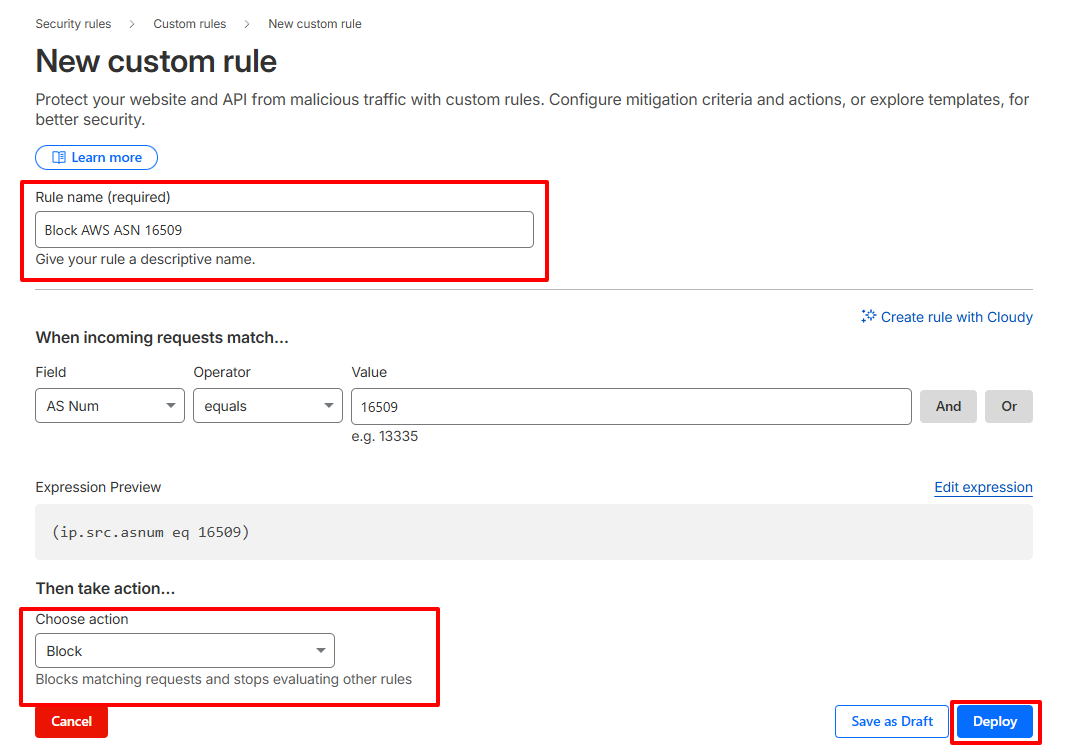
Step-By-Step: Create A Cloudflare ASN Rule
- Log in to your Cloudflare dashboard
- Select your website
- Go to Security → Security Rules → Custom Rules
- Click Create Rule
- Match traffic by AS Num. Example for Amazon AWS:
(ip.src.asnum eq 16509) - Choose an action:
-
-
Managed Challenge (recommended starting point)
-
Block (use only when confident)
-
- Name the rule clearly and deploy it
When Network-Level Blocking Makes Sense
Use Cloudflare ASN rules only when:
- You are seeing high-volume infrastructure-based attacks
- Spam persists even after form-level filtering
- You understand the risk of blocking corporate or privacy-focused users
For most Ultimate Member sites, Cloudflare should supplement, not replace, form-level filtering.
Final Takeaway
VPN and data center spam is no longer optional to address. Ultimate Member alone cannot detect it.
oopspam provides the safest and most precise solution because it filters traffic at the form level and integrates directly with Ultimate Member. Cloudflare adds an extra layer when attacks escalate.
Block selectively. Monitor results. Escalate only when necessary. That balance keeps your Ultimate Member community clean without locking out real users.
