
Chazie Baniquid
Technical Content Marketer
5 minutes to read
How to Block VPN and Data Center IP Submissions in Beaver Builder Contact Form?
Beaver Builder Contact Form does not include VPN or data center IP blocking. To stop modern spam, you must add a third-party layer. The two most effective options are oopspam (form-level) and Cloudflare Security Rules (network-level).
If you are seeing fake leads, junk messages, or automated submissions that bypass CAPTCHA, this guide shows exactly how to fix it.
Why Beaver Builder Contact Form Gets Hit by VPN and Cloud Spam
Beaver Builder Contact Form supports basic validation and reCAPTCHA, but it does not check IP reputation. It cannot tell whether a submission comes from:
- A real residential user
- A VPN or proxy
- A cloud data center (AWS, Google Cloud, Azure, DigitalOcean)
Modern spam relies heavily on cloud infrastructure and rotating IPs. CAPTCHA alone is no longer enough.
That is why IP-based filtering must happen outside the form itself.
The Two Ways to Block VPN and Data Center Traffic
You have two practical options. They solve the problem at different layers.
- Method 1: Block spam inside WordPress using oopspam
- Method 2: Block traffic earlier using Cloudflare security rules
You can use either method alone, or both together for stronger protection.
Method 1: Using oopspam Anti-Spam
oopspam (that’s us 👋) integrates directly with WordPress and filters submissions before they reach your inbox or database. It uses a real-time threat database that includes:
- Known VPN and proxy networks
- IP ranges from over 1,500+ cloud infrastructure providers
- Continuously updated reputation signals
This means it blocks both known and emerging abuse patterns.
Step-by-Step: Enable oopspam for Beaver Builder Contact Form

Step 1: Install the Plugin
Start by logging in to your WordPress dashboard. Go to Plugins, then Add New, and search for oopspam Anti-Spam. Install the plugin and activate it once the installation is complete.
Step 2: Get and Connect Your API Key
Next, create a free account in the oopspam dashboard and copy your API key.

Return to your WordPress dashboard, navigate to Settings → oopspam Anti-Spam, and paste the API key into the My API Key field.

Step 3: Activate Protection for Beaver Builder
After connecting the API key, open the General tab in the oopspam settings and make sure Activate Spam Protection is turned on.
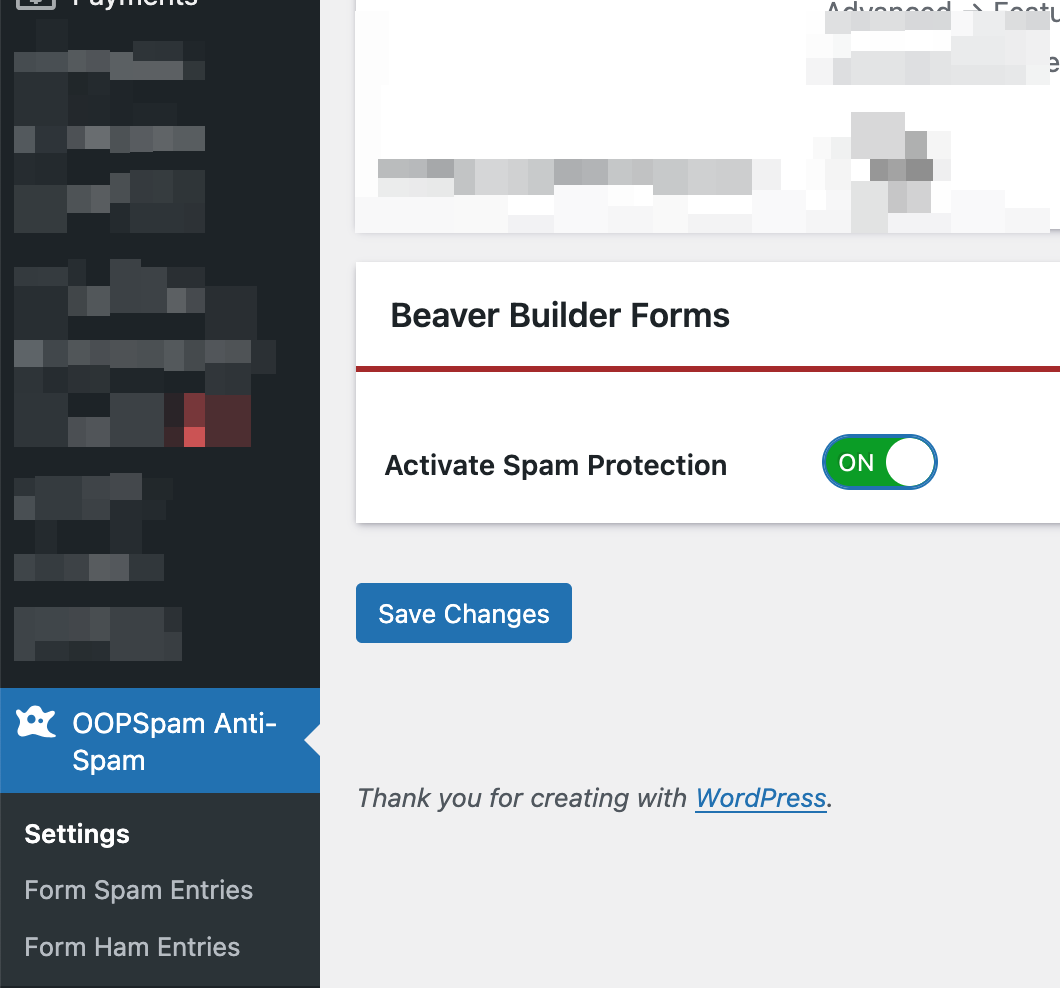
Once the plugin detects the Beaver Builder Contact Form, the form-specific protection options will automatically become available.
Step 4: Enable IP Filtering
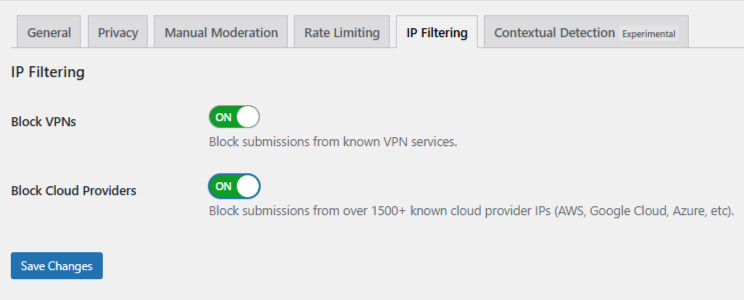
Go to the IP Filtering tab and enable:
- Block Cloud Providers. Strongly recommended. This stops most bot-driven spam.
- Block VPNs. Use with caution if your audience relies on privacy tools.
Click Save Changes. No changes are required inside Beaver Builder itself.
Using Manual Moderation When Spam Is Targeted
Not all spam is fully automated. Some submissions are slow, repetitive, and written to appear legitimate. These often rotate IPs and bypass simple rules. oopspam includes a Manual Moderation section for these cases.
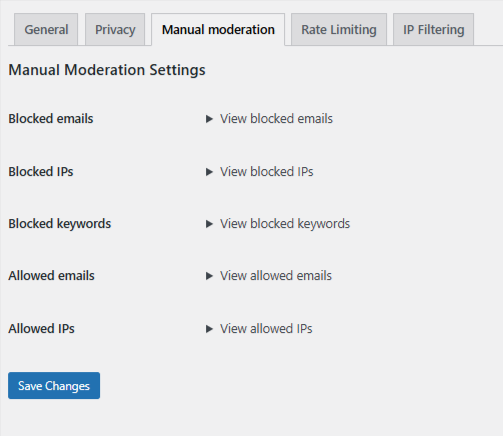
Manual moderation allows you to:
- Block specific IP addresses tied to repeat abuse
- Block known spam email addresses
- Block keywords or phrases that consistently appear in junk messages
- Allow trusted IPs or emails so they are never filtered
This approach is effective when spam is targeted but does not justify blocking entire networks.
Method 2: Blocking VPN and Cloud Traffic Using Cloudflare Security Rules
If your site already runs on Cloudflare, you can block VPN and cloud traffic even earlier. This reduces server load and stops attacks upstream.
Important: Cloudflare rules are not form-specific unless scoped carefully.
How Cloudflare ASN Blocking Works
Cloudflare allows you to match traffic by ASN (Autonomous System Number). Each major cloud provider operates known ASNs.
Example: Amazon AWS → ASN 16509
Blocking an ASN blocks traffic from that entire network.
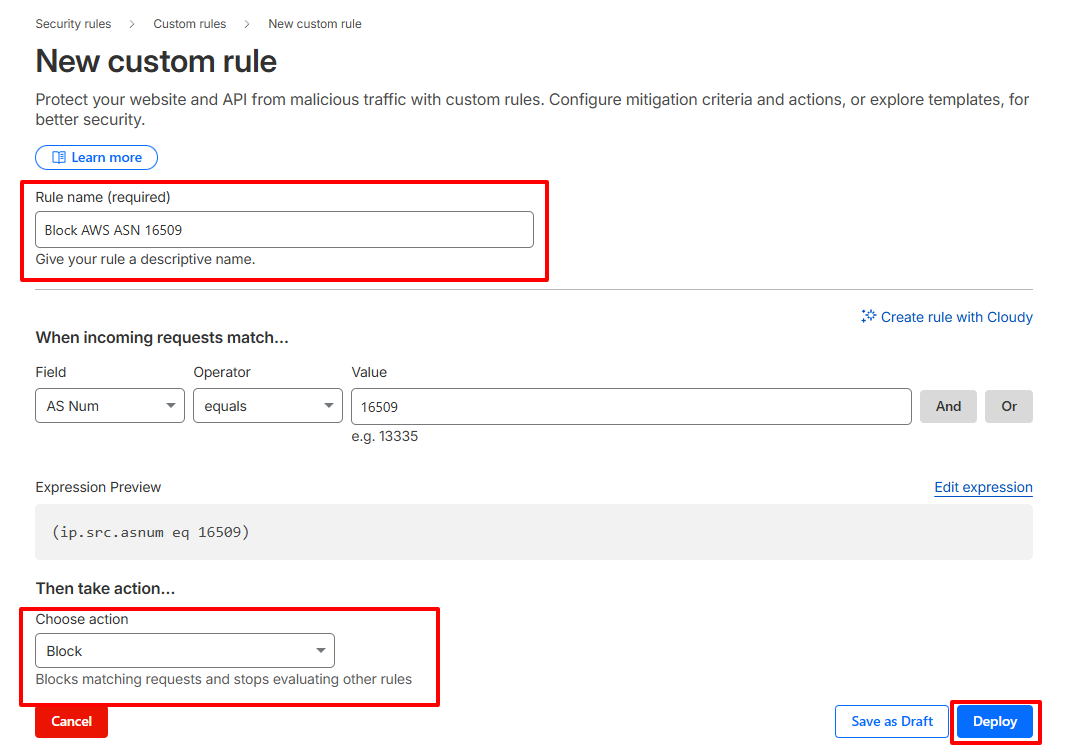
Step-by-Step: Create a Cloudflare ASN Rule
- Log in to your Cloudflare dashboard
- Select your website
- Go to Security → Security Rules → Custom Rules
- Click Create Rule
- Set the condition to match AS Num. Example:
(ip.src.asnum eq 16509) - Choose an action:
-
- Managed Challenge (recommended starting point)
- Block (use only when confident)
- Name the rule clearly and deploy it
When This Method Makes Sense
Cloudflare ASN blocking is effective when:
- You are seeing high-volume, infrastructure-based attacks
- Spam persists even after form-level filtering
- You understand the risk of blocking legitimate users on hosted networks
Warning: This method can block real users on corporate networks or privacy-focused VPNs if applied broadly.
Final Takeaway
Beaver Builder Contact Form is clean and fast, but it was not designed to fight modern infrastructure-based spam on its own.
If you want reliable protection:
- Use oopspam to block VPN and cloud IPs at the form level
- Use Cloudflare rules only when you need network-wide control
That combination keeps your inbox clean without breaking legitimate submissions.
