
Chazie Baniquid
Technical Content Marketer
4 minutes to read
How to Block VPN and Data Center IP Submissions in MailPoet?

Spam signups from VPNs, proxies, and cloud servers weaken MailPoet lists. They inflate subscriber counts, reduce engagement, and hurt sender reputation. These submissions often look legitimate and pass basic form checks.
MailPoet is built for email delivery, not traffic analysis. It does not identify VPNs or cloud infrastructure. Blocking this type of spam requires a third-party filter that evaluates submissions in real time, before MailPoet saves the subscriber.
What VPN and Data Center IP Spam Looks Like in MailPoet
Most MailPoet spam comes from rotating networks, not a single IP. VPNs, proxies, Tor exit nodes, and cloud providers constantly change IP addresses, making rate limits and CAPTCHA ineffective.
MailPoet treats this traffic as normal users due to limited network visibility. Over time, lists grow while engagement drops, and email providers begin trusting your domain less.
Method 1: Automatically Block VPN and Cloud IPs Using oopspam
oopspam (that’s us 👋) is a form-focused anti-spam solution that evaluates each submission in real time. It connects your WordPress forms to a continuously updated threat database that identifies VPNs, proxies, Tor networks, and cloud infrastructure.
Spam is filtered before MailPoet saves the subscriber.
How to Enable oopspam for MailPoet
Install and activate oopspam Anti-Spam from the WordPress plugin repository.

Create an account at oopspam.com and generate an API key.

Then open Settings → oopspam Anti-Spam in WordPress and paste your key.

Ensure Activate Spam Protection is turned ON for MailPoet. Once MailPoet is detected, protection becomes available automatically.
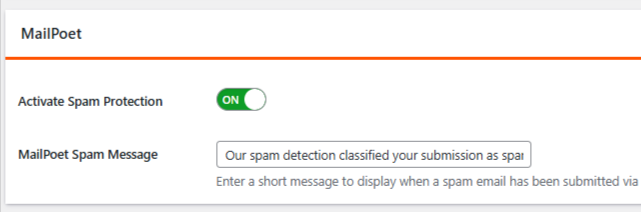
Enable IP Filtering (Critical Step)
This is the step that blocks VPN and cloud traffic.
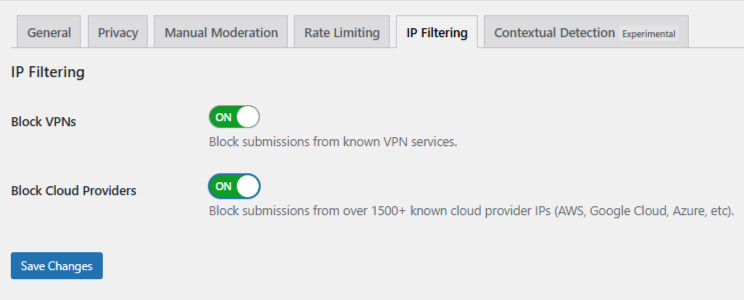
Open the IP Filtering tab inside oopspam settings
- Enable Block Cloud Providers (strongly recommended)
- Enable Block VPNs only if your audience does not rely heavily on privacy tools
Save changes.
From this point forward, oopspam filters submissions automatically in the background. No additional MailPoet configuration is required.
Using Manual Moderation When Spam Is Targeted
Not all spam is automated. Some abuse is slow, repetitive, and intentionally written to appear legitimate. These submissions often rotate IPs and avoid obvious spam keywords.
oopspam includes a Manual Moderation section for these cases.
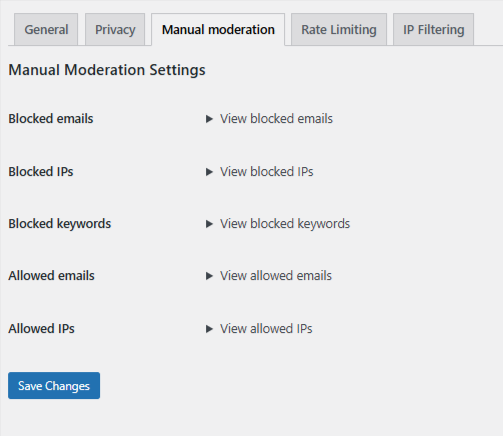
Manual moderation allows you to:
- Block specific IP addresses or email addresses tied to repeat abuse
- Block keywords or phrases that consistently appear in spam
- Allow trusted IPs or email addresses so they are never filtered
This approach is effective when spam is persistent but limited and does not justify blocking entire networks.
Method 2: Block VPN and Cloud Traffic Using Cloudflare Security Rules
If your site runs on Cloudflare, you can block VPN and cloud traffic at the network edge using ASN-based rules. An ASN represents a network operator, such as a cloud provider.
For example, Amazon Web Services uses ASN 16509.
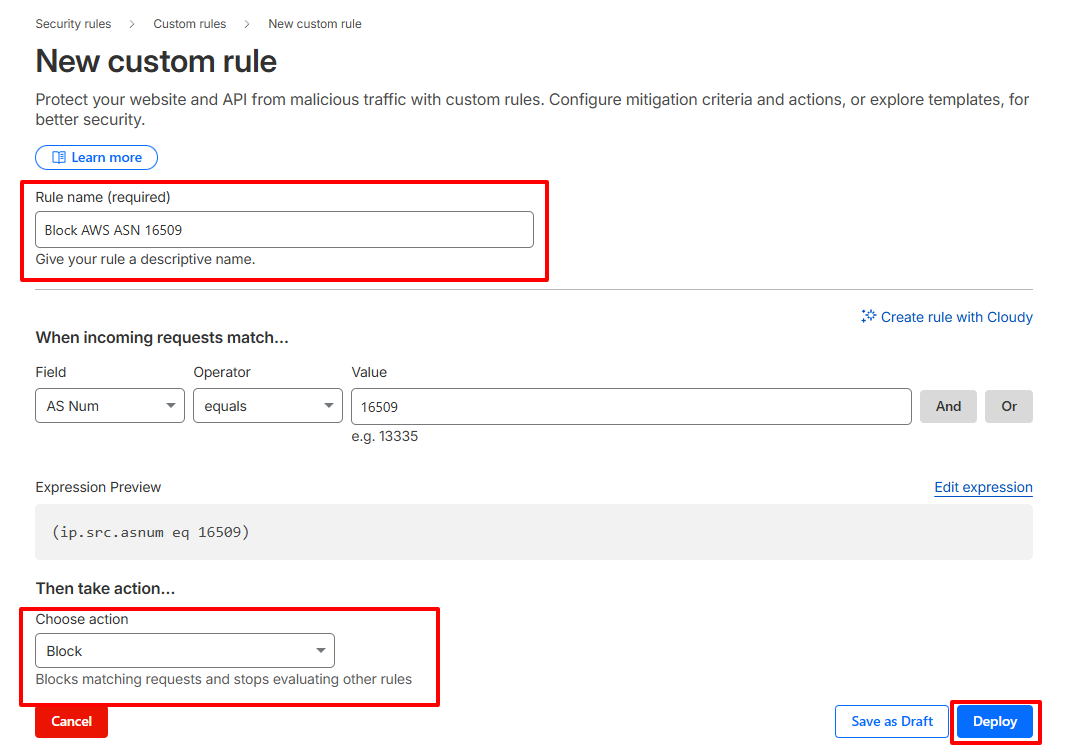
How to Create a Cloudflare ASN Rule
- Log in to your Cloudflare dashboard and select your website
- Go to Security → Security Rules → Custom rules
- Create a new rule and match traffic by AS Num
- Use an expression such as
(ip.src.asnum eq 16509) - Choose Managed Challenge as a starting action. Use Block only when confident
- Name the rule clearly and deploy it
Cloudflare rules apply to your entire site. They are not limited to MailPoet forms. This can block corporate users, privacy-focused visitors, and legitimate automation. This method should be used only when attacks are severe or persistent.
Final Recommendation
MailPoet alone cannot block VPN or data center IP spam. To protect your list, submissions must be filtered before they are saved. oopspam provides precise, MailPoet-safe protection at the form level. Cloudflare offers network-level control when attacks escalate.
Clean lists protect deliverability and early filtering saves time. Blocking spam before it enters MailPoet is always easier than removing it later.
