
Chazie Baniquid
Technical Content Marketer
5 minutes to read
3 Ways to Protect Your Forminator from Spam
Forminator includes several built-in spam protection tools, and you can strengthen them further with CAPTCHA services and external filtering tools. The most effective approach is to use layered protection, combining Forminator’s native security features with external spam detection services.
The following methods provide practical ways to reduce spam submissions in Forminator forms.
1. Enable Built-in Forminator Security Features
Forminator already includes basic protection tools that can stop many automated bots before they reach your inbox.
Enable Honeypot Protection
Honeypot protection is one of the simplest and most effective defenses against automated spam bots.

You can enable it inside the form builder:
Forminator → Edit Form → Behavior → Security → Enable Honeypot Protection
This feature adds a hidden field to the form that real users cannot see. Many automated bots attempt to fill every form field, including hidden ones. When that hidden field is filled, Forminator identifies the submission as spam and blocks it.
Because honeypots run silently in the background, they do not affect user experience.
AJAX Form Loading Consideration
Forminator includes an option called: Load form using AJAX

This loads forms asynchronously after the page loads.
While AJAX improves page performance, some website owners disable it when troubleshooting spam because certain bot scripts target AJAX endpoints directly.
If you are experiencing unusual spam activity, testing the form with AJAX disabled can sometimes reduce automated submissions.
However, this depends on the site setup and is not always necessary.
2. Add CAPTCHA or Turnstile Protection
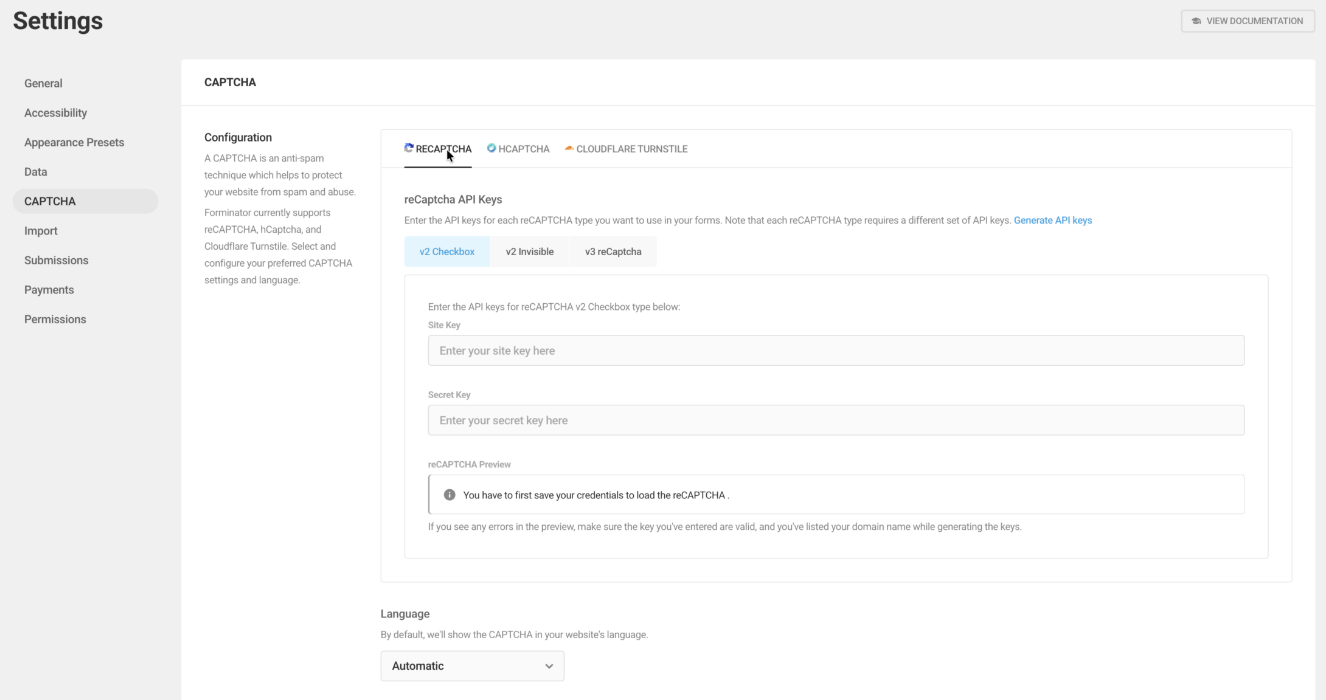
For stronger protection, Forminator supports several CAPTCHA providers.
You can configure these in: Forminator → Settings → CAPTCHA
Supported providers include:
- Google reCAPTCHA
- hCaptcha
- Cloudflare Turnstile
Once configured, you can add the CAPTCHA field inside any form.
Google reCAPTCHA
Google reCAPTCHA is one of the most widely used spam prevention tools.
Forminator supports:
- reCAPTCHA v2 Checkbox – Users confirm “I’m not a robot.”
- reCAPTCHA v2 Invisible – Runs in the background unless suspicious activity is detected.
- reCAPTCHA v3 – Assigns a risk score without showing a challenge.
It is a strong first layer of protection for most websites.
hCaptcha
hCaptcha works similarly to reCAPTCHA but focuses more on privacy and user control.
Forminator supports:
- hCaptcha Checkbox
- hCaptcha Invisible
Some website owners prefer hCaptcha because it offers a privacy-friendly alternative to Google services.
Cloudflare Turnstile
Cloudflare Turnstile is a modern CAPTCHA alternative designed to minimize friction for real users.
Unlike traditional CAPTCHA systems, Turnstile often works without requiring users to solve puzzles.
3. Add Advanced Spam Filtering with OOPSpam
For websites that receive frequent spam submissions, a dedicated spam filtering service can provide stronger protection.
OOPSpam (that’s us 👋) is an API-based spam detection system that analyzes submissions before they reach your inbox.
Instead of relying only on CAPTCHA, it evaluates signals such as:
- message content
- IP reputation
- behavioral patterns
- known spam fingerprints
This helps detect more advanced spam attempts.
Steps to Add OOPSpam to WordPress
Step 1: Install the Plugin

In your WordPress dashboard go to: Plugins → Add New. Search for: OOPSpam Anti-Spam. Install and activate the plugin.
Step 2: Get Your API Key

Create an account on the OOPSpam website. After logging in, go to your dashboard and copy your API key. This key connects your website to the OOPSpam spam detection system.
Step 3: Add the API Key in WordPress
Return to your WordPress dashboard and navigate to: Settings → OOPSpam Anti-Spam

Paste your API key into the API key field and save the settings.
Step 4: Enable Protection for Forminator
Inside the OOPSpam settings page: Enable Activate Spam Protection for Forminator.
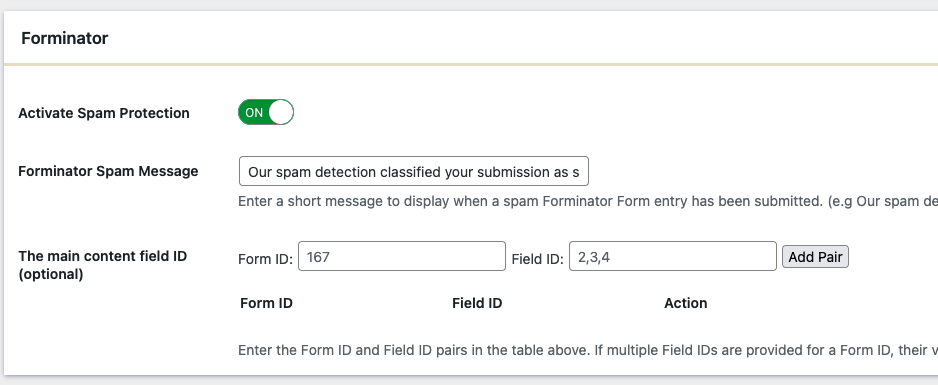
Once enabled, OOPSpam will automatically monitor submissions coming from Forminator forms.
No additional configuration is required in the Forminator builder.
Optional OOPSpam Advanced Filters
For stronger protection, OOPSpam also provides additional filtering options such as:
- Rate limiting to block repeated submissions from the same IP
- VPN, proxy, and TOR blocking
- Country allow or deny lists
- Language filtering
- Disposable email detection
- Contextual spam detection
- Spam logs for monitoring attempts
For example, contextual spam detection analyzes the wording of a message to determine whether it resembles known spam patterns.
These advanced filters are especially useful for:
- lead generation forms
- support forms
- high-traffic websites
Final Thoughts
No single tool can eliminate spam completely. The most effective strategy is combining multiple protections.
A recommended setup for most Forminator websites includes:
- Honeypot enabled
- CAPTCHA or Turnstile enabled
- OOPSpam filtering
This layered approach helps block both basic bots and more sophisticated spam attempts while keeping forms usable for real visitors.
