How to Block VPN and Data Center IP Submissions in FluentCart Forms

Technical Content Marketer

Reviewed by Onar Alili
Co-founder & Engineer
Published 7 min read
FluentCart does not block VPN or data center IPs on its own. The fastest fix is the oopspam Anti-Spam plugin. Install it, turn on FluentCart protection, then enable Block VPNs and Block Cloud Providers under the IP Filtering tab. For a manual, network-level option, create Cloudflare WAF custom rules that block hosting provider ASNs and Tor traffic.
Why VPN and Data Center IPs Are a Problem in FluentCart
FluentCart is a self-hosted eCommerce plugin for WordPress from the WPManageNinja team. Every order and every failed attempt hits your own server and database. Bots cost you hosting resources, gateway fees, and chargebacks.
Most automated abuse comes from two sources:
- Data centers and cloud providers. Bots run on servers at AWS, Google Cloud, DigitalOcean, Linode, Hetzner, and similar hosts. Real shoppers rarely buy from a server.
- VPNs, proxies, and Tor. Fraudsters use these to hide their location and rotate identities between attempts.
The biggest threat is card testing. Fraudsters run stolen card numbers through small checkouts to find the ones that work. These scripts rely heavily on infrastructure IPs.
FluentCart already includes Cloudflare Turnstile, Stripe 3D Secure, and duplicate-order protection. These stop simple bots. They do not check where an IP comes from. A fresh data center IP with no spam history passes straight through. Blocking by IP origin closes that gap.
Not sure where a suspicious IP comes from? Paste it into IP Reputation Check to see if it belongs to a VPN or data center.
Method 1: Block VPN and Cloud IPs with oopspam
The oopspam Anti-Spam plugin supports FluentCart natively. It screens every order in the background, with no CAPTCHA and no changes to your checkout. Its IP database covers known VPN and proxy ranges and thousands of data center networks, and it updates automatically.
Step 1: Install the Plugin
In your WordPress dashboard, go to Plugins > Add New. Search for oopspam Anti-Spam, then install and activate it.
Step 2: Add Your API Key
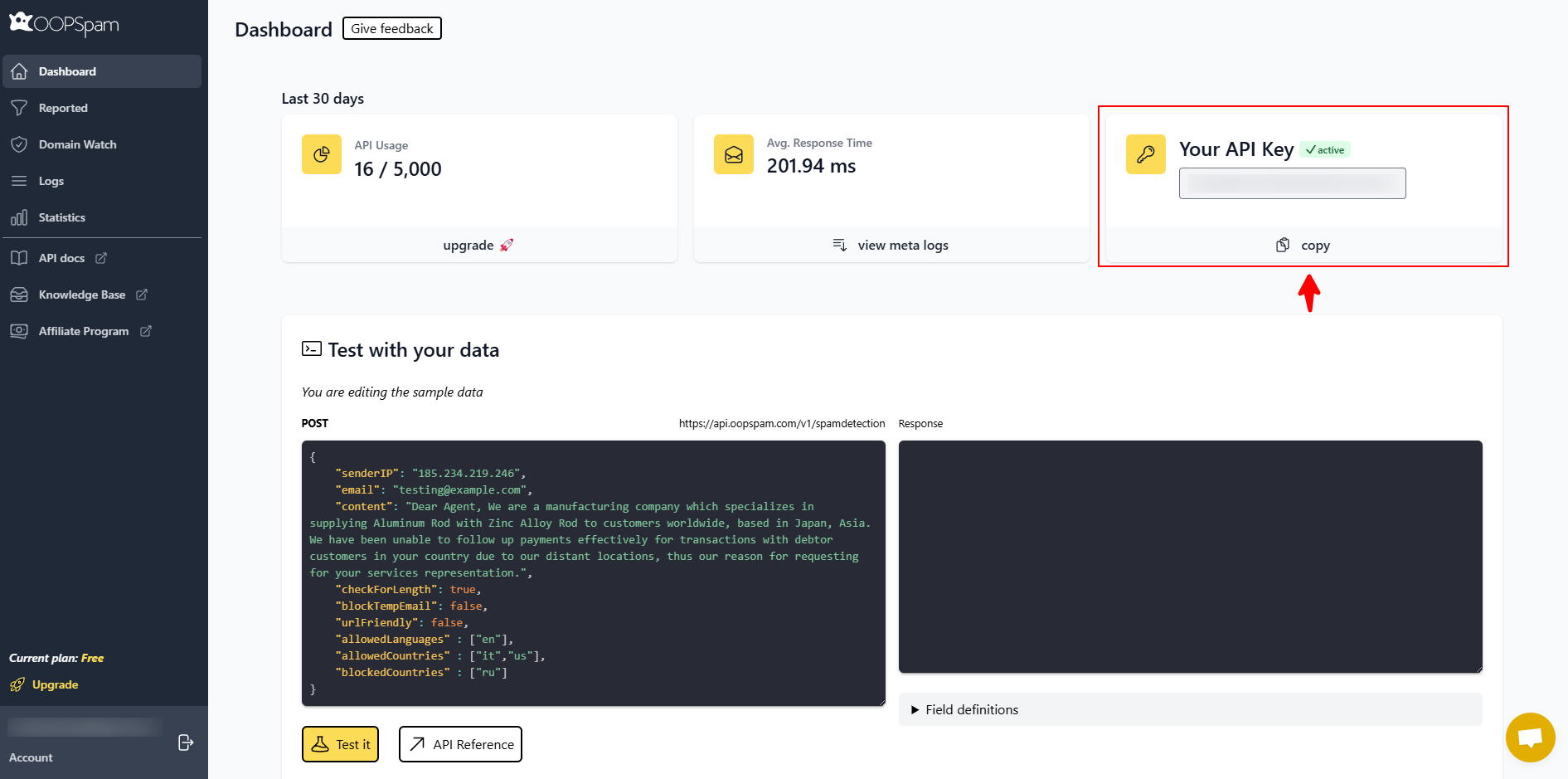
Create a free account on the oopspam Dashboard and copy your API key.
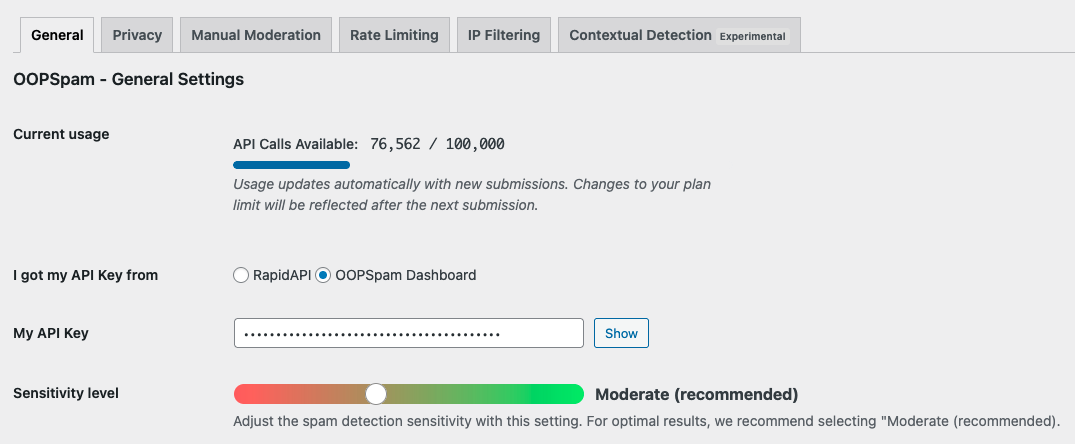
In WordPress, go to Settings > oopspam Anti-Spam. Under the General tab, select oopspam Dashboard as the source and paste your key into the My API Key field.
Step 3: Activate FluentCart Protection
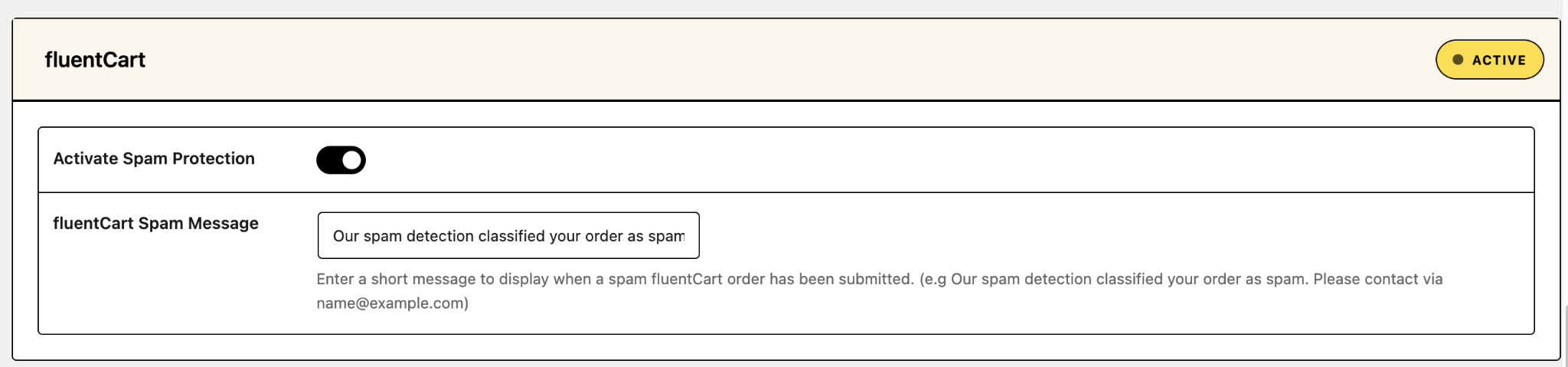
Scroll to the FluentCart section and turn on Activate Spam Protection. You can also set a custom message for blocked buyers.
Step 4: Enable IP Filtering
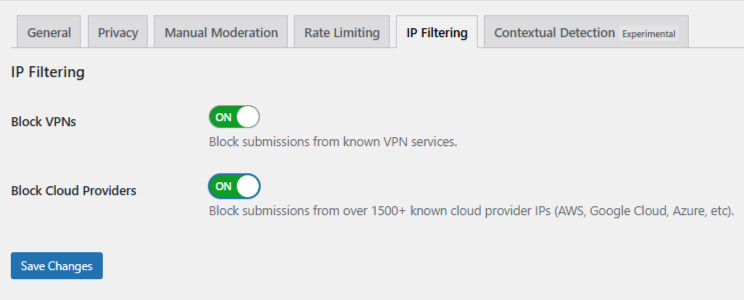
Open the IP Filtering tab. You will see two toggles:
- Block Cloud Providers: Blocks orders from hosting platforms and data centers. This is the safer, high-impact setting. Turn it on.
- Block VPNs: Blocks orders from commercial VPNs, proxies, and Tor. Use it with care, since some real buyers use personal VPNs for privacy.
Click Save Changes. oopspam now filters FluentCart orders automatically.
Step 5: Add Extra Layers (Optional)
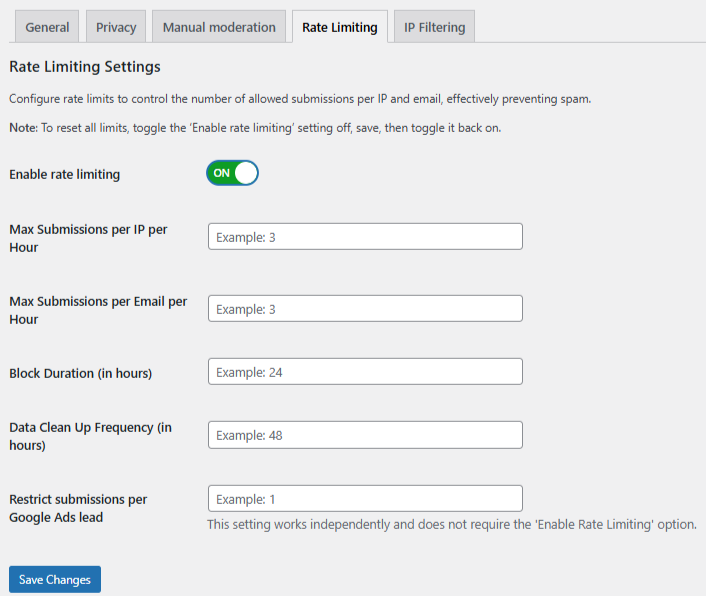
Card testers often combine tactics. Two more oopspam settings help:
- Rate Limiting: Cap checkout attempts per IP or email within a set time window. This stops rapid-fire card testing.
- Country Blocking: Reject orders from countries you do not sell or ship to.
Method 2: Block VPN and Cloud IPs with Cloudflare Firewall
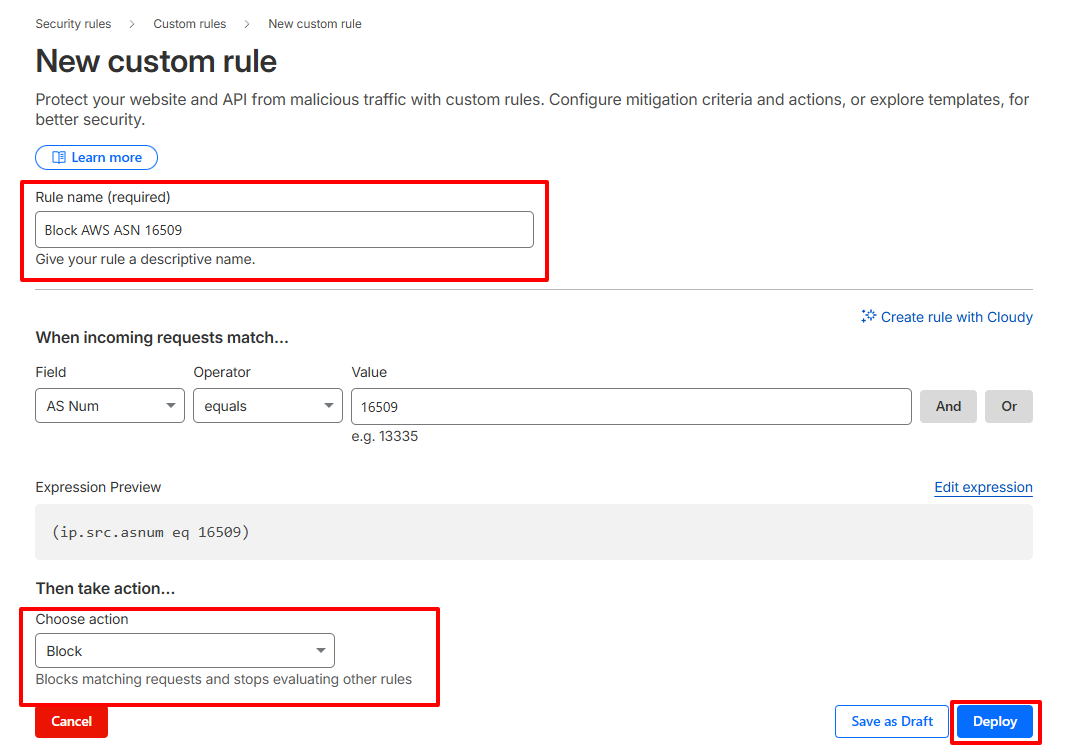
If your store runs behind Cloudflare, you can block traffic at the network edge before it reaches WordPress. You do this with WAF custom rules that target ASNs (Autonomous System Numbers). An ASN identifies the network that owns an IP range, such as a cloud host.
How to Set It Up
- In the Cloudflare dashboard, go to Security > Security Rules > Custom rules and click Create rule.
- Name the rule, for example “Block hosting providers on checkout.”
- Click Edit expression and add the ASNs you want to block. Example:
(ip.src.asnum in {14061 16509 14618 396982 63949 24940 16276 20473})
or (ip.src.country eq "T1")
This covers DigitalOcean (14061), AWS (16509, 14618), Google Cloud (396982), Linode/Akamai (63949), Hetzner (24940), OVH (16276), and Vultr (20473). The country code T1 is Cloudflare’s label for Tor exit nodes.
- To protect only your store, scope the rule to your checkout. Add a condition such as
and http.request.uri.path contains "/checkout". Check your browser’s network tab to confirm which URL FluentCart sends order requests to, and include it. - Choose an action. Block stops the request. Managed Challenge filters bots while letting most humans through. Managed Challenge is the safer choice for checkout pages.
- Click Deploy.
Limitations
- Manual upkeep. Hosting networks change. You must track and update ASNs yourself.
- No commercial VPN coverage. Most VPN providers rent space across many networks. ASN rules miss much of that traffic.
- Rule limits. Cloudflare’s Free plan allows only five custom rules.
- False positives. Some legitimate businesses route traffic through cloud servers.
This method suits developers and teams with time to maintain rules. It works best alongside oopspam, not instead of it. Cloudflare cuts server load. oopspam handles order-level checks, like email reputation, that a firewall cannot see.
oopspam vs Cloudflare: Quick Comparison
| oopspam | Cloudflare | |
|---|---|---|
| Setup time | About 5 minutes | 15 to 30 minutes |
| Maintenance | Automatic | Manual ASN updates |
| VPN detection | Yes | Tor only (T1) |
| Data center blocking | Yes, thousands of networks | Only ASNs you add |
| Checks email reputation | Yes | No |
| Requires Cloudflare | No | Yes |
Balance Security with Real Buyers
- Start with Block Cloud Providers. It carries the lowest risk.
- Enable Block VPNs only if fake orders continue. Privacy-focused buyers and remote workers may use VPNs.
- Review your logs weekly. oopspam logs blocked entries in WordPress. Release any false positives and adjust settings.
- Watch your payment dashboard. A spike in small declined charges is the clearest sign of card testing.
Final Thoughts
Fake FluentCart orders cost money, server resources, and customer trust. Most of them come from VPNs and data centers. Blocking those sources stops a large share of card testing before it reaches your payment gateway.
oopspam is the simplest fix: two toggles and no rule maintenance. Cloudflare adds a strong network-level layer for technical teams. Use one, or use both for full coverage.