
Chazie Baniquid
Technical Content Marketer
4 minutes to read
How to Block VPN and Data Center IP Submissions in Formidable Forms
Formidable Forms does not have a built-in way to block VPN or data center IP submissions. If you want to stop this type of spam reliably, you must add a third-party layer. The two options are OOPSpam and Cloudflare Security Rules. This guide shows you exactly how to use both, step by step, with Formidable Forms in mind.
Why VPN and Data Center Spam Gets Through Formidable Forms
Formidable Forms is for building and managing forms. It supports validation, conditional logic, and custom hooks. What it does not do is classify incoming IP addresses.
Formidable Forms cannot tell whether a submission comes from:
- A VPN exit node
- A cloud provider like AWS or Google Cloud
- A proxy or hosting network
That type of detection requires constantly updated IP databases and reputation scoring. Without that data, Formidable Forms can only block IPs you already know.
This is why VPN-based and data center spam keeps getting through.
Method 1: Automatically Block VPN and Cloud IPs in Formidable Forms With OOPSpam
OOPSpam Anti-Spam (that’s us 👋) integrates with Formidable Forms and evaluates each submission before it is saved. It checks the IP against known VPN networks, cloud providers, and proxy infrastructure.
Spam is filtered before it reaches your Formidable entries.
Why OOPSpam Works Well With Formidable Forms
It solves the exact gap Formidable Forms has. OOPSpam uses:
- IPs from thousands of cloud infrastructure providers
- Known VPN and proxy networks
- Continuously updated threat signals
- Reputation-based scoring
This means it blocks both known and emerging spam sources. You do not need to maintain IP lists manually.
Step-by-Step: Enable VPN and Data Center Blocking With OOPSpam

Step 1: Install the plugin
Go to WordPress Dashboard → Plugins → Add New and search for OOPSpam Anti-Spam. Install and activate the plugin.
Step 2: Get your API key

Create an account on the OOPSpam website and generate an API key from the dashboard.
Step 3: Connect OOPSpam to WordPress

Go to OOPSpam Anti-Spam → Settings. In the General tab, paste your API key and click Save Changes.
Step 4: Enable Formidable Forms protection
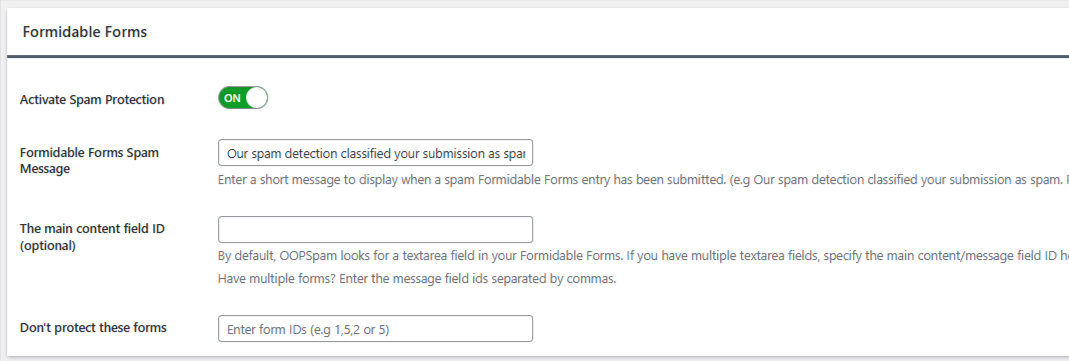
Stay in the General tab and scroll to the Formidable Forms section. Turn ON spam protection for Formidable Forms.
Step 5: Enable IP filtering
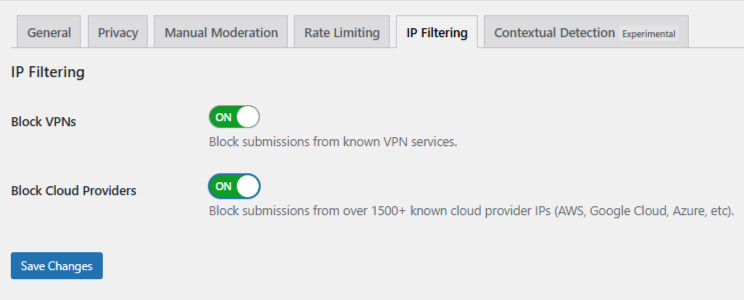
Open the IP Filtering tab and turn ON:
- Block VPNs - Use this with caution if your users commonly use VPNs.
- Block Cloud Providers - This is strongly recommended. Most automated spam comes from data centers.
Click Save Changes.
Once enabled, Formidable Forms submissions from VPNs and cloud providers are blocked automatically.
Optional: Use OOPSpam Manual Moderation for Extra Control
Some spam is persistent but not fully automated. Manual moderation gives you precision without turning off automation.
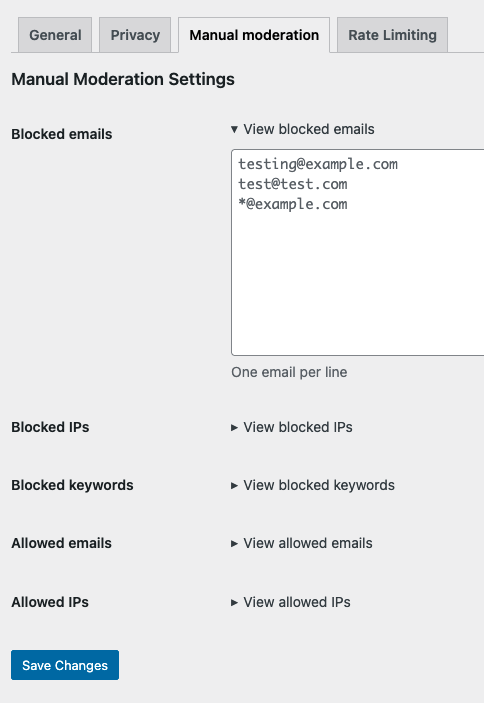
In OOPSpam → Manual Moderation, you can:
- Block specific IP addresses
- Block email addresses used repeatedly for spam
- Block keywords that appear in abusive submissions
- Allow safe IPs or email addresses to prevent false positives
This is useful when you want control over borderline submissions without affecting normal users.
Method 2: Block VPN and Cloud Traffic With Cloudflare Security Rules
If your site uses Cloudflare, you can block VPN and data center traffic at the network level. This stops requests before WordPress loads.
Warning: This method is powerful, but aggressive. Cloudflare rules affect your entire website. They do not apply only to forms.
Step-by-Step: Create a Cloudflare Security Rule
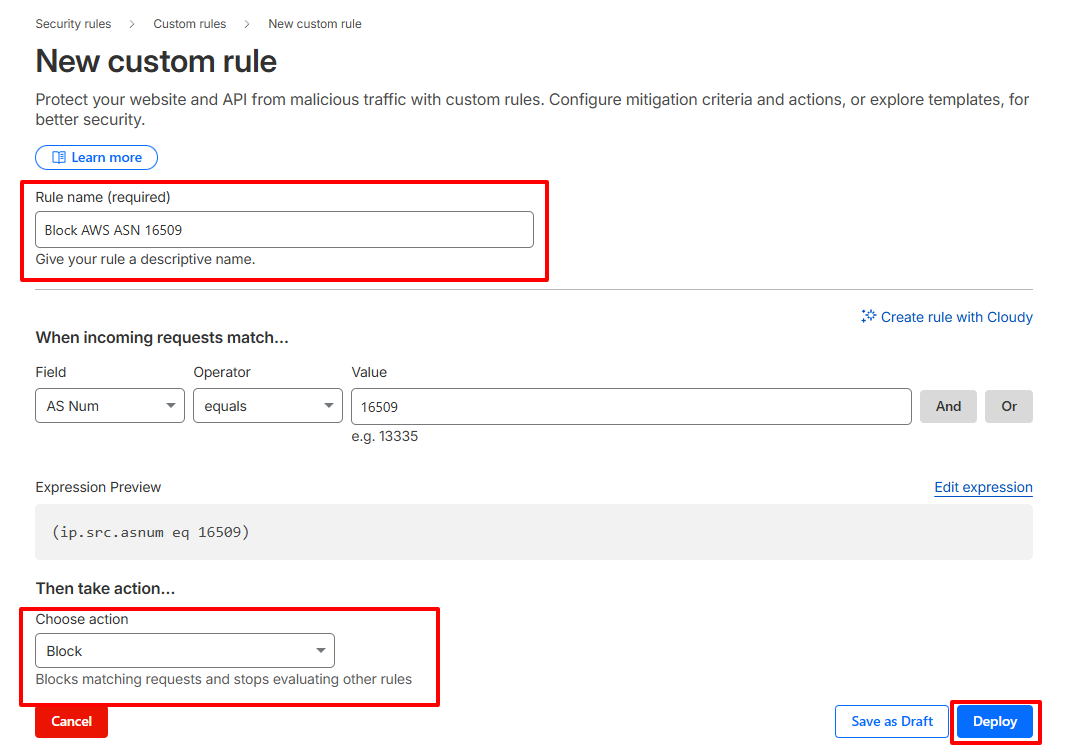
You block traffic by cloud provider ASN.
- Log in to your Cloudflare dashboard
- Select your website
- Go to Security → Security Rules
- Create a new Custom Rule
- Match traffic by ASN
Example for AWS: (ip.src.asnum eq 16509)
- Choose an action:
-
-
Block to stop traffic completely
-
Managed Challenge to reduce false positives
-
- Name the rule clearly
- Deploy the rule
You can repeat this process for other cloud providers if needed.
Final Takeaway
Blocking VPN and data center spam in Formidable Forms requires an extra layer. For most Formidable Forms users, OOPSpam Anti-Spam is the fastest and safest solution. Cloudflare is a strong complement when used carefully.
