
Chazie Baniquid
Technical Content Marketer
5 minutes to read
How to Block VPN and Data Center IP Submissions in HappyForms

HappyForms cannot block VPN or data center IP submissions on its own. To stop this type of spam, you must use a third-party anti-spam plugin like OOPSpam or configure Cloudflare security rules.
Spam submissions today are not simple bots. Most form abuse now comes from VPNs, cloud infrastructure, and automated systems designed to look like real users. This is why many HappyForms users still see spam even with honeypots or CAPTCHA enabled.
This guide explains two reliable ways to block VPN and data center IP traffic in HappyForms, step by step.
Why VPN and Data Center Traffic Causes Spam
VPN and data center IPs are widely used for spam because they are easy to rotate and hard to trace. Attackers rely on cloud providers such as AWS, Google Cloud, and Azure to automate form submissions at scale.
These submissions often:
- Pass basic validation
- Fill required fields correctly
- Submit at realistic speeds
Without network-level detection, HappyForms cannot tell these submissions apart from real users.
Method 1: Block VPN and Data Center IPs Using OOPSpam
OOPSpam Anti-Spam (that’s us 👋) adds VPN, proxy, TOR, and cloud IP detection directly to HappyForms. OOPSpam integrates with HappyForms and filters spam before submissions are stored.
Full integration requires HappyForms Pro.
This method is recommended because it works at the form level, avoids user friction, and provides detailed control.
Step-by-Step: Enable OOPSpam for HappyForms

Step 1: Install the Plugin
Install and activate the OOPSpam Anti-Spam plugin from the WordPress Plugin Repository.
Step 2: Create an OOPSpam Account

Create an account in the OOPSpam dashboard and generate your API key.
Step 3: Connect the API Key

Go to OOPSpam → General Settings, paste your API key, and save.
Step 4: Enable HappyForms Protection
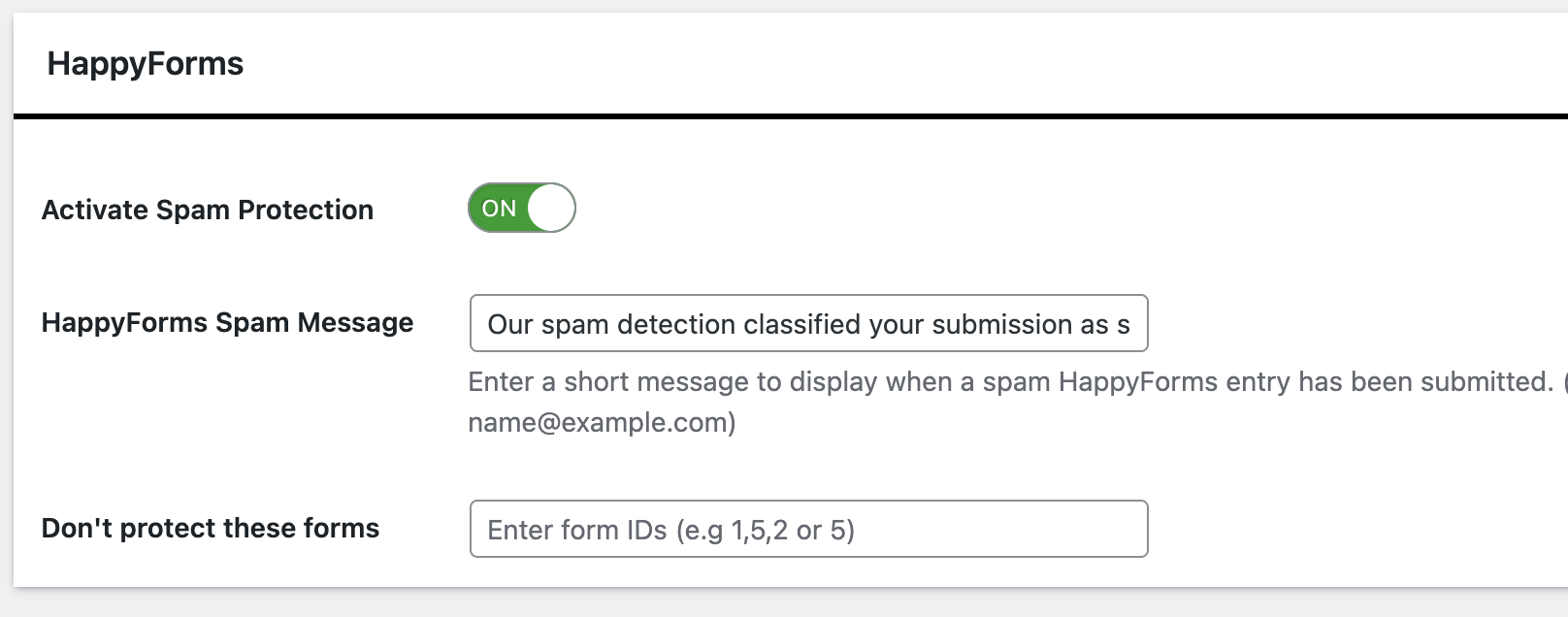
Under General Settings tab, turn on Activate Spam Protection and confirm HappyForms is enabled.
Step 5: Enable IP Filtering
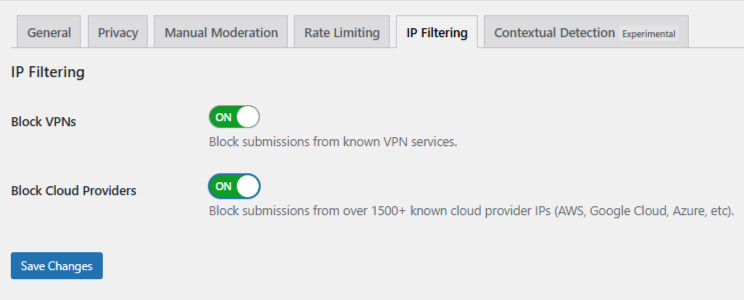
Open the IP Filtering tab and enable:
- Block VPNs - Use with caution if you expect privacy-conscious users.
- Block Cloud Providers - Strongly recommended to stop automated spam.
Save your changes. No configuration inside HappyForms is required.
Step 6 (Optional): Use Manual Moderation for Extra Control
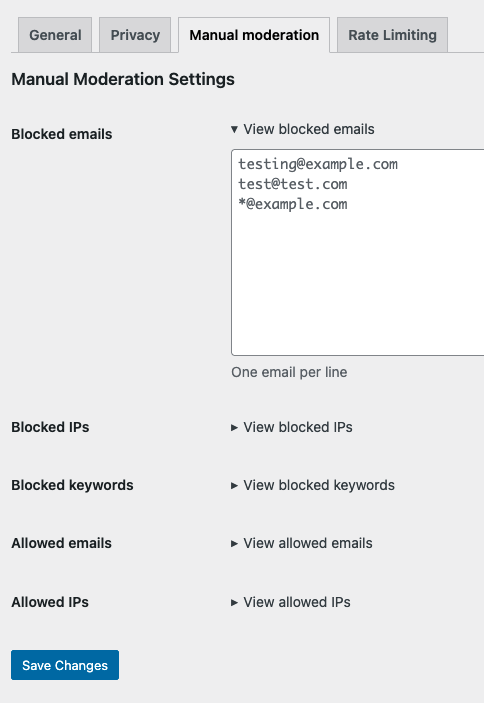
Manual moderation gives you precise control over repeat or borderline abuse.
In OOPSpam → Manual Moderation, you can:
- Block specific IP addresses or full IP ranges - This is useful for stopping a known abusive cloud provider or hosting network.
- Block email addresses - Prevent repeat offenders from submitting forms again.
- Block keywords - Stop common spam phrases or abusive patterns.
- Allow safe IPs or email addresses - Ensure trusted users are never blocked.
This option is especially useful when spam is persistent but not fully automated.
What Happens After OOPSpam Is Enabled
Once enabled, submissions from VPNs and cloud infrastructure are filtered automatically. Spam never reaches your HappyForms entries or inbox. You can review blocked submissions in the OOPSpam logs if needed.
For most HappyForms users, this method offers the best balance between security and usability.
Method 2: Block VPN and Data Center IPs Using Cloudflare
If your site runs through Cloudflare, you can use security rules to block known VPN and data center traffic at the network level. This prevents spam traffic from ever reaching HappyForms.
This method applies to your entire site, not just forms.
Step-by-Step: Create a Cloudflare Security Rule
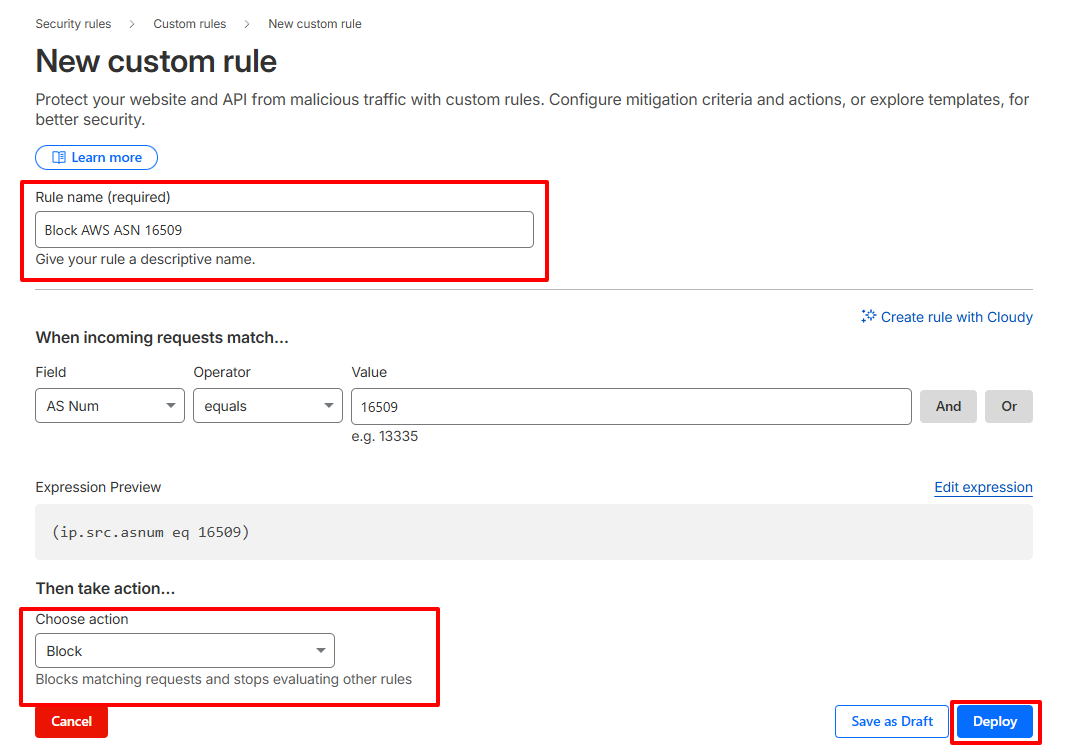
- Log in to your Cloudflare dashboard and select your website.
- Go to Security → Security Rules and create a new custom rule.
Set the rule to match traffic by ASN.
Example for AWS: (ip.src.asnum eq 16509)
- Choose an action:
-
- Block to stop traffic completely
- Managed Challenge to reduce false positives
- Name the rule clearly and deploy it.
You can repeat this process for other cloud providers if needed.
Important Cloudflare Considerations
ASN blocking is effective but aggressive. Some legitimate users may appear to come from cloud infrastructure, including corporate networks and remote teams.
Because of this, Cloudflare rules should be monitored closely and used carefully. For many sites, Cloudflare works best when combined with form-level filtering rather than used alone.
Final Thoughts
HappyForms is a reliable form builder, but it cannot block VPN or data center spam on its own. If you want fewer fake leads, cleaner submissions, and less time wasted reviewing spam, you need external protection.
For most HappyForms users, OOPSpam is the simplest and safest solution. Cloudflare adds another layer when traffic volume or abuse becomes severe. Use the right tool for the right layer, and your forms will stay clean.
