
Chazie Baniquid
Technical Content Marketer
5 minutes to read
How to Limit Form Submissions in Beaver Builder Contact Form
Beaver Builder’s Contact Form does not support submission limits. To control spam, abuse, and repeated entries, you must add a third-party solution.
The most reliable options are OOPSpam for rate limiting and advanced form plugins like Gravity Forms for hard entry caps. If you are receiving too many submissions, fake messages, or bot abuse, this guide shows the exact fixes that work.
Why Beaver Builder Contact Forms Get Spam
Beaver Builder focuses on layout and performance. Its Contact Form module is meant for basic contact requests, not advanced form logic. Out of the box, the form:
- Sends email notifications
- Displays a success message or redirect
- Supports CAPTCHA
What it does not do is limit how often someone can submit the form.
There is no way to cap submissions by IP, email address, or user. There is also no way to block repeated attempts over time. This makes the form an easy target for bots and automated abuse.
When spam starts arriving, the problem is not Beaver Builder itself. The problem is the missing protection layer.
Option 1: Use OOPSpam for Rate Limiting and Spam Control
OOPSpam (that’s us 👋) integrates directly with Beaver Builder Contact Forms and adds the missing protection layer. It focuses on preventing repeated abuse without adding friction for real users.
Step 1: Install and connect OOPSpam

Go to Plugins → Add New, search for OOPSpam Anti-Spam, then install and activate it.
Next, create an account at OOPSpam and copy your API key.

In WordPress, go to OOPSpam → General Settings, paste the API key, and save your changes.

Step 2: Enable protection for Beaver Builder
Once connected, activate spam protection for Beaver Builder forms. This ensures every submission is checked before it is delivered. From this point on, spam detection is active.
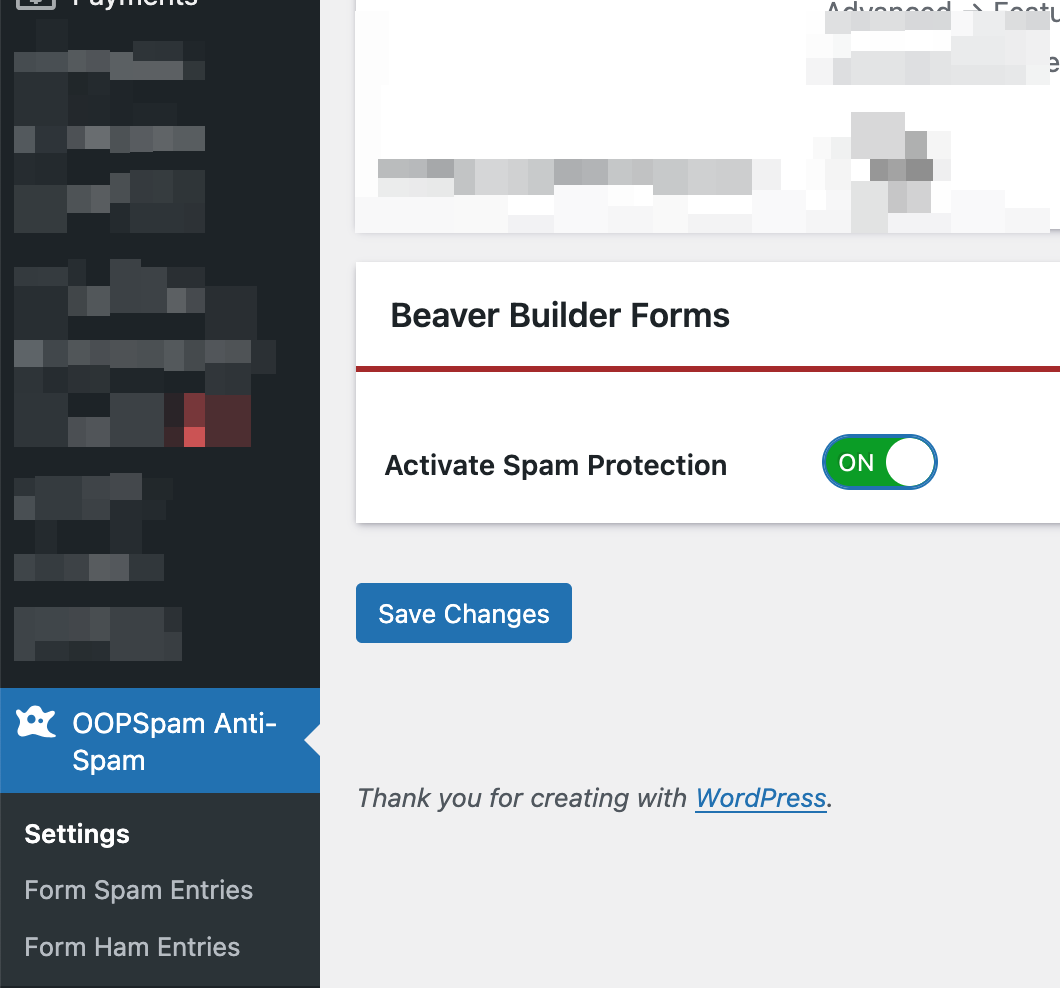
Step 3: Enable rate limiting
Open the Rate Limiting tab and toggle Enable Rate Limiting on.
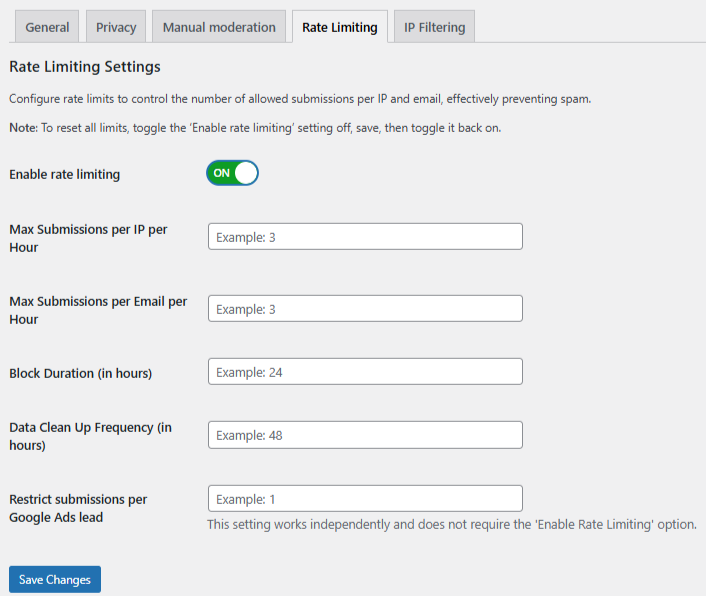
Set limits based on your traffic patterns:
- Max submissions per IP per hour – Prevents repeated automated attempts from the same source
- Max submissions per email per hour – Blocks bots reusing the same email address
- Block duration (hours) – Controls how long violators stay blocked
- Data cleanup schedule – Automatically removes old activity logs
Save your changes. These settings stop form floods without affecting normal users.
Step 4: Strengthen protection if needed
For higher-risk sites, you can enable additional filters such as:
- VPN, proxy, and TOR blocking
- Country-based filtering
- Language filtering
- Contextual spam detection
- Logs and monitoring
These options help reduce advanced spam while keeping legitimate engagement intact.
Option 2: Use a Third-Party Form Plugin for Hard Entry Limits
If your form must stop accepting entries after a certain point, Beaver Builder is not enough. This is where plugins like Gravity Forms or WPForms come in. These plugins include built-in Restrictions or Form Locker features.
They allow you to:
- Limit total form entries
- Restrict submissions per IP or cookie
- Require users to be logged in
- Schedule forms with start and end dates
- Show custom messages when limits are reached
How this works with Beaver Builder
You do not replace Beaver Builder. Instead:
- Create the form inside the form plugin
- Configure limits and restrictions
- Embed the form into your Beaver Builder page
Beaver Builder controls layout and design. The form plugin controls submission logic.
Example: Gravity Forms Built-In Restrictions
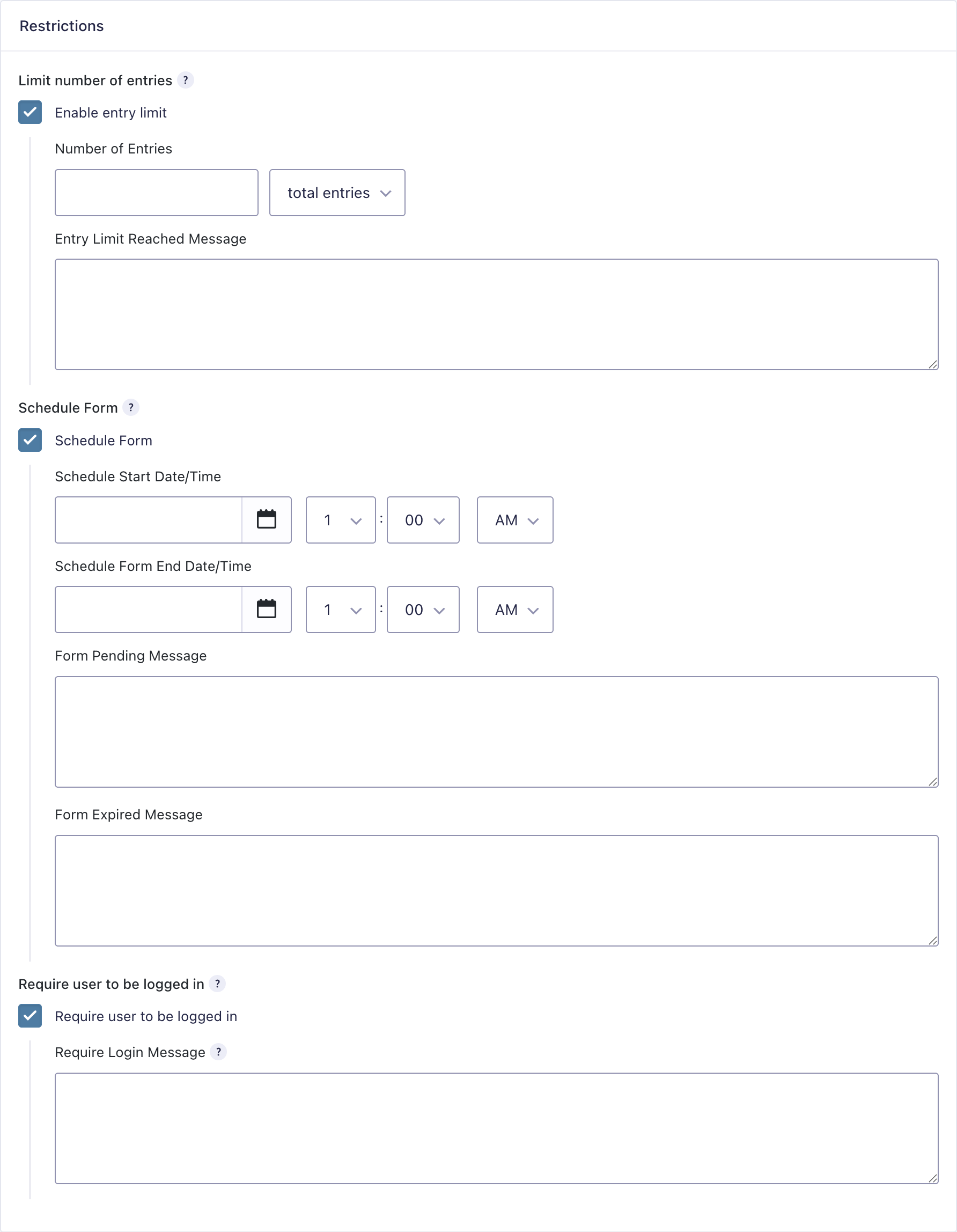
This image shows Gravity Forms’ Restrictions settings, where you control how and when a form can be submitted. These options let you:
- Limit the total number of form entries
- Set start and end dates for when the form opens and closes
- Show custom messages when the form is pending, expired, or full
- Require users to be logged in before submitting
This makes Gravity Forms useful for controlled registrations, preorders, or member-only forms. These restrictions apply only to forms created in Gravity Forms.
Final Thoughts
Beaver Builder Contact Forms are intentionally simple. They are not designed for advanced submission control.
The right solution depends on your goal. Use OOPSpam if you receive repeated spam submissions and you want protection without changing forms. Add a form plugin when you want user-based or time-based limits.
That is the correct and scalable way to limit form submissions in Beaver Builder.
