
Chazie Baniquid
Technical Content Marketer
5 minutes to read
How to Block VPN and Data Center IP Submissions in Toolset Forms?
Toolset Forms do not have a built-in way to block VPN or data center IP addresses. If spam is getting through, you must add a third-party protection layer. The accurate option is form-level filtering using oopspam. Cloudflare security rules are also effective, but they apply to your entire site and require more caution.
This guide explains why Toolset Forms are targeted, what VPN and data center spam looks like today, and how to block it using the right tools without breaking legitimate submissions.
Why Toolset Forms are targeted by modern spam
Toolset Forms are flexible and widely used. That makes them attractive to attackers.
Toolset relies on basic protections such as reCAPTCHA and form validation. These tools help stop simple bots, but they do not analyze where traffic comes from. Toolset does not know if a submission originates from a residential user, a VPN, or a cloud server.
Spam tactics have changed. Many attacks now come from cloud infrastructure and proxy networks that are designed to look legitimate. CAPTCHA alone is no longer enough.
Method 1: Form-level filtering with oopspam
oopspam (that’s us 👋) integrates directly with Toolset and evaluates each submission in real time. Instead of blocking entire networks, it checks the visitor’s IP against known VPN and cloud provider databases at the moment the form is submitted.
If a submission is flagged, it never reaches your database.
Step-by-step: Blocking VPN and cloud IPs with oopspam

Step 1: Install the plugin
Log in to your WordPress dashboard. Go to Plugins, then Add New. Search for “oopspam Anti-Spam.” Install and activate the plugin.
Step 2: Create an API key
Open the oopspam dashboard. Create an account and generate an API key. This key allows your site to access IP reputation checks.

Step 3: Connect the API key in WordPress
Go to Settings, then oopspam Anti-Spam. Paste your API key into the “My API Key” field and save your changes.

Once connected, Toolset Forms protection options become available.
Step 4: Enable protection for Toolset Forms
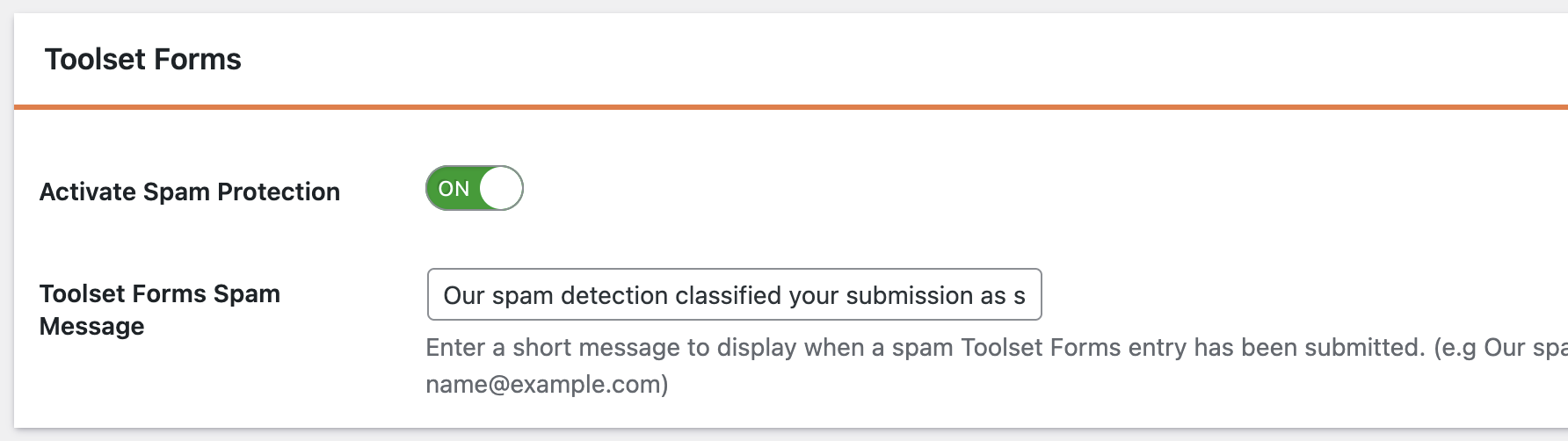
In the oopspam settings, locate the Toolset Forms section below. Turn on spam protection so submissions are checked before Toolset processes them.
Step 5: Enable IP filtering
Open the IP Filtering tab. Turn on:
- Block VPNs – Use with caution if your audience includes privacy-conscious users.
- Block Cloud Providers – Recommended to stop automated, server-based spam.
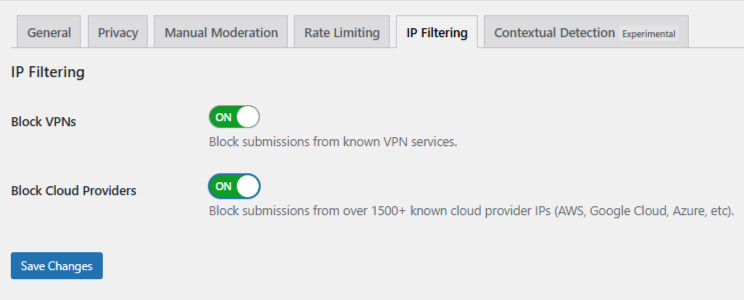
Save your changes. Filtering now runs automatically in the background.
When to be careful with VPN blocking
You may want to disable VPN blocking if your audience includes:
- International users
- Privacy-conscious visitors
- Developers or remote teams
oopspam lets you control these settings independently. Use that flexibility to avoid false positives.
Using Manual Moderation when spam is targeted
Not all spam is automated. Some abuse is slow, repetitive, and intentionally human-like. These submissions often pass CAPTCHA and IP filtering.
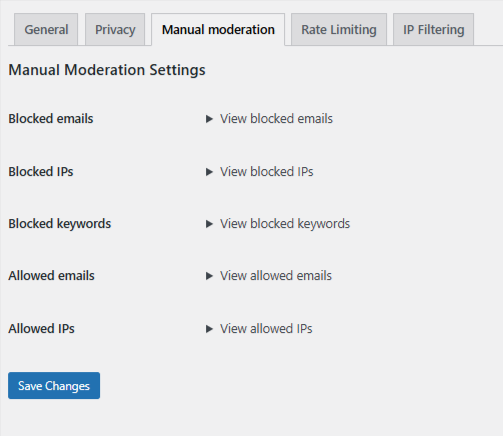
oopspam includes a Manual Moderation section for these cases. It allows you to fine-tune protection when patterns appear.
Manual Moderation lets you respond to specific behavior instead of blocking entire networks. This keeps legitimate users unaffected.
In oopspam → Manual Moderation, you can:
- Block specific IP addresses or IP ranges – Stop repeat spam from known abusive sources.
- Block email addresses – Prevent known offenders from submitting forms again.
- Block keywords or phrases – Filter messages that match common spam or abusive patterns.
- Allow safe IPs or email addresses – Ensure trusted users are never blocked.
Changes apply immediately. Toolset Forms do not need to be reconfigured.
This approach is useful when spam is persistent but does not justify aggressive blocking.
Method 2: Blocking VPN and cloud traffic with Cloudflare
If your site runs on Cloudflare, you can block VPN and data center traffic at the network edge.
Cloudflare uses ASN-based rules. An ASN identifies the organization that owns an IP range. Blocking an ASN blocks traffic from that entire network.
This method is powerful, but it is not form-specific.
How to create a Cloudflare ASN rule
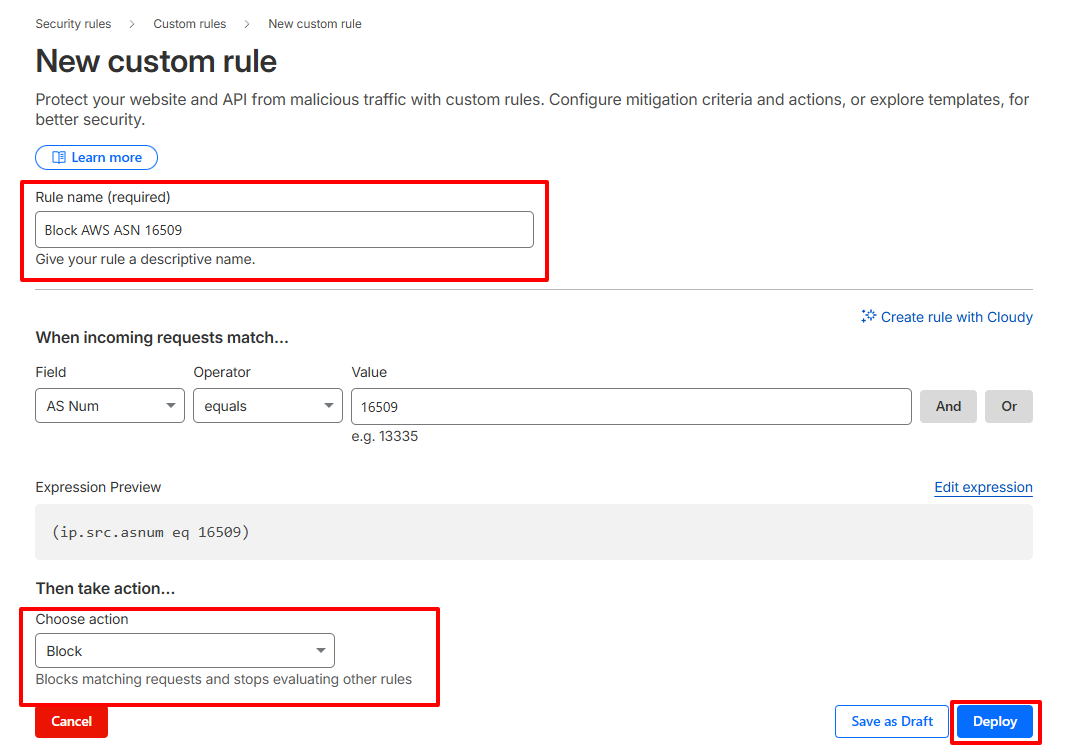
- Log in to your Cloudflare dashboard and select your website.
- Go to Security, then Security Rules, then Custom rules. Create a new rule.
- Set the condition to match traffic by AS Number. For example, Amazon AWS uses ASN 16509:
(ip.src.asnum eq 16509) - Choose an action. Start with ‘Managed Challenge’. Use ‘Block’ only when you are confident it will not affect legitimate users.
- Name the rule clearly and deploy it.
Final takeaway
Toolset Forms do not block VPN or data center IPs by default. That is expected.
If you want reliable protection, you must add the right layer in the right place. Form-level filtering with oopspam gives you control without collateral damage. Network-level blocking should be reserved for extreme cases.
This layered approach blocks modern spam without harming real users.
