How to Limit Form Submissions in GiveWP Donation Forms?

Technical Content Marketer

Reviewed by Onar Alili
Co-founder & Engineer
Published 5 min read
GiveWP donation forms are public, which makes them targets for bots and fraud. Attackers may test stolen cards, attempt large donations, or submit repeatedly. To limit submissions, use three layers: donation amount limits, Donation Goals, and rate limiting with oopspam. Together, they reduce spam and abuse while keeping forms open for real donors.
1. Set Donation Amount Limits in GiveWP
Start by controlling the donation amount inside the form settings. This prevents very small card-testing amounts and unusually large fraudulent donations.
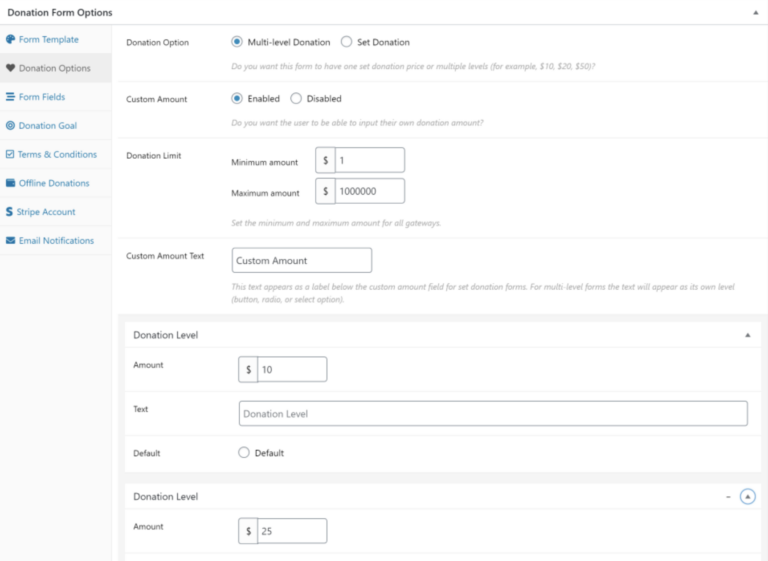
How to Set Minimum and Maximum Amounts
- Go to Donations → All Forms.
- Click Edit on the form.
- Click Donation Options in the left panel.
Under Custom Amount, make sure it is Enabled if you want donors to enter their own amount.
Scroll to Donation Limit. Set:
- Minimum amount
- Maximum amount
For example, you might set a minimum of $10 and a maximum of $5,000.
Click Update to save.
These limits apply to all payment gateways connected to the form.
How to Disable Custom Amounts
If you want full control over donation values:
- In Donation Options, set Custom Amount to Disabled.
Now donors must choose from preset Donation Levels (e.g., $10, $25, $50). This prevents extreme or suspicious entries.
Setting amount limits reduces financial abuse. To control repeated submissions, you will also need rate limiting.
2. Enable Donation Goal to Close Forms Automatically
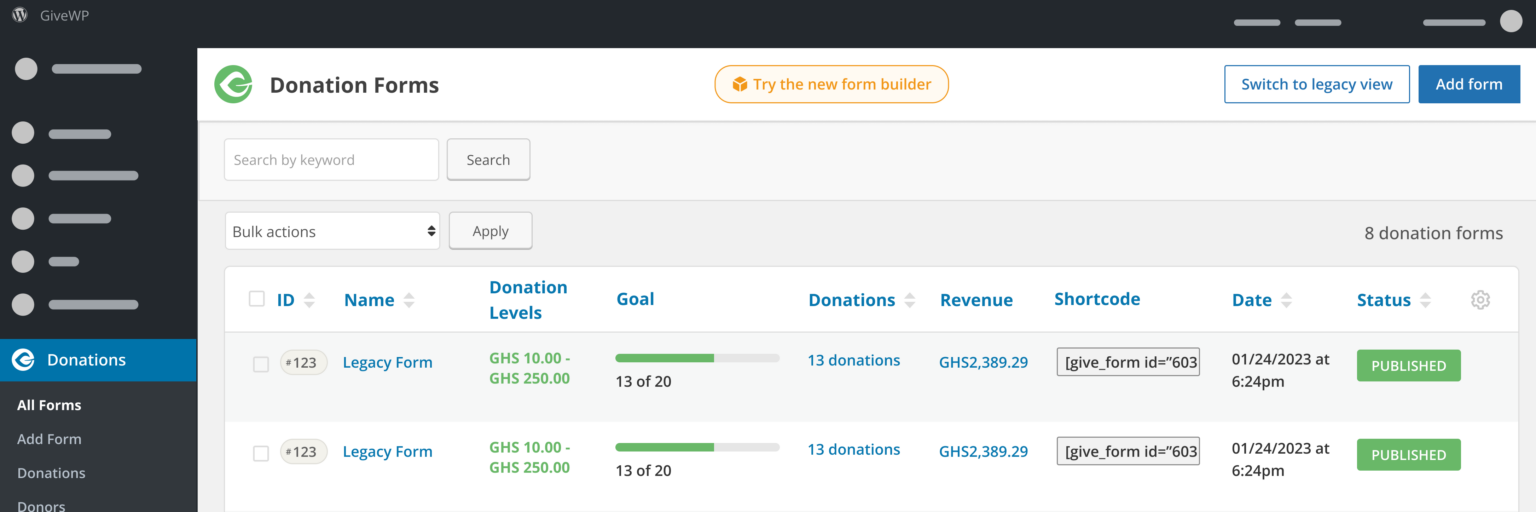
Donation Goals allow you to automatically close a form when a target is reached. This is useful for limited campaigns and event-based fundraising.
You can configure a goal based on:
- A total donation amount
- A number of donations
Once the goal is reached, the form closes automatically.
Donation Goals are ideal for campaigns with fixed targets. They control how long a form remains open, but they do not control how frequently someone can submit it.
3. Add Rate Limiting with oopspam
GiveWP does not include built-in per-IP or per-email rate limits. Without rate limiting, a bot can submit your form many times within minutes.

oopspam (that’s us 👋) adds this missing control. It checks submissions before GiveWP processes them and blocks repeated abuse automatically.
Step 1: Install oopspam
Go to Plugins → Add New. Search for oopspam Anti-Spam. Install and activate the plugin.
Create an account at oopspam.com and copy your API key.

In WordPress, open oopspam → General Settings, paste the API key, and save.

Your site is now connected to oopspam’s filtering system.
Step 2: Enable Protection for Donation Forms
In oopspam settings, enable spam protection for your forms so each submission is checked before it reaches GiveWP.
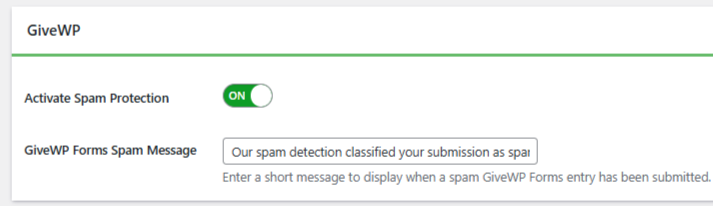
This ensures spam and abuse are filtered early.
Step 3: Turn On Rate Limiting
Open the Rate Limiting tab in oopspam and enable it.
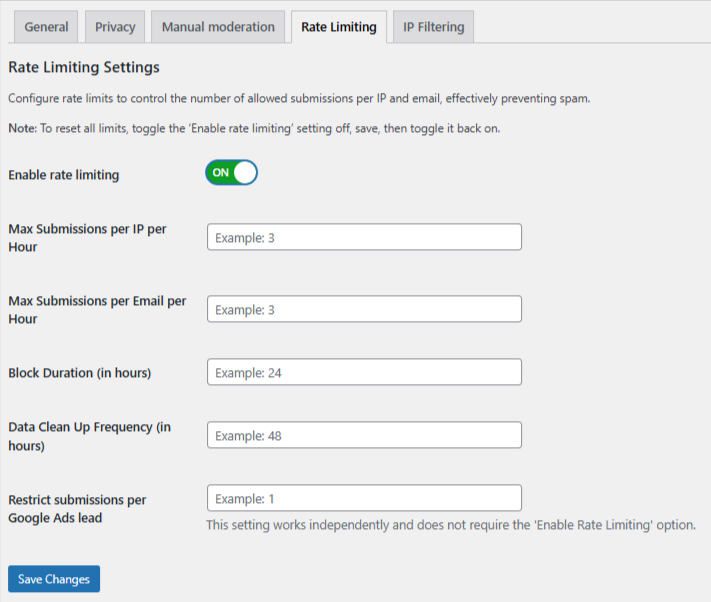
You can configure:
- Max submissions per IP per hour – Limits how many times one IP can submit in an hour.
- Max submissions per email per hour – Limits how many times one email can submit in an hour.
- Block duration – How long the IP or email stays blocked after hitting the limit.
- Data cleanup schedule – Automatically removes old logs to keep the system running smoothly.
For example, you might allow 5 submissions per IP per hour. If the limit is exceeded, that IP is temporarily blocked.
This stops rapid-fire bot activity and repeated abuse attempts.
Strengthen Protection with Advanced Filters
oopspam also provides additional controls that GiveWP does not include by default. You can enable:
- VPN, proxy, and TOR blocking
- Country allow or deny lists
- Language filtering
- Contextual spam detection
- Detailed logs for monitoring attempts
oopspam also includes manual moderation tools. From the moderation tab, you can block specific email addresses, block abusive IP addresses, block common spam keywords, and allow trusted emails or IPs to bypass spam checks when needed.
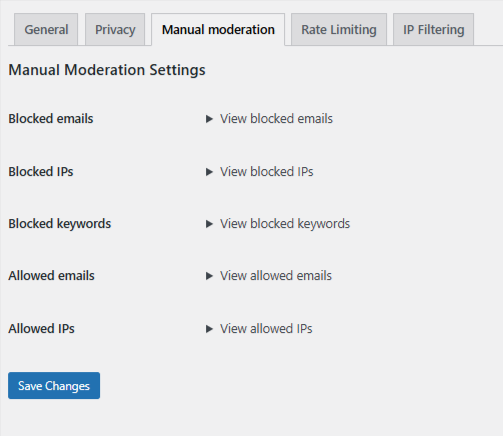
These features create layered protection. They help reduce false positives while catching more sophisticated spam behavior.
How the Three Layers Work Together
Each method addresses a different risk.
- Donation amount limits protect against financial abuse.
- Donation Goals control campaign limits and form availability.
- oopspam rate limiting protects against repeated and automated submissions.
When combined, they create a balanced and effective protection strategy for GiveWP donation forms.
Final Thoughts
Limiting form submissions in GiveWP is not complicated. You simply need the right combination of controls. With these layers in place, your GiveWP donation forms remain secure, stable, and focused on fundraising rather than fighting spam.
