
Chazie Baniquid
Technical Content Marketer
5 minutes to read
How to Block VPN and Data Center IP Submissions in ACF Frontend Forms?
Advanced Custom Fields (ACF) Frontend Forms give you flexibility to create custom forms for posts, users, and options, but they offer no built-in way to block spam from VPNs, proxies, or data center IPs.
This matters because most automated spam, lead abuse, and bot traffic now originates from:
- VPNs
- Proxy networks
- Cloud providers (AWS, GCP, Azure, DigitalOcean)
- TOR exit nodes
To block these high-risk IP types, you must use an external service or network-level filtering solution that provides IP intelligence. Below are the two most effective methods.
Method 1: Block VPN & Data Center IPs with OOPSpam
OOPSpam Anti-Spam (that’s us 👋) filters VPN, proxy, cloud provider, and malicious IP traffic before ACF processes form data. It uses IP intelligence, machine learning, rate limiting, and behavior checks to block bad submissions. This is the most reliable solution because ACF cannot detect anonymous IPs on its own.
Step 1: Install OOPSpam Anti-Spam

Go to Plugins → Add New, search OOPSpam Anti-Spam. Click Install then Activate
Step 2: Create an OOPSpam Account and Get Your API Key

Create an account in the OOPSpam dashboard and copy your API Key.
Step 3: Connect OOPSpam to WordPress

Go to WordPress Admin → OOPSpam → General Settings and paste your API key. Save your changes. Your site can now filter high-risk traffic through OOPSpam.
Step 4: Enable ACF Frontend Forms Protection
In OOPSpam → General Settings, scroll to form integrations and turn ON ACF Frontend Forms Spam Protection. Save.
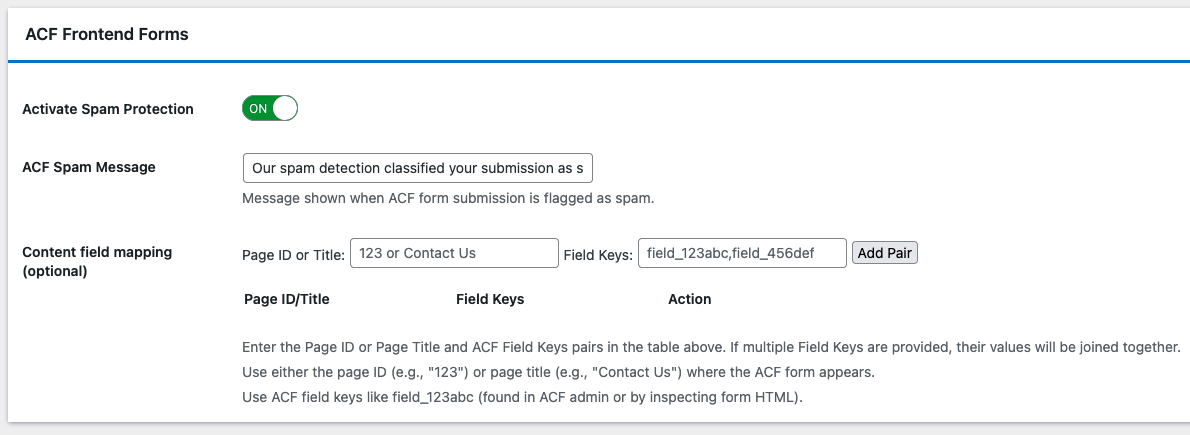
This ensures every ACF submission passes through spam and IP checks before saving posts or user data.
Step 5: Turn On VPN and Cloud Provider Blocking
Go to OOPSpam → IP Filtering tab. Enable:
- Block VPNs
- Block Cloud Providers
Click Save Changes.
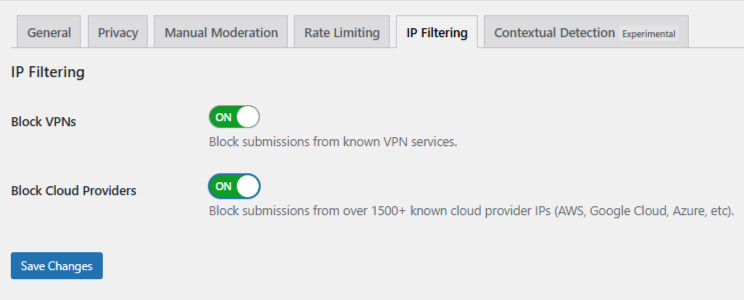
OOPSpam will now:
- Block VPN submissions
- Block cloud server IPs from AWS, Google Cloud, Azure, and others
- Detect proxy and TOR traffic
- Apply machine learning scoring
- Log suspicious activity for review
This is the simplest way to stop anonymous IP spam on ACF forms.
Step 6: Optional — Use Manual Moderation
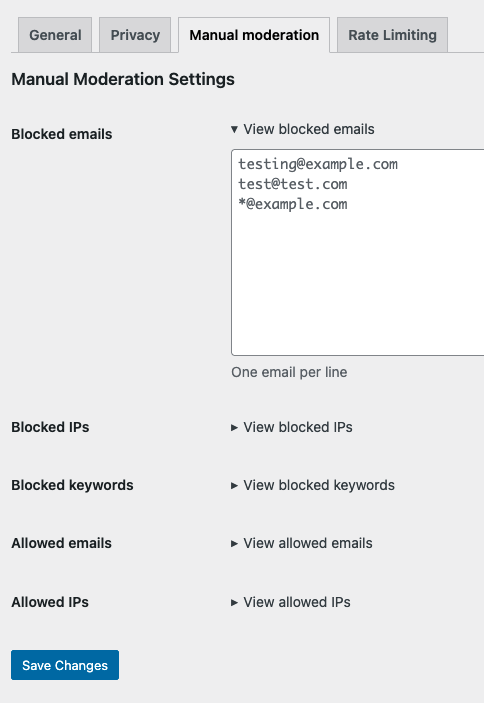
In OOPSpam → Manual Moderation tab, you can also:
- Block specific IPs or entire IP ranges — helpful when you want to block a single abusive IP or a full range belonging to a cloud provider or hosting company.
- Block emails — stop repeat offenders using the same address.
- Block keywords — prevent spam patterns or abusive phrases from getting through.
- Allow safe IPs or email addresses — ensure trusted users are never blocked.
This gives you precise control when handling borderline or recurring spam submissions.
Method 2: Block VPN and Data Center IPs with Cloudflare Firewall Rules
Cloudflare blocks bad traffic before it reaches WordPress. This reduces server load and stops bots at the edge. You must maintain rules manually, so use this as a second layer.
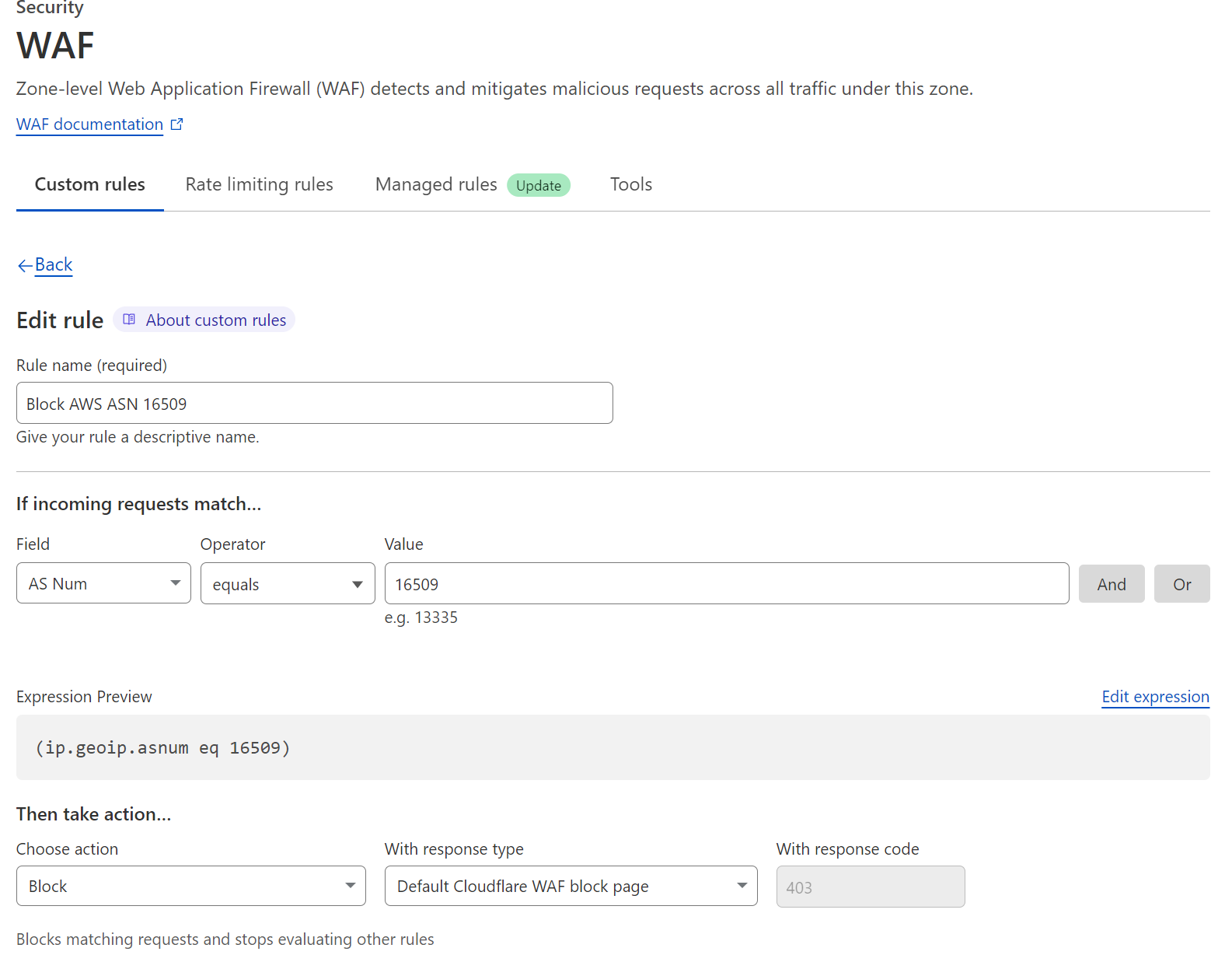
Steps:
- Go to your Cloudflare dashboard
- Select your website
- Go to: Security → Security rules
- Click Create Rule.
- Name the rule. Example: Block AWS ASN 16509
This makes the rule easy to manage later.
Add an ASN Blocking Condition
Cloud providers use ASNs (Autonomous System Numbers). Example rule for blocking AWS:
- Field: AS Num
- Operator: equals
- Value: 16509
Expression example: (ip.geoip.asnum eq 16509)
Repeat with ASNs for Google Cloud, Azure, DigitalOcean, OVH, or other networks you want to block.
Choose: Block or Challenge (safer for testing)
Cloudflare now blocks requests from those data centers before they reach ACF.
Which Method Should You Choose?
If you want the easiest and accurate solution, use OOPSpam. It requires no maintenance and works directly inside WordPress with ACF.
If you want added security, use Cloudflare for edge-level filtering.
The strongest setup uses both methods.
Final Recommendation
ACF Frontend Forms are powerful, but they need extra protection from VPN and data center spam. You can fix this by adding IP intelligence. OOPSpam provides automatic, accurate filtering without manual rule updates. Cloudflare adds network-level blocking that stops bots before they reach your server.
Together, they give you a complete layered defense for your ACF forms.
