
Chazie Baniquid
Technical Content Marketer
5 minutes to read
How to Block VPN and Data Center IP Submissions in Elementor Atomic Forms
Elementor Atomic Forms does not filter VPN or data center IPs. Bots, spam campaigns, and automated abuse tools use cloud servers and VPNs to stay anonymous and bypass basic IP blocks. Because Atomic Forms is still a new product, there is no native option to handle this. You need external protection, and this guide covers the two methods that work right now.
Why VPN and Data Center IPs Are a Problem
Most automated spam does not come from a residential address. It comes from cloud infrastructure. Bots are deployed on AWS, Google Cloud, or other data centers, and attackers route traffic through VPNs or proxies to avoid detection. This makes submission volume unpredictable and hard to trace manually.
Atomic Forms processes whatever is submitted. It does not evaluate where the request originated. That is the gap these two methods address.
Method 1: Use oopspam Anti-Spam
oopspam (that’s us 👋) blocks VPN and data center IP submissions before Elementor Atomic Forms processes them. It checks against a live database covering over 1,500 cloud providers and known VPN networks, stopping the abuse before it reaches your form entries or triggers your email notifications.
Step 1: Install the Plugin
Go to Plugins > Add New in WordPress. Search for oopspam Anti-Spam, install it, and activate.

Step 2: Add Your API Key
Sign up at oopspam.com and copy your API key from the dashboard.

Go to Settings > oopspam Anti-Spam, paste the key, and save.

Step 3: Enable Protection for Atomic Forms
In the oopspam settings, find the Elementor Atomic Forms section and toggle on Activate Spam Protection. oopspam will now check every submission automatically.
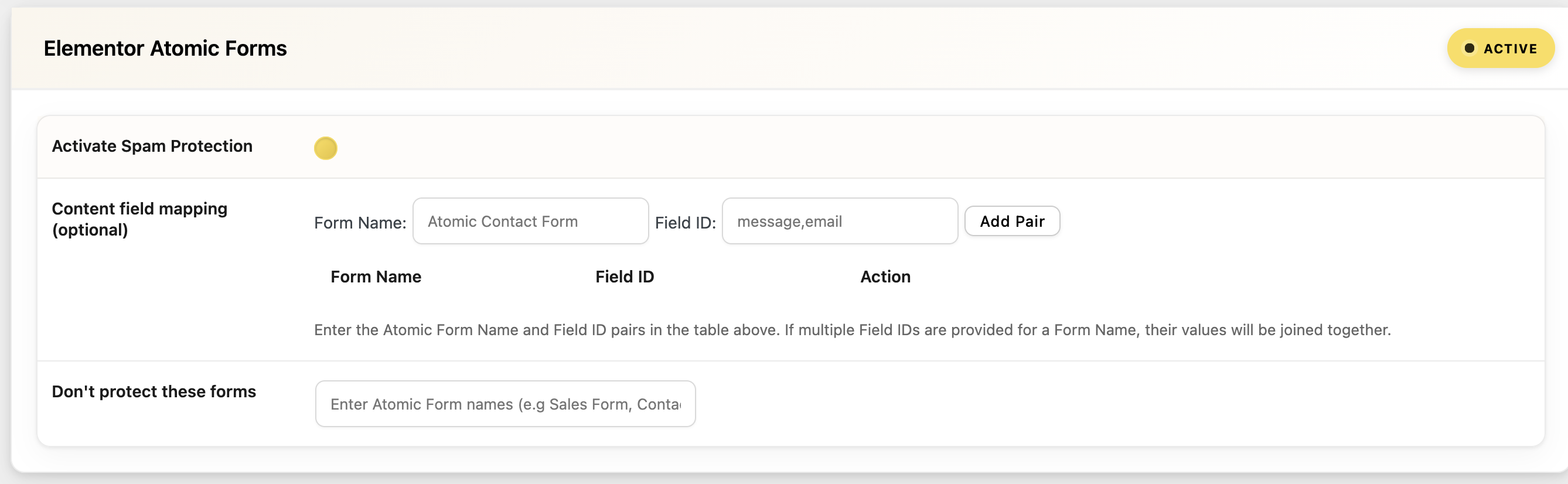
Step 4: Set IP Filtering
Go to the IP Filtering tab and enable:
- Block Cloud Providers: Stops submissions from data centers. Recommended for most sites. The majority of bot-driven form spam runs through cloud infrastructure.
- Block VPNs: Stops anonymous submissions routed through VPN services. Use this carefully if your audience includes privacy-conscious users who may legitimately use a VPN.
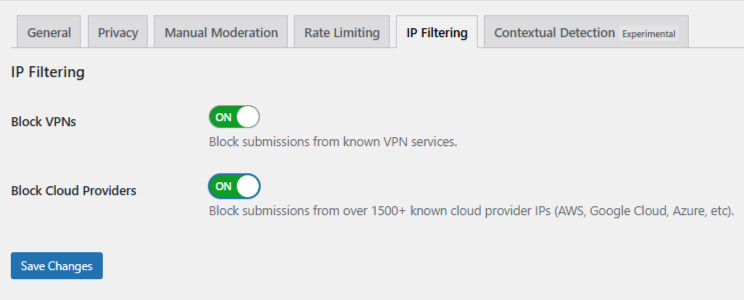
Save changes.
Manual Moderation
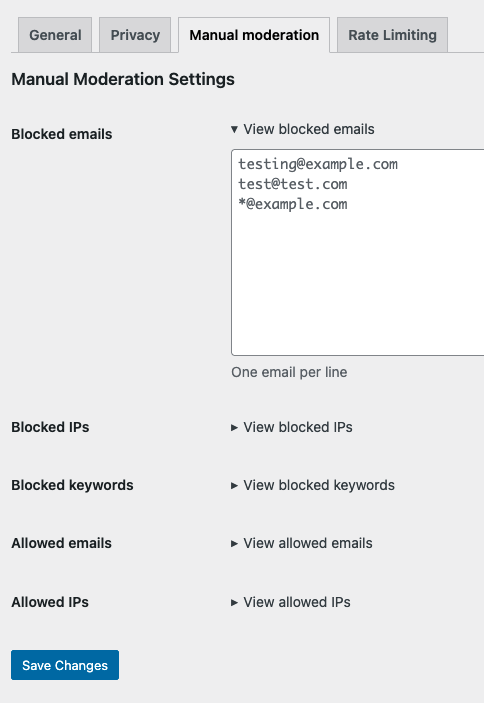
For persistent abuse that does not come from automated bots, use oopspam’s Manual Moderation. You can block specific IP addresses, email addresses, or keywords, and whitelist trusted users to prevent false positives. This is useful when the same source keeps finding ways around automated filters.
Method 2: Use Cloudflare Security Rules
Cloudflare lets you block traffic by ASN (Autonomous System Number) before it reaches your WordPress server. Every cloud provider operates under known ASNs. Blocking an ASN stops all traffic from that provider’s network before it ever touches your site.
This is not specific to Atomic Forms. It applies site-wide, which makes it a strong tool when attacks are high-volume or when form-level filtering alone is not enough.
How to Set It Up
- Log in to your Cloudflare Dashboard and select your site.
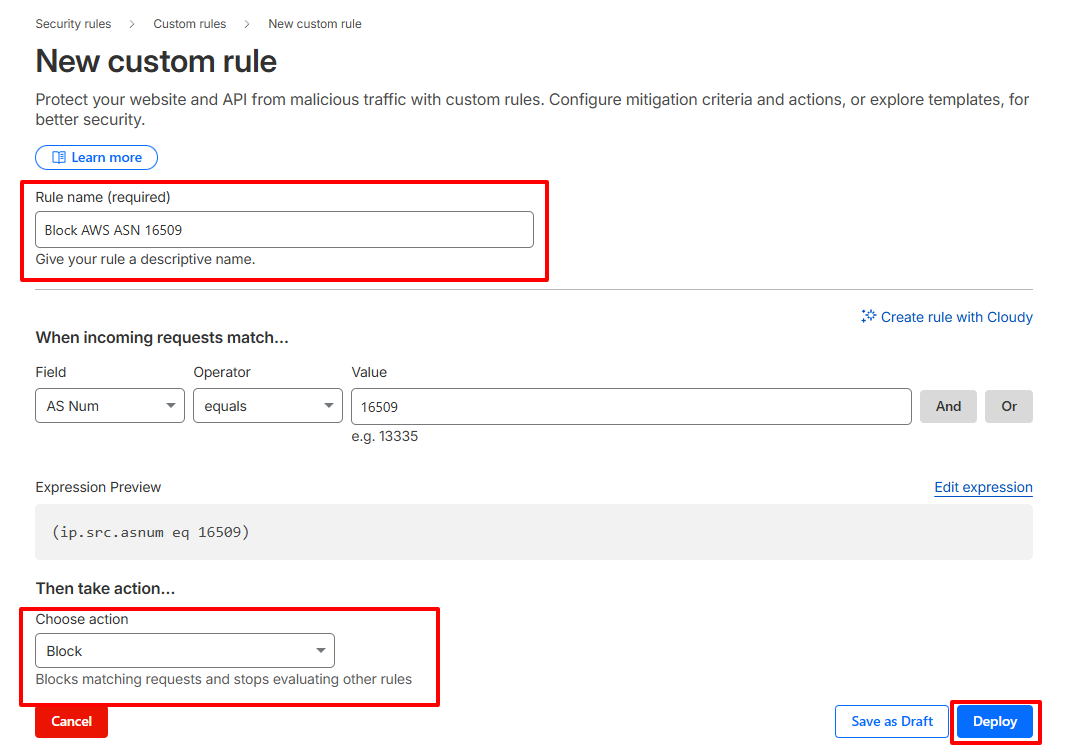
- Go to Security > Security Rules > Custom Rules.
- Click Create Rule and give it a name such as “Block Data Center IPs.”
- Set the field to AS Num. For example, use ip.geoip.asnum eq 16509 to block AWS traffic.
- Set the action to Managed Challenge to start, or Block if you are confident in the rule.
- Save and deploy the rule.
Repeat this for other major cloud providers as needed. Common ASNs to consider include those belonging to AWS, Google Cloud, Microsoft Azure, and DigitalOcean.
Important: Broad ASN blocking can occasionally catch legitimate users on corporate networks or cloud-hosted connections. Monitor your Cloudflare logs closely after deploying a new rule and adjust as needed.
Final Thoughts
Elementor Atomic Forms handles form building well, but filtering where submissions come from is not part of what it does yet. oopspam fills that gap at the form level by checking IP reputation, VPN usage, and data center traffic before a submission is processed. Cloudflare adds a second layer at the network edge for high-volume threats that need to be stopped earlier.
Set up oopspam first. Add Cloudflare rules if attacks persist at scale. The combination keeps your Atomic Forms clean without adding any friction for legitimate users.
