How to Stop Spam Prospects in Account Engagement (Pardot)

Co-founder & Brand Designer

Reviewed by Onar Alili
Anti-Abuse Engineer & Co-founder
Published 16 min read
The best way to stop spam in Account Engagement (Pardot) is to stop it before it becomes a prospect. Start with the free built-in options: turn on reCAPTCHA for Account Engagement forms, add a honeypot field to form handlers, and clean up what gets through with automation rules. To catch spam typed by real people and bots that skip reCAPTCHA, check each submission with oopspam (that’s us 👋) before it reaches Account Engagement, either with Zapier or with the oopspam API.
Marketing Cloud Account Engagement, formerly Pardot, is Salesforce’s B2B marketing automation platform. It collects leads two ways: forms you build inside Account Engagement, and form handlers that connect your own website forms to it. Spam reaches both. Fake prospects fill your database, sync to Salesforce, trigger completion actions and get added to email lists. Emails to fake addresses bounce, which hurts your sender reputation. This guide covers 5 ways to stop them, ordered by setup effort: free built-in options first, then oopspam.
Why Does Account Engagement Get Spam?
Three facts shape your defense:
- A form handler is a public URL. Your website form posts to an Account Engagement endpoint, and that URL sits in your page’s HTML. Bots copy it and post to it directly, so a CAPTCHA on your page never runs. Admins in the Trailblazer Community report exactly this.
- Every accepted submission becomes a prospect. Once it’s in, it can sync to Salesforce, trigger automations and receive emails. Cleaning up afterwards takes manual work.
- Humans spam too. Paid spammers solve any CAPTCHA. Content, IP and email checks stop them.
1. Turn On reCAPTCHA for Account Engagement Forms
Account Engagement forms have reCAPTCHA built in. In the form wizard, open step 3, Look and Feel, then the Advanced tab. Select Enable explicit bot protecting using reCAPTCHA (Trailhead) and click Confirm & Save.
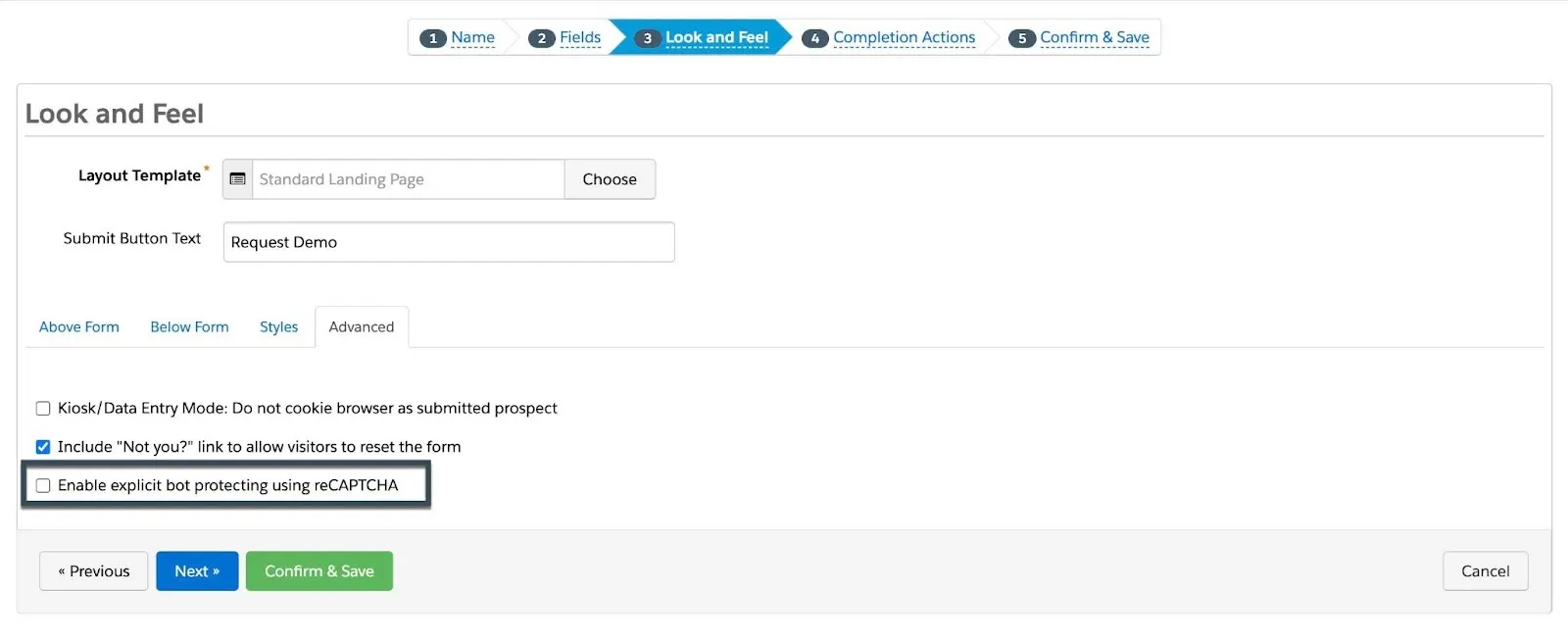
Keep the reCAPTCHA visible. Don’t hide it with CSS in your layout template, or real visitors can’t submit the form (Nebula Consulting).
This setting only covers forms built in Account Engagement. Form handlers use your own HTML form, so this option doesn’t apply to them. reCAPTCHA also relies on JavaScript in the browser, so bots that post straight to the endpoint skip it.
2. Add a Honeypot Field to Your Form Handlers
A honeypot is a field that real visitors never see. Bots that fill in every field fill it too, which flags them. It’s the simplest check you can add to an external form that posts to a form handler.
- Add a text field to your website form, for example
website, and hide it with CSS so people don’t see it. - Create a matching custom prospect field in Account Engagement and map the honeypot field to it in the form handler.
- Add a completion action or automation rule: if that field isn’t blank, add the prospect to a “Spam” list.
- Review the list and delete those prospects.
A honeypot costs nothing and adds no friction. It has two limits: the prospect is still created, and smarter bots skip hidden fields.
3. Clean Up Spam with Automation Rules
Spam usually follows a pattern: the same message, a naming style, a country or a set of email domains. Turn that pattern into an automation rule:
- Create an automation rule with criteria that match the spam, such as a country, an email domain or a phrase in a message field.
- Set its actions to add matching prospects to a “Spam” list and stop them from syncing to Salesforce.
- Review the list regularly and delete the prospects.
This is cleanup, not prevention. The prospect is created first, and you have to update the rule each time the pattern changes.
4. Replace a Compromised Form Handler
If bots keep hitting one form handler, create a new form handler, update your website form to post to the new URL, then delete the old one. Bots that saved the old URL now hit a dead endpoint, and real visitors don’t notice.
It’s a quick reset, not a fix. A bot that reads your page will find the new URL too.
5. Filter Submissions with oopspam Before They Reach Account Engagement
The methods above either miss human spam or clean up after the prospect exists. A spam filter in front of Account Engagement stops both. oopspam scores each submission’s message, IP address and email, and returns a spam score from 0 to 6. A score of 3 or more means spam (API docs). Optional rules block disposable emails, VPNs, data center IPs, countries and languages.
You can connect it two ways:
- Zapier: no code. Best if your form already works with Zapier, or you want to flag spam prospects automatically.
- The oopspam API: a developer adds a check on your server before the data goes to the form handler. Best for custom website forms.
Both start the same way: create a free oopspam account and copy your API key from the dashboard.
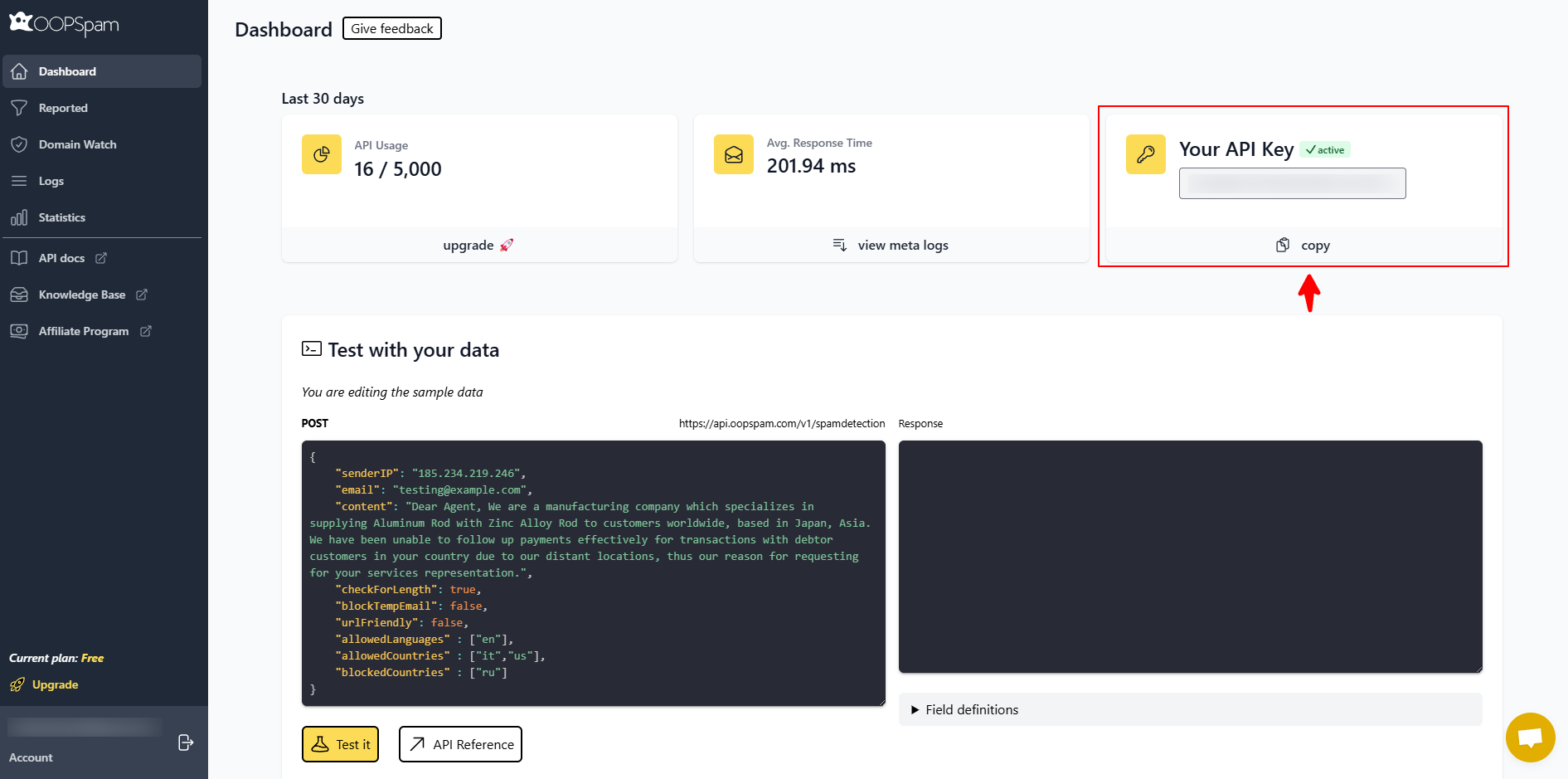
Option A: Filter Spam with Zapier (No Code)
Zapier connects your form, oopspam and Account Engagement. In Zapier, Account Engagement appears as Pardot. It offers triggers such as New Form Submission and New Prospect, and actions such as Create Prospect, Find or Create Prospect and Add Prospect to List (Zapier). The oopspam app adds a Check for Spam action. A Zap with a filter step needs a paid Zapier plan, and each spam check uses one task.
There are two ways to set it up.
Block spam before it becomes a prospect
Use this for your website forms. Instead of posting to a form handler, your form sends each submission to Zapier, and only clean submissions become prospects.
- Trigger: if your form builder has a Zapier app, such as Webflow, Typeform or Jotform, choose it and its new-submission event. For Webflow, that’s New Form Submission. For a custom HTML form, use Webhooks by Zapier with Catch Hook, and post your form data to the webhook URL Zapier gives you (Zapier help).
- Check for Spam: add an oopspam step and choose Check for Spam. Connect your oopspam API key. Map the message to Content, the visitor’s IP to Sender IP and the email to Email. Turn on extra options, such as blocking disposable emails, if you need them.
- Filter: add Filter by Zapier. Set Only continue if to Spam Score, (Number) Less than, 3.
- Create the prospect: add a Pardot step with Create Prospect, or Find or Create Prospect to avoid duplicates. Map the email, name and other fields.
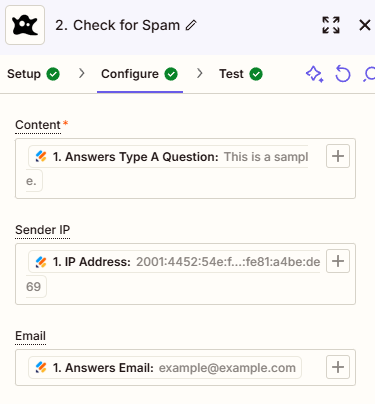
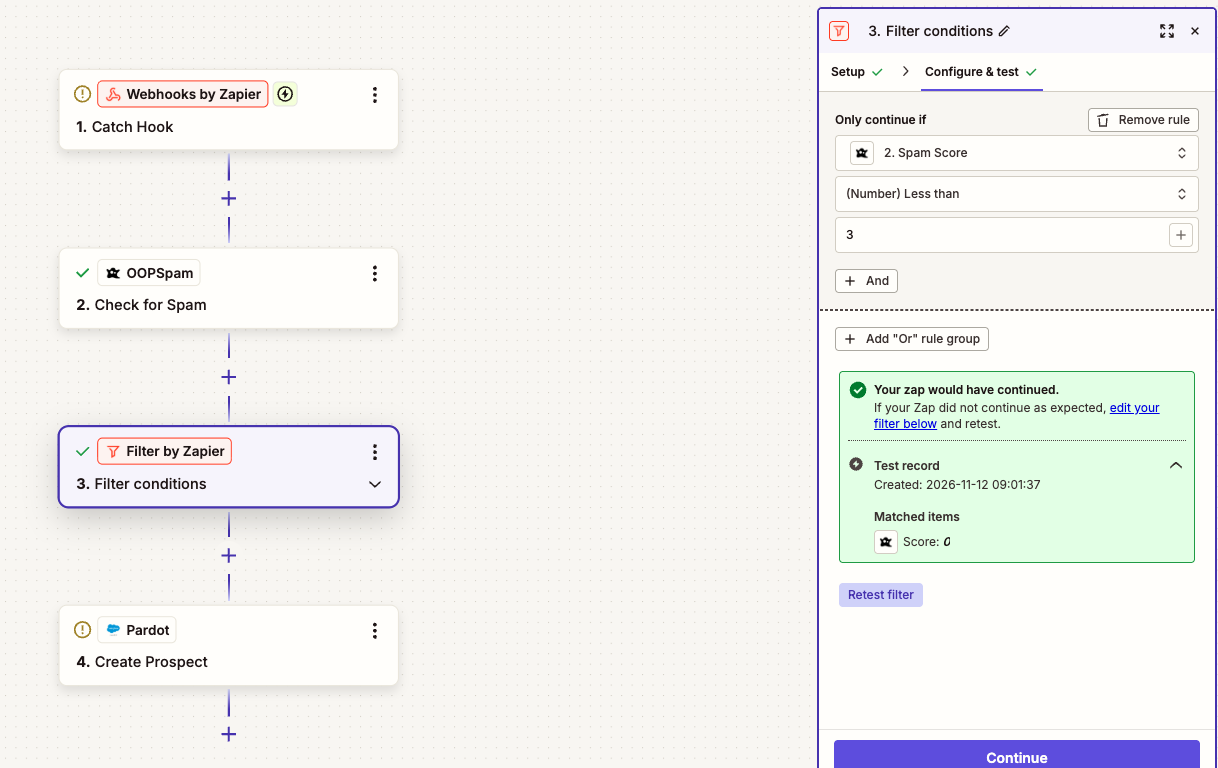
With Webflow, the Zap is the same except for the trigger:
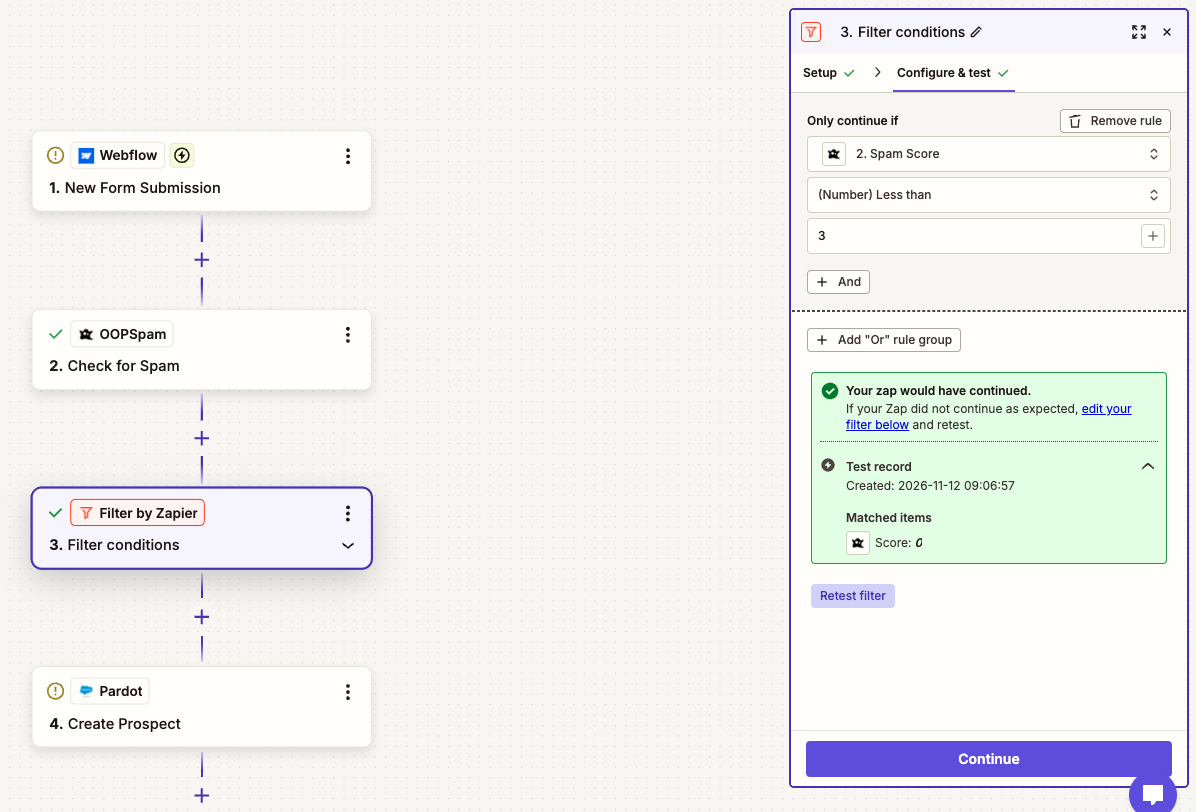
Test the filter with a normal entry. Zapier should report that your Zap would have continued.
Flag spam in forms you already have
If you keep your Account Engagement forms or form handlers, check each new prospect after it’s created and move spam to a list.
- Trigger: add Pardot with New Prospect. To check every Account Engagement form submission, not just new prospects, use New Form Submission instead.
- Check for Spam: map the prospect’s comments or message field to Content and the email to Email.
- Filter: set Only continue if to Spam Score, (Number) Greater than, 2, so submissions scoring 3 or more continue.
- Flag: add a Pardot step with Add Prospect to List and choose your “Spam” list. An automation rule can then stop those prospects from syncing to Salesforce.
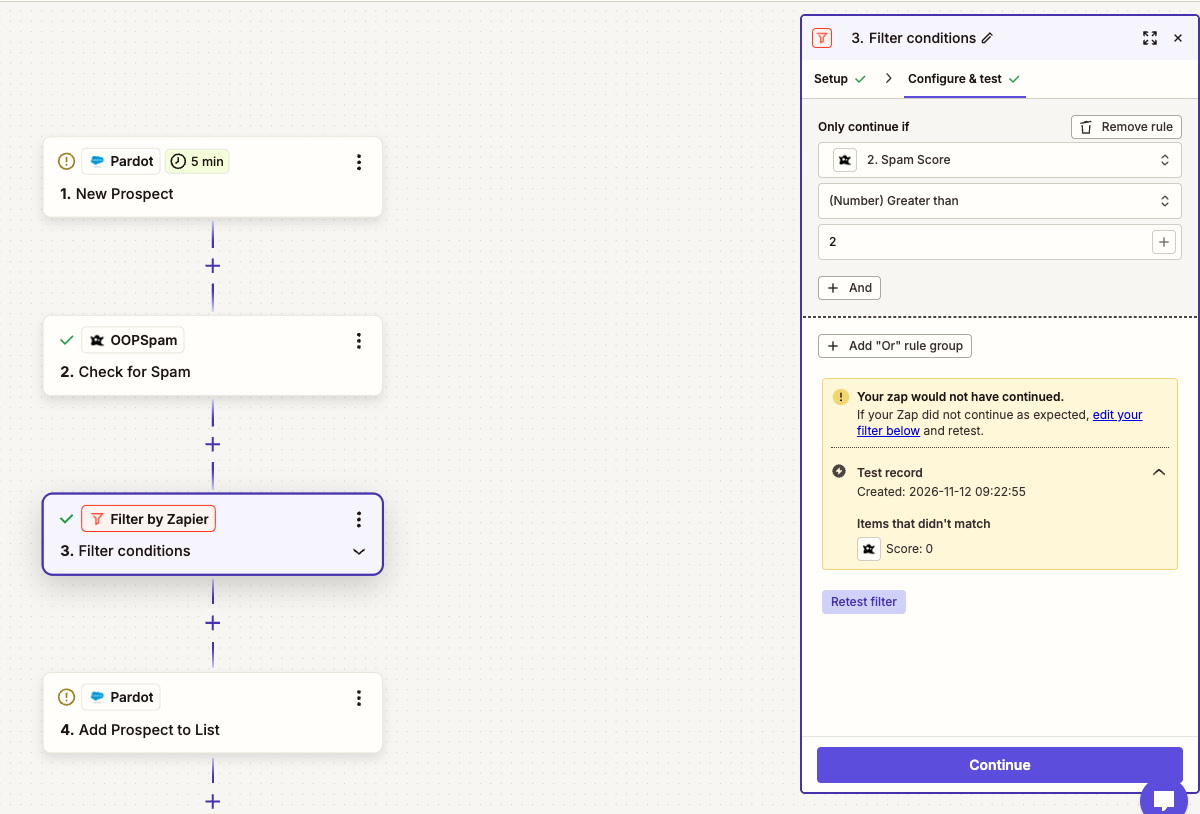
This flags spam rather than blocking it, because the prospect already exists. The Pardot trigger also checks for new prospects on a schedule, so there’s a delay of a few minutes.
For a full walkthrough of the oopspam steps, see Add Spam Protection to Embedded Forms Using oopspam and Zapier.
Option B: Filter Spam with the oopspam API (For Developers)
This is the most complete setup. Your website form posts to your own server instead of the form handler. Your server checks the submission with oopspam and forwards only clean submissions to Account Engagement, using a server-side post to the form handler (Nebula Consulting). Bots never see the form handler URL, so they can’t post to it directly.
- Change your form’s
actionto an endpoint on your server, for example/contact. - On the server, send the message, the visitor’s IP and the email to
https://api.oopspam.com/v1/spamdetection, with your API key in theX-Api-Keyheader. - If the
Scoreis 3 or more, drop the submission and show the visitor your usual thank-you page. If it’s lower, post the fields to your form handler URL, or create the prospect with the Account Engagement API.
Here’s an example in JavaScript (Node.js with Express) and PHP:
app.post('/contact', express.urlencoded({ extended: true }), async (req, res) => {
  const { email, first_name, last_name, message } = req.body;
  const ip = (req.headers['x-forwarded-for'] || req.socket.remoteAddress).split(',')[0].trim();

  let score = 0;
  try {
    const check = await fetch('https://api.oopspam.com/v1/spamdetection', {
      method: 'POST',
      headers: { 'Content-Type': 'application/json', 'X-Api-Key': process.env.OOPSPAM_API_KEY },
      body: JSON.stringify({ senderIP: ip, email, content: message, blockTempEmail: true })
    });
    score = (await check.json()).Score;
  } catch (err) {
    // If the check fails, let the submission through so you don't lose real leads
  }

  if (score < 3) {
    await fetch(process.env.FORM_HANDLER_URL, {
      method: 'POST',
      headers: { 'Content-Type': 'application/x-www-form-urlencoded' },
      body: new URLSearchParams({ email, first_name, last_name, message })
    });
  }

  res.redirect('/thank-you');
});
<?php
$email   = $_POST['email'] ?? '';
$message = $_POST['message'] ?? '';
$fields  = [
  'email'      => $email,
  'first_name' => $_POST['first_name'] ?? '',
  'last_name'  => $_POST['last_name'] ?? '',
  'message'    => $message,
];
$ip = trim(explode(',', $_SERVER['HTTP_X_FORWARDED_FOR'] ?? $_SERVER['REMOTE_ADDR'])[0]);

$ch = curl_init('https://api.oopspam.com/v1/spamdetection');
curl_setopt_array($ch, [
  CURLOPT_POST           => true,
  CURLOPT_RETURNTRANSFER => true,
  CURLOPT_TIMEOUT        => 5,
  CURLOPT_HTTPHEADER     => ['Content-Type: application/json', 'X-Api-Key: ' . getenv('OOPSPAM_API_KEY')],
  CURLOPT_POSTFIELDS     => json_encode([
    'senderIP'       => $ip,
    'email'          => $email,
    'content'        => $message,
    'blockTempEmail' => true,
  ]),
]);
$response = curl_exec($ch);
curl_close($ch);

// If the check fails, the score stays 0 so you don't lose real leads
$score = $response ? (json_decode($response, true)['Score'] ?? 0) : 0;

if ($score < 3) {
  $ch = curl_init(getenv('FORM_HANDLER_URL'));
  curl_setopt_array($ch, [
    CURLOPT_POST           => true,
    CURLOPT_RETURNTRANSFER => true,
    CURLOPT_POSTFIELDS     => http_build_query($fields),
  ]);
  curl_exec($ch);
  curl_close($ch);
}

header('Location: /thank-you');
exit;
A few things to know:
- Send the visitor’s IP, not your server’s. oopspam checks
senderIPagainst IP blocklists. Behind Cloudflare or a load balancer, read it from the forwarding header, as above. - Add rules in the request. Use
blockedCountriesorallowedCountries,allowedLanguages,blockVPNandblockDCto filter by location, language and network. The API docs list every option. - Tracking can change. A submission forwarded from your server doesn’t carry the visitor’s browser cookie, so Account Engagement may not link the new prospect to their earlier page views. Test it before you switch your main forms.

Comparison
| Method | Stops bots | Stops human spam | Prevents the prospect | Effort | Cost |
|---|---|---|---|---|---|
| reCAPTCHA (Account Engagement forms) | Most bots on the page | No | Yes | Low | Included |
| Honeypot (form handlers) | Simple bots | No | No, flags it | Low | Free |
| Automation rules | Known patterns | Known patterns | No, cleans up | Medium, ongoing | Included |
| New form handler | Bots with the old URL | No | Yes, until found again | Low | Free |
| oopspam with Zapier | Yes | Yes | Yes, when Zapier replaces the form handler | Low, no code | Free oopspam plan, paid Zapier plan |
| oopspam API | Yes | Yes | Yes | Medium, needs a developer | Free plan, then paid |
FAQ
Does Account Engagement have built-in spam protection?
Yes, for forms built in Account Engagement. Turn on Enable explicit bot protecting using reCAPTCHA in the Advanced tab of the form’s Look and Feel step. Form handlers have no built-in spam filter, so use a honeypot, automation rules or a filter like oopspam.
Can I add reCAPTCHA to a Pardot form handler?
You can add reCAPTCHA to your own website form, but it only helps if your server verifies the token before passing the data on. Bots that post straight to the form handler URL skip it.
How do I delete spam prospects already in Account Engagement?
Build an automation rule that matches the spam, add those prospects to a list, stop them from syncing to Salesforce, then delete them from the list. The oopspam Zapier setup can add new spam prospects to that list for you.
Do I need a developer to use oopspam with Account Engagement?
No. The Zapier setup needs no code. The API setup gives you the most control and keeps bots away from your form handler, but it needs someone who can change your server.
Will blocking spam affect my Salesforce data?
Yes, for the better. Spam stopped before Account Engagement never becomes a prospect, so it never syncs to Salesforce as a fake lead or contact.
Final Thoughts
Account Engagement’s reCAPTCHA protects its own forms, and honeypots, automation rules and fresh form handlers reduce the damage on form handlers. None of them stop human spam, and most act after the prospect exists. oopspam checks each submission first, with Zapier or the API, so only real leads reach Account Engagement and Salesforce.
