How to Get Your WooCommerce Store Ready for AI Shoppers

Co-founder & Brand Designer

Reviewed by Onar Alili
Anti-Abuse Engineer & Co-founder
Published 12 min read
AI shopping agents can now find products, fill in checkout forms and pay on behalf of a real customer. Many WooCommerce stores stop them at the last step, because the fraud protection on checkout can’t tell a shopping agent from a card-testing bot. A CAPTCHA, a “Verify you are human” check or a firewall rule that blocks data center traffic ends the sale. To get ready, decide which agents you want to sell to, let verified ones through at the network level, and replace challenge-based checks on checkout with server-side checks that judge the order itself. oopspam (that’s us 👋) does that in WooCommerce without showing any challenge.
This guide explains how AI shoppers reach your store, where checkout protection blocks them, how to tell trusted agents from bad bots, and how to set up WooCommerce so it sells to the first and stops the second.
How AI Shoppers Reach Your Store
An AI shopper is an agent that shops for a person. The person describes what they want, and the agent finds, compares and buys it. These agents reach a WooCommerce store in two ways.
Through a protocol. OpenAI and Stripe built the Agentic Commerce Protocol (ACP) so agents can place orders through an API instead of clicking through your pages. Stripe’s Agentic Commerce Suite uses ACP, and WooCommerce was a launch partner, so Woo stores using Stripe can sell through AI agents with one integration. Several WordPress plugins also add ACP support directly.
Through your website. Browser agents, such as ChatGPT’s agent mode, open your store in a real browser and click through it like a person: search, product page, cart, checkout. This needs no integration on your side, so it’s how most agents will meet most stores for now. It’s also where they get stuck.
The volume is still small. Checkout.com found that only 3% of merchant-reported transactions involve AI agents, even though 89% of merchants say they’re preparing for agentic commerce (AgentReady). That makes now a cheap time to fix your checkout, before agent traffic grows.
Where Checkout Protection Blocks AI Shoppers
Most checkout protection was built on one rule: if it isn’t a human, block it. An AI agent buying for a real customer breaks that rule, so it gets caught by the same checks as a card-testing bot.
In one test of AI agents shopping 10 stores, a CAPTCHA triggered at checkout on one store and the agent couldn’t solve it. On five stores, the agent stopped because there was no guest checkout (OST Agency). In another test with $25 and four stores, the agent made no purchases. On Poland’s largest marketplace, Cloudflare detected the agent’s headless browser and blocked it before it reached shipping details (Jock.pl).
The usual blockers on a WooCommerce store are:
- CAPTCHA, reCAPTCHA or Turnstile on checkout, login or registration. Some agents fail the challenge, and others stop because they won’t solve one for the user.
- Firewall and bot rules. Cloudflare now sorts AI traffic into Search, Agent and Training. Since September 15, 2026, new domains and free-plan sites block Agent and Training bots by default on pages that show ads (Cloudflare). Older custom rules that challenge all automated traffic on cart or checkout pages do the same, often by accident.
- Data center IP blocking. Browser agents run in cloud browsers, so they come from data center IPs. A rule that blocks cloud providers on checkout blocks them too. Meanwhile fraudsters are moving the other way: our 2025 Spam Report found data center IPs are a declining share of attack traffic as attackers switch to residential proxies.
- Forced account creation. An agent may refuse to create an account for the user, or fail at email verification.
The catch is that these checks don’t reliably stop bad bots either. In July 2025, ChatGPT’s agent clicked straight through Cloudflare’s “Verify you are human” checkbox while narrating that the step proved it wasn’t a bot (Ars Technica via Bioethics.com). Paid CAPTCHA solvers do the same for fraudsters. In September 2025 we stopped more than 450,000 card testing attempts in a single week on WooCommerce stores. E-commerce spam rose to 22% of all the spam we tracked in 2025, up from 15% the year before, mostly because of card testing. A challenge on checkout costs you agent sales and still lets determined bots through.
How to Tell Trusted AI Agents from Bad Bots
Until recently, the only way to identify a bot was its user agent string and IP address. Both are easy to fake, so a scraper can claim to be ChatGPT and a fraud bot can look like a normal browser.
Web Bot Auth
Web Bot Auth fixes this with cryptography. It’s based on two IETF drafts, and Cloudflare uses it to verify bots and agents:
- The agent’s operator creates a key pair and publishes the public key at a standard address on its own domain.
- The operator registers that address with Cloudflare.
- Every request the agent sends carries a signature in its HTTP headers. Cloudflare checks the signature against the public key and marks the request as a verified bot.
A fraudster can copy a user agent string, but not a signature made with someone else’s private key. Verification also doesn’t depend on IP addresses, so it works for agents running in the cloud.
Payment networks are building on it. Visa’s Trusted Agent Protocol and Mastercard’s Agent Pay both use Web Bot Auth so merchants can verify agents registered with the network, and American Express plans to use it too (Cloudflare). In practice, a signed request can tell your store that it comes from a known agent, acting for a customer of a known card network.
What you need to do
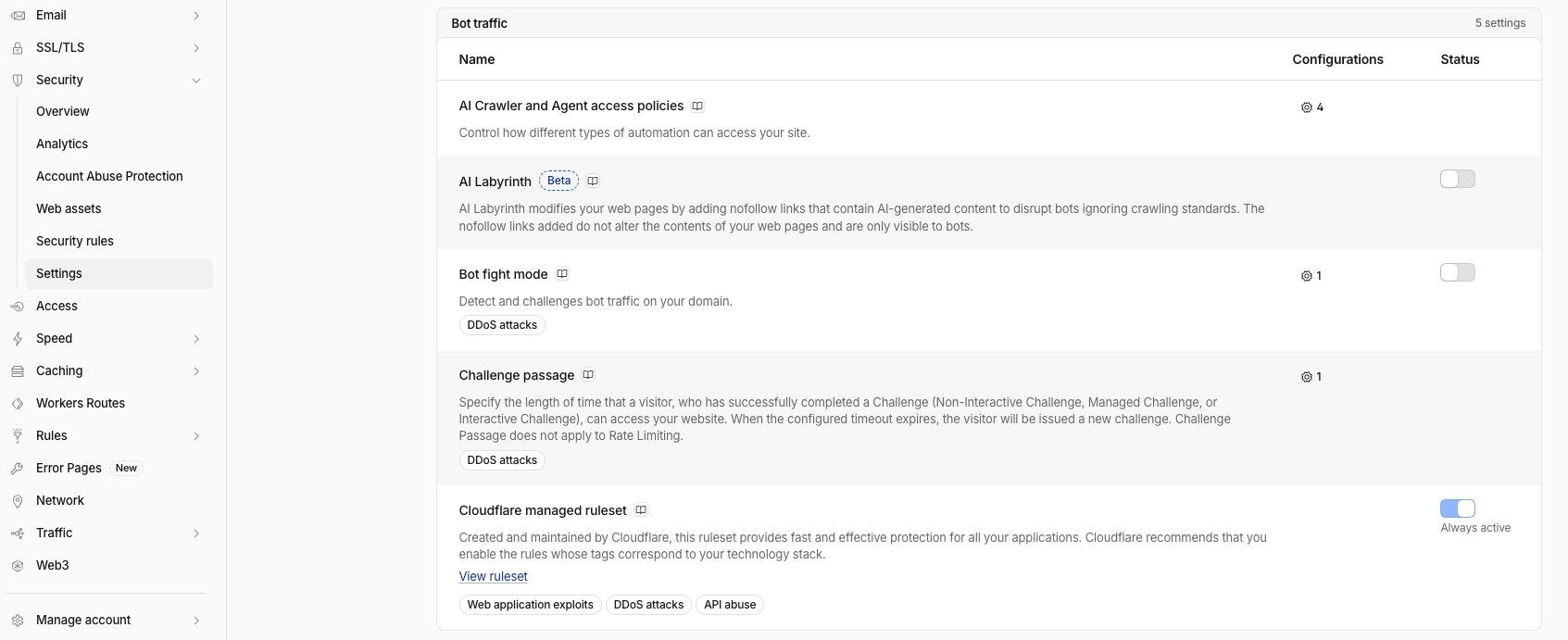
If your store is behind Cloudflare, you don’t have to verify signatures yourself. Cloudflare does it and marks the traffic as a verified bot or signed agent, and you decide what to allow in Security > Settings > AI Crawler and Agent access policies (Cloudflare docs) and your custom rules. If you’re not on Cloudflare, Web Bot Auth support depends on your host or firewall.
Verification only tells you who the agent is. It doesn’t tell you whether the order is legitimate. A verified agent can still be sent to buy with a stolen card, so you still need to check the order itself.
How to Make Your WooCommerce Store Agent-Ready
- Decide your policy. Do you want AI agents to buy from you? Most stores do, since the agent is acting for a real customer. Write the decision down, because it shapes every setting below.
-
Check your Cloudflare AI settings. If you use Cloudflare, go to Security > Settings and open AI Crawler and Agent access policies. Check how Search, Agent and Training traffic is handled, allow Agent traffic if you want AI shoppers, and make sure the new defaults haven’t blocked it. While you’re there, check that Bot fight mode isn’t challenging agents on checkout.
- Review custom firewall rules. Look for rules that challenge or block bots, data center IPs or automated traffic on
/cart,/checkoutand/my-account. Exclude verified bots from those rules instead of challenging everyone. - Remove challenges from checkout. Take CAPTCHA, reCAPTCHA and Turnstile off the checkout and replace them with checks that run on the server and never ask the visitor to prove anything.
- Turn on guest checkout. In WooCommerce > Settings > Accounts & Privacy, allow customers to place orders without an account.
- Keep product data clean. Agents compare stores on price, stock, shipping cost and return policy. Show them clearly on the product page, and don’t add surprise costs late in checkout.
- Consider a protocol integration. If you use Stripe, Stripe’s Agentic Commerce Suite lets agents order through an API, which skips your checkout pages entirely.
- Test it. Ask a browser agent, such as ChatGPT’s agent mode, to buy a cheap product from your store and watch where it stops.
If you’d rather keep AI shoppers out
Some stores sell limited drops, tickets or high-risk products where any automated buyer is a problem. In that case, block the Agent category in Cloudflare, keep data center blocking on, and add rate limits on checkout. Be aware that capable agents can pass a checkbox CAPTCHA, so don’t rely on one alone.
How oopspam Protects Checkout Without Blocking AI Shoppers
The oopspam WordPress plugin checks WooCommerce orders, registrations and reviews on your server. There’s no challenge, so a person, a browser agent and an API order all go through the same checkout. What it judges is the order, not whether a human is typing it:
- Spam score. oopspam scores the email, IP address and content of each order and registration, and blocks the ones that look like spam or fraud.
- Rate limiting. Cap orders per IP address or email per hour. During card testing attacks, some stores get thousands of fraudulent checkout attempts per hour. An agent buying for one customer sends one.
- Card testing rules. Block orders from unknown origin uses WooCommerce Order Attribution to catch orders that skip your storefront, and you can block specific order amounts that card testers use.
- Honeypot. A hidden field on checkout, registration and login catches bots that fill in every field.
- Country and address rules. Block countries you don’t ship to and billing addresses linked to fraud.
Settings to check if you sell to AI agents
A few oopspam settings block automated traffic on purpose. If you want AI shoppers, review them:
- Block Cloud Providers. Browser agents come from data center IPs, so this blocks them. Leave it off for checkout, and rely on the spam score and rate limits instead.
- Block orders from unknown origin. Orders placed through an API, including some agent integrations, may have no storefront origin. Use Payment methods to check origin to apply the check only to the payment methods card testers target, such as cards and PayPal, and test an order from your agent integration before you go live.
- REST API checkout blocking. If an agent integration creates orders through the WooCommerce REST API, make sure this doesn’t block it.
- Manual moderation. Add trusted emails or IP addresses to the allow list so they skip the checks.
How to set it up
- Install oopspam Anti-Spam from Plugins > Add New and activate it.
- Create a free oopspam account, copy your API key and paste it in oopspam Anti-Spam > Settings.
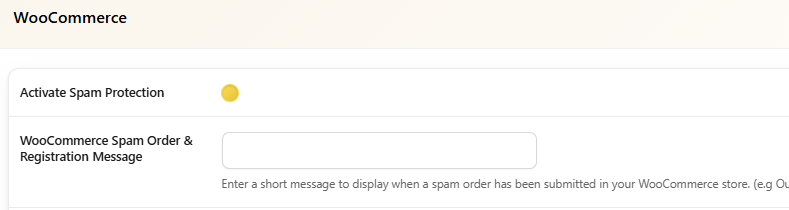
- In the WooCommerce section, turn on Activate Spam Protection and add a short message for blocked orders.
- Turn on rate limiting and the card testing settings, and review the settings above if you sell to AI agents.
- Remove CAPTCHA from checkout, and check Form Spam Entries after a few days to see what’s being blocked.
FAQ
Can AI agents solve CAPTCHAs?
Some can. ChatGPT’s agent has passed Cloudflare’s checkbox check, while other agents stop at a CAPTCHA or refuse to solve one for the user. Either way, a CAPTCHA is a poor way to decide who can buy from you.
Should I block AI shopping agents?
Only if automated buying hurts your business, such as limited drops or ticket sales. For most stores, an agent is a customer with an assistant. Block bad orders, not agents.
What is Web Bot Auth?
A way for bots and AI agents to sign their requests with a private key, so sites can verify who they are instead of trusting a user agent string. Cloudflare uses it to verify bots, and Visa and Mastercard use it to identify agents in their payment programs.
Do I need Cloudflare to sell to AI agents?
No. Agents can shop any store that doesn’t block them. Cloudflare makes it easier to verify agents and control which ones get in.
Will removing CAPTCHA from checkout increase fraud?
Not if you replace it. Server-side checks such as spam scoring, rate limits and card testing rules stop fraud by looking at the order, which also catches bots that solve CAPTCHAs.
Final Thoughts
AI shoppers are still a small share of orders, but they’ll grow, and the stores that sell to them will be the ones whose checkout doesn’t ask “Are you human?” Decide which agents you want, let verified ones through at the firewall, and move fraud protection from challenges to server-side checks of the order. That keeps checkout open to real customers, with or without an assistant, and closed to card testers.
Related guides
- 5 Ways to Stop Spam Orders and Registrations in WooCommerce
- How to Protect Your Store from Fake Orders, Card Testing, and Checkout Spam
- How to Stop Failed Orders with Unknown Origin in WooCommerce
- How to Block VPN and Data Center IP Traffic in Your WooCommerce Shop
- The Best CAPTCHA Alternatives & Competitors
- Defending WooCommerce: How We Blocked 450,000 Card Testing Attempts in One Week
- Card Testing Attacks: A New Threat Vector Through WooCommerce Block-based Checkout
- Best Fraud Detection Plugins for WordPress in 2026
