

nahnufitness | source
I signed up for a test and joined a paid program right away. All the spam emails getting through reCaptcha and Captcha have now stopped. Loved how easy it was to work with Elementor Forms.

Privacy-friendly Accessible Customizable Fast + accurate API Trusted on 3.5 million+ sites
✓ No credit card required ✓ Cancel anytime
Last updated
| Feature | oopspam | reCAPTCHA |
|---|---|---|
| What visitors see | Nothing. Checks run on your server | v2: a checkbox and, when unsure, image puzzles. v3: no puzzle, but a badge on every page |
| Free tier | 40 checks/month | 10,000 assessments/month, shared across all sites in your Google Cloud organization |
| Paid | From $23/month for 25,000 checks, unlimited websites | $8/month flat for 10,001–100,000 assessments, then $1 per 1,000 |
| Reads the message content | ✓ Spam words, links, language | ✗ Scores visitor behavior only |
| Block by country or language | ✓ | ✗ |
| Explains each block | ✓ Spam score and reasons | v3 returns a score; you decide what to do with it |
| Script added to your pages | None | Google's reCAPTCHA script |
Prices checked on 5 October 2026. Sources: oopspam pricing, Google reCAPTCHA pricing.
I signed up for a test and joined a paid program right away. All the spam emails getting through reCaptcha and Captcha have now stopped. Loved how easy it was to work with Elementor Forms.

This is a great plugin with a very responsive and knowledgable support team. Works well for default comment fields, WPForms and WooCommerce. Has some other integrations but those are the ones we tried. If you have any doubts, just go back into your logs of spam that slipped through reCAPTCHA and Akismet and a honeypot… pick a message and enter the data on the app.oopspam.com dashboard you can edit the test data right there and it will show you what spam score their system would give that message.

This tool works out of the box. I used it to replace reCaptcha, which is not working according to data protection laws in Germany. It is very easy to handle and install, you don’t need to add fields etc. to your forms. The free version lets you have a look at the efficiency of the tool. Works perfectly with different forms like Elementor, Formidable etc.

Every image grid, "select all traffic lights" or audio fallback is a place where a real person can give up. Visitors who can't solve the challenge don't complain: they leave, and you never see the lost signup.
oopspam filters on the server, so there is no puzzle between a visitor and the submit button. Fewer abandoned forms, more conversions.
reCAPTCHA is a Google service. To score a visitor it sends their behaviour, device and network signals to Google, which is why it keeps coming up in GDPR and data-transfer reviews, and why the reCAPTCHA badge has to be declared in your cookie notice.
oopspam scores submissions on the server with the minimum data needed, keeps no logs by default, and shows no badge. That makes the compliance conversation much shorter. See why the reCAPTCHA badge is a problem.


reCAPTCHA loads Google's script on every page that uses it. On slower connections that's extra work before a visitor can even fill in the form, and it's a script you don't control. In our test on a simple contact-form page, adding reCAPTCHA took the page from 5 to 13 network requests and from 35.6 kB to 565 kB transferred, and load time went from 285 ms to 1.56 seconds. Your numbers will vary with hosting, but the extra weight lands on every page that loads the script. See how reCAPTCHA affects page performance.
Not sure whether v2 or v3 is your problem? Our guide to reCAPTCHA v2 vs v3 breaks down what each version loads. oopspam loads nothing on the front end.
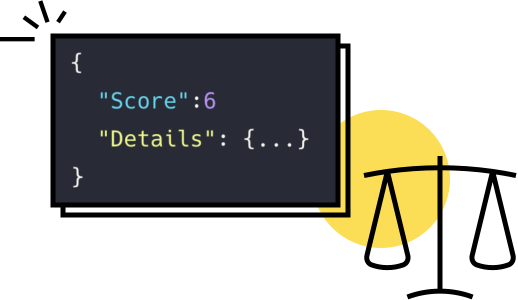
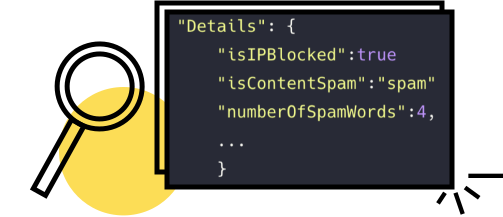
"CAPTCHA alternative" can mean a few different things. Here's the landscape so you can pick the right approach:
Most sites get the best balance with server-side filtering, optionally alongside a honeypot. See our full roundup of the best CAPTCHA alternatives.
Replace reCAPTCHA without touching your forms.
The oopspam WordPress plugin works with Elementor Forms, WPForms, Gravity Forms, Ninja Forms, Contact Form 7 and WooCommerce. Disable reCAPTCHA, paste your API key, and you're done: no script, no badge, no puzzle.


We reply fast. Contact us for any questions or concerns.
On WordPress it takes a few minutes, and you don't need to edit your forms.
Not on WordPress? Send each submission to the oopspam API (one call per check), or connect your forms through Zapier or Make.
Your search for a reCAPTCHA alternative is over
✓ No credit card required ✓ Cancel anytime
Up to a point. reCAPTCHA is free for 10,000 assessments a month, and that limit is per Google Cloud organization, shared across all your sites. From 10,001 to 100,000 assessments it's an $8 flat monthly fee, then $1 per 1,000 (Google Cloud pricing, checked 5 October 2026).
v2 shows a checkbox and, when it's unsure, an image puzzle. v3 runs in the background and returns a score from 0.0 to 1.0 that you have to act on yourself. Both load Google's script on your pages. Our reCAPTCHA v2 vs v3 guide goes deeper.
No. oopspam checks submissions on your server, so there is no widget, badge or challenge on your forms.
Yes. oopspam works on the server, separately from the reCAPTCHA widget, so you can run both and remove reCAPTCHA once you've seen the results.
Not by default. The oopspam API scores each submission without storing it, so there is no data to identify or track your visitors. See our GDPR notice and Data Processing Agreement.
You can start with 40 free spam checks a month, no credit card required. Paid plans start at $23/month for 25,000 checks, and every plan covers unlimited websites. See pricing.
© 2017 - 2026 OOPSpam LLC


